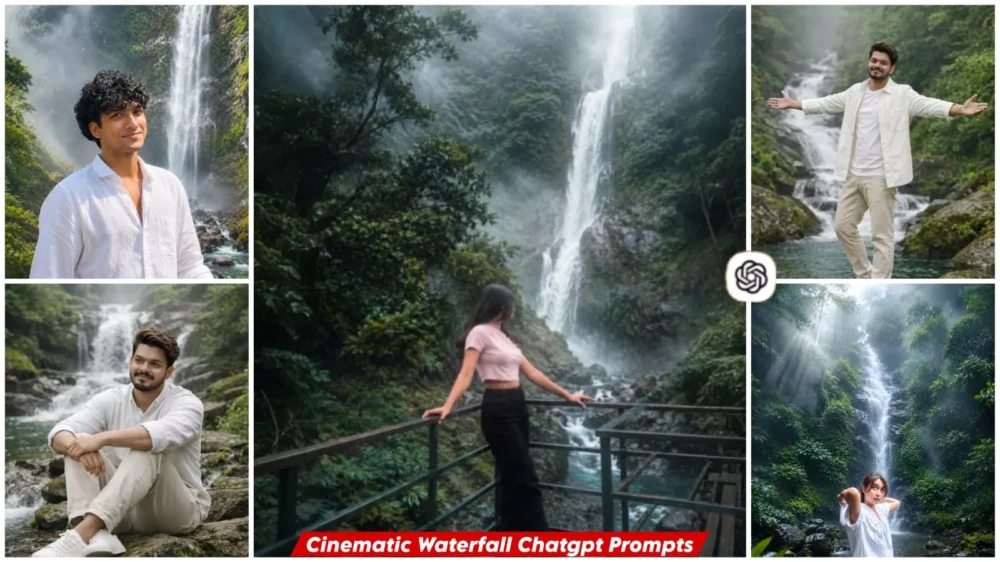
Cinematic Waterfall Ai Photo Editing Prompts – If you use Instagram, you have likely noticed the rapidly growing trend of AI photo editing. You might have seen ordinary photos transformed in seconds into images featuring massive waterfalls, dense forests, and cinematic lighting. This trend—featuring cinematic waterfall edits—is currently going viral and gaining popularity very quickly. In this article, we will learn how to create these viral edits and the specific steps you need to follow. Simply follow the process outlined here.
Details Of Cinematic Waterfall Ai Photo Editing Prompts
This is a cinematic waterfall editing style. It involves transforming an ordinary photo by placing the subject in front of a vast natural waterfall—complete with towering mountains, still water, and mist—creating a look that feels completely natural. The goal goes beyond simply changing the background; the aim is to craft an image that looks naturally perfect and authentic. The resulting photo appears incredibly realistic.
Why Is This Waterfall-Style Editing Going Viral?
Well, people on social media these days love images that stand out at first glance—photos that look truly unique. The background needs to have depth and natural beauty, appearing completely authentic rather than obviously edited. The main reason for this trend’s popularity is the cinematic feel it gives your photos, featuring grand, natural waterfalls. It makes for a stunning Instagram shot, and the most amazing part—despite being AI-generated—is that the image looks completely natural. That is exactly what people appreciate today: the ability to create such images easily, without the need for Photoshop or laborious editing.
What Make This Prompt Special?
Many people assume they can simply type anything into a prompt and get a ready-made photo, but that isn’t the case; without including the right details and specifics, the resulting image won’t turn out correctly. This prompt includes instructions that ensure the face looks completely natural and perfect. The elements depicted are integrated naturally—such as the water and the light mist—mimicking exactly what you would see if you visited a waterfall in real life. Realistic features like mountains and greenery are also included, giving the photo the look and feel of a shot taken with a DSLR camera.
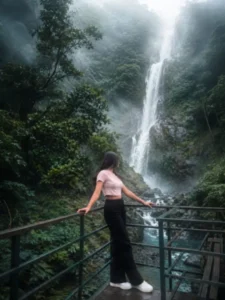
Transform this image into a breathtaking ultra-realistic foggy forest masterpiece. Add a majestic tall natural waterfall seamlessly integrated into the background, cascading down realistic moss-covered rocks into a crystal-clear forest stream. Surround the waterfall with dense lush rainforest vegetation, wet stones, rich green foliage, and natural water mist. Add dense natural white fog covering the entire environment, creating a mysterious and cinematic atmosphere. Apply rich forest-inspired color grading with deep emerald green, dark teal, moss green, and earthy brown tones. Enhance the trees, foliage, waterfall, and background elements to resemble a lush enchanted rainforest hidden in the mist. Introduce soft volumetric light rays subtly penetrating through the fog, illuminating the waterfall and creating realistic depth and atmosphere. Increase overall image quality to ultra-high-definition 4K resolution with razor-sharp details, HDR enhancement, realistic textures, balanced contrast, and natural color harmony. Improve shadows, highlights, and dynamic range while maintaining a realistic appearance. Add a moody woodland aesthetic, dreamy fog layers, atmospheric perspective, realistic water reflections, silky flowing waterfall, fine water spray, and professional cinematic photography grading. Preserve the person's exact face, hairstyle, body proportions, pose, clothing, expression, and camera angle without any changes. The final result should look like a premium DSLR photograph captured in a cold misty rainforest with a spectacular waterfall, ultra-realistic details, immersive depth, soft natural lighting, and stunning visual quality.
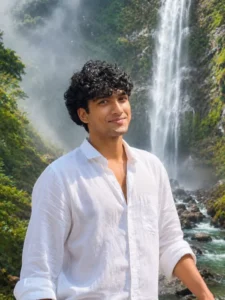
Waterfall Fantasy - Ultra-realistic close-up portrait (followed by given picture face is 100% unchanged), standing near a majestic waterfall in a lush green valley, wearing an oversized white shirt and black baggy jeans. Water mist is softly glowing around, cinematic DSLR photography style, natural dreamy lighting, ultra detailed textures, full 8K quality. Face exactly same as uploaded photo, 100% accurate, lifelike expression, shot from close-up angle.
Don't change the FACE
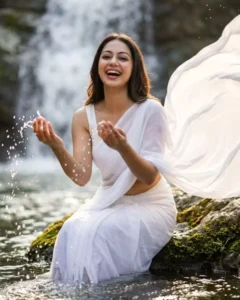
Create ultraphotorealistic hyper-realistic cinematic woman (the reference image given)in a white plain saree and sleeveless blouse, saree pallu flowing in air. Hairs full open.She is sitting on a big stone near a half-visible waterfall and Her legs are completely into water .Wearing silver oxidised jhumka.Her hands are stretched, playfully splashing water, looking towards camera with a radiant smile.during hazy afternoon.100% unchanged face no alteration.
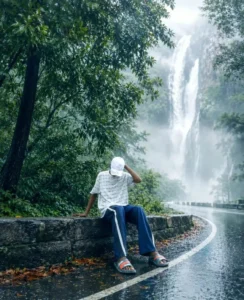
Transform this image into a breathtaking ultra-realistic road water. Add dense natural white fog covering the entire environment, creating a mysterious and cinematic atmosphere. Apply rich forest-inspired color grading with deep emerald green, dark teal, moss green, and earthy brown tones. Enhance the trees, foliage, and background elements to resemble a lush enchanted forest hidden in the mist. Introduce soft volumetric light rays subtly penetrating through the fog, creating depth and realism.
Realistic waterfall in background view
Increase overall image quality to ultra-high-definition 4K resolution with razor-sharp details, HDR enhancement, realistic textures, balanced contrast, and natural color harmony. Improve shadows, highlights, and dynamic range while maintaining a realistic appearance. Add a moody woodland aesthetic, dreamy fog layers, atmospheric perspective, and professional cinematic photography grading. The final result should look like a premium DSLR forest photograph
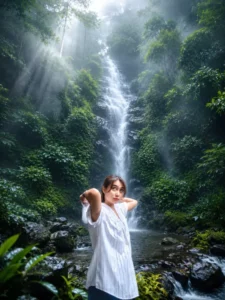
> Transform the uploaded photo into an ultra-realistic cinematic rainforest waterfall scene while preserving the person's exact face, hairstyle, body proportions, pose, clothing, expression, and camera angle. Replace only the background with a breathtaking tall tropical waterfall surrounded by lush emerald-green rainforest, dense jungle vegetation, moss-covered rocks, and crystal-clear flowing water. Add thick natural white mist and atmospheric fog throughout the environment, creating a dreamy and mysterious mood. Introduce soft volumetric sun rays filtering through the forest canopy from the upper left, illuminating the waterfall and surrounding trees with realistic god rays. Enhance the foliage with rich deep green, teal, and earthy tones while keeping the waterfall bright, silky, and naturally flowing. Add realistic wet rocks, subtle water reflections, moisture in the air, and cinematic depth. Apply premium film color grading with soft contrast, gentle bloom, slightly cool highlights, and realistic HDR lighting. Maintain sharp focus on the subject while using a softly blurred background for depth. Preserve natural skin tones and textures without changing facial identity. The final image should look like a high-end DSLR travel photograph shot on a full-frame camera, 35mm lens, f/2.8, ultra-detailed, photorealistic, 8K, National Geographic quality, atmospheric, immersive, cinematic masterpiece.
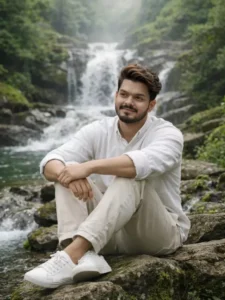
Create an image Hyper-realistic lifestyle., sitting on a rock near a flowing waterfall, clear water, mossy stones, rich green surroundings, bright daylight with soft mist in the air, man dressed in clean casual travel clothing, calm face with slight natural confidence, environment feels fresh, energetic, and alive, natural color grading, high clarity, realistic water motion, realistic textures, cinematic composition, professional photography look, shallow depth of field, sharp focus on subject, 4K resolution, documentary-style realism, no dramatic effects, no artificial styling
Use the person from the reference photo as the main subject.
Keep their exact facial features, hairstyle, skin tone, and expression perfectly unchanged preserve all realism, emotional depth, and subtle facial lighting. Allow changes only in camera position, background motion, outfit and atmosphere.
Please keep my real face and body unchanged and realistic, exactly like the uploaded photos.
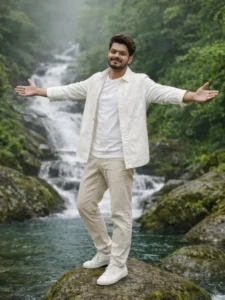
Create an image Hyper-realistic lifestyle., sitting on a rock near a flowing waterfall, clear water, mossy stones, rich green surroundings, bright daylight with soft mist in the air, man dressed in clean casual travel clothing, calm face with slight natural confidence, environment feels fresh, energetic, and alive, natural color grading, high clarity, realistic water motion, realistic textures, cinematic composition, professional photography look, shallow depth of field, sharp focus on subject, 4K resolution, documentary-style realism, no dramatic effects, no artificial styling
Use the person from the reference photo as the main subject.
Keep their exact facial features, hairstyle, skin tone, and expression perfectly unchanged preserve all realism, emotional depth, and subtle facial lighting. Allow changes only in camera position, background motion, outfit and atmosphere.
Please keep my real face and body unchanged and realistic, exactly like the uploaded photos.
How To create Your Image Using Chatgpt?
We have already provided you with prompts to create such photos; simply choose the one you like best from the various styles available. Copy the prompt by clicking the copy button, then open ChatGPT and paste it there. Next, click the plus icon to upload a photo—you can upload any image. Once you hit generate, it will create a perfect version of your photo, yielding excellent results.
Conclusion
We hope the editing was helpful. I’ve explained everything in detail, and you’ll likely get excellent results. If you don’t understand something, please leave a comment and ask us, and we’ll definitely help.