Butterfly Effect Photo Ai Editing Prompts – In today’s world, you will observe that photo editing has evolved into a distinct and diverse trend—one that has completely transformed the entire editing landscape. Gone are the days when you would spend hours laboring over a single edit; nowadays, you can transform an ordinary photograph into a professional, cinematic-style image in just a few seconds. A new trend, specifically known as the “Butterfly Effect,” is currently going viral at an incredible pace.
Many people are eager to create photos using this style, and it is garnering immense popularity not only on Instagram but across other social media platforms such as YouTube and Facebook as well. In this article, we will explore exactly how to create the Butterfly Effect. This style can be created by anyone—both men and women—though it is particularly well-suited for women, as the aesthetic resonates strongly with them. If you are interested in creating this effect, this article will walk you through the specific editing techniques required, as well as strategies to help your edits go viral.
Details Of Butterfly Effect Photo Ai Editing Prompts
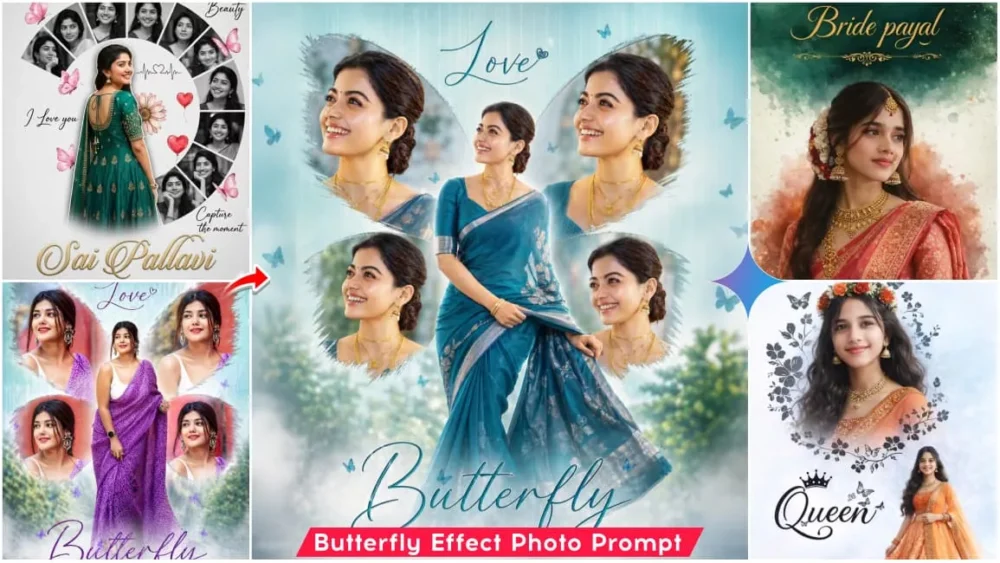
The “Butterfly Effect” is a unique editing style in which the main subject is positioned centrally, flanked by two “wings”—much like those of a butterfly. Within these two wings, four distinct photographs are displayed; essentially, the space is split and divided into four separate sections. The result is quite striking, creating the illusion that these photographs are attached to—or emerging from behind—your wings, and it is precisely this feature that makes the style so unique. The central area features the primary image, while the sides showcase portrait-style shots set against a soft, plain-style background. This effect is typically created using tools such as Google Gemini or ChatGPT. We will now proceed to learn exactly how to create this effect.
Why Is This Trend Resonating So Strongly
Why is this trend resonating so strongly with people—to the point where they are creating edits like this? Well, everyone wants their photos to look appealing and somewhat unique, and the “Butterfly Effect” fulfills precisely this need. The reason for its popularity is that its aesthetic is quite striking and professional; most importantly, it is incredibly easy to create using AI. It also tends to go viral very quickly on social media. It is perfect for portrait photography, and the truly remarkable thing is that you can generate this type of image—featuring multiple visual elements—using just one or two source photos. You are bound to absolutely love the result.
How You Can Select The Perfect Photo
Here is how you can select the perfect photo to ensure excellent results. If you wish to create a high-quality butterfly-themed edit, choosing the right photograph is absolutely essential. You should use a high-resolution image in which your face is clearly visible, while keeping the background completely simple. Avoid using complex or unconventional backgrounds; instead, stick to simple elements. Furthermore, the lighting in the photo you intend to use should be soft. The image should not be cluttered or busy, and your facial expression should appear completely natural. By selecting a photo that meets these criteria, you will achieve the best possible results.
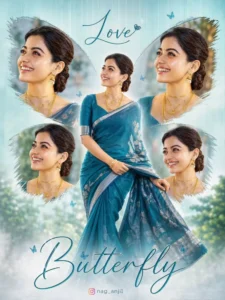
Create a high-resolution, cinematic butterfly-themed collage poster of a young South Indian woman.

Name : Love

Use the uploaded image as the exact face reference (strict face preservation - 100% identical facial features, skin tone, hairstyle, expression, no changes at all). The design should feature:
A large central full-body image of the woman wearing a traditional saree (deep teal/blue tone with silver border), standing gracefully and slightly twirling the
Surrounding her, include 4 smaller portrait shots (close-up angles, smiling, side poses) arranged symmetrically in a butterfly wing shape.
Add soft feathered edges around the smaller images to blend into the background. Background:
Soft pastel teal/blue gradient background with subtle vertical texture lines. Light mist/fog effect at the bottom.
Slight nature touch (blurred trees or greenery in background for depth).

Styling:
Elegant, dreamy, and feminine aesthetic. Soft natural lighting with smooth skin tones.
Add subtle glow and depth of field.

Typography:
Add a stylish cursive title text at the bottom: "Butterfly" Add a name at the top in elegant handwritten font.
Include a small Instagram-style username below.

Quality:
Ultra HD, 4K resolution

Sharp focus, professional photo manipulation Poster design, studio-quality finish--ar 3:4 --v 6 --style raw Create a high-resolution, cinematic butterfly-themed collage poster of a young South Indian woman.

Name : nag_anji1

Use the uploaded image as the exact face reference (strict face preservation - 100% identical facial features, skin tone, hairstyle, expression, no changes at all). The design should feature:

A large central full-body image of the woman wearing a traditional saree (deep teal/blue tone with silver border), standing gracefully and slightly twirling the

Surrounding her, include 4 smaller portrait shots (close-up angles, smiling, side poses) arranged symmetrically in a butterfly wing shape.

Add soft feathered edges around the smaller images to blend into the background. Background:
Soft pastel teal/blue gradient background with subtle vertical texture lines. Light mist/fog effect at the bottom.
Slight nature touch (blurred trees or greenery in background for depth).

Styling:
Elegant, dreamy, and feminine aesthetic. Soft natural lighting with smooth skin tones.
Add subtle glow and depth of field.

Typography:
Add a stylish cursive title text at the bottom: "Butterfly" Add a name at the top in elegant handwritten font.
Include a small Instagram-style username below.

Quality:
Ultra HD, 4K resolution
Sharp focus, professional photo manipulation Poster design, studio-quality finish--ar 3:4 --v 6 --style raw
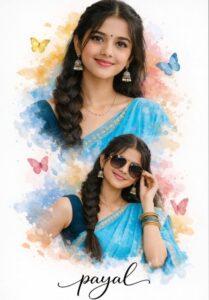
A beautiful Indian girl with a long braid, wearing a vibrant sky blue saree and a dark teal blouse. The image is a double exposure creative edit on a clean white background. Top half shows a close-up portrait with a warm smile, and the bottom half shows her in a stylish pose wearing sunglasses. Surrounded by soft watercolor splashes in shades of yellow, blue, and pink, with delicate butterflies floating around. At the bottom, 'Your Name' is written in elegant black cursive calligraphy.
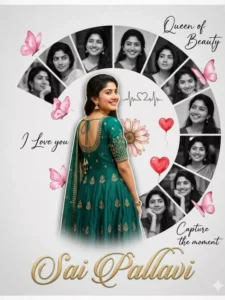
Acreativeromantic digital photocollage featuring a
อฯ1"ขวณู นอลเb ขออวกอไท น! นอนเลส วนosрนDy bนทoด
main subject is a full-body cutout placed slightly left, turned back and smiling over her shoulder, wearing a peacock green embellished rich frock. Behind and
around heris a semi-circular collage of multiple
black-and-white portrait shots of the same woman, each in different expressions and poes, arranged in curved segments. The background is a soft light grey textured surface -with a minimal aesthetic.Decorative elements include pink butterflies, a floral daisy near the center,
red heart balloons, and cute love-themed stickers
Handwritten-style text elements like “Queen of Beauty, ”
pอ.อมกวรวว ..นอนงน อyand0ว, , puD .'no วงฯ ใ,
around. A small heartbeat line with a heart icon is
included. At the bottom, the name “Divya" appears in
elegant cursive typography. Soft shadows, smooth cutout
blending, high-end Photoshop manipulation, romantic
mood, pastel tones, high
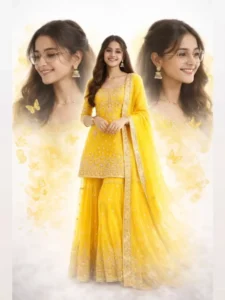
A cinematic, hyper-realistic triple exposure digital portrait of a beautifullndian girl. In the center, she is standing full-length wearing a vibrant yellow heavy embroidered georgette sharara suit with a matching dupatta. On both sides, there are large, soft-focus close-up profiles of her face smiling, wearing elegant gold spectacles and traditional jhumka earrings. The background is a dreamy, ethereal blend of white clouds and golden mist, with delicate golden buttenflies floating around her. The lighting is soft and glowing, creating a magical, high-end fashion poster aesthetic. 8k resolution, highly detailed embroidery, realistic skin texture.
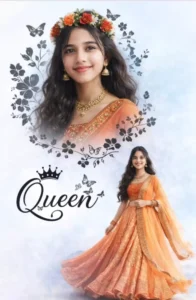
A beautifuldouble exposure portrait of a vounS Indian sirl with long wavy hair. In the top half, a close-up profile of her face smiling, wearing a floralcrown of red and oranse flowers and traditional éold iewelry (ihumkas and necklace). In the bottom half, a full-body shot of her wearing a vibrant orange embroidered lehenga choli, standing gracefully. The background is a soft, dreamy light blue and white textured sky. Eledant black floral vines and butterfly silhouettes frame the top portrait. Between the two images, stylish black cursive text reads "Queen" with a smallcrownicon on top. Cinematic lighting, highresolution, 8k, ethnic desi aesthetic.
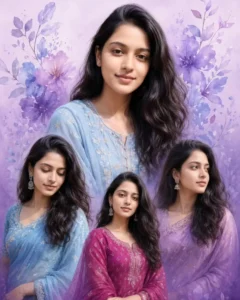
A dreamy and elegant digital greeting card collage featuring the girl from the reference image. The background is a soft, vertical gradient transitioning from light lavender at the top to a rich, darker purple at the bottom. The collage includes multiple instances of her in dynamic, overlapping positions: a prominent large bust shot of her smiling at the top center, and three other poses below and around it (looking down gently, standing confidently, and looking to the side). In all images, she has long, dark, wavy hair and is wearing various elegant sky blue and magenta traditional Indian outfits [kurtis and saris). The edges of the collage elements are softly blended. Artistic, watercolor-style floral and leaf elements in shades of blue and purple are interspersed in the upper part of the background.
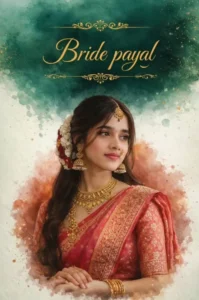
A high-quality ultra-realistic cinematic portrait of a beautiful young Indian bride. She is wearing a traditional pink and gold Banarasisilk saree with intricate embroidery. She is adorned with heavy traditional gold jewelry, including a necklace, ihumkas, a nath (nose ring), and a maang tikka. Her hair is styled in a yraceful halfupdo with fresh white and red flowers (gajra). The background is an artistic watercolor splash style with shades of emerald green and soft orange. At the top, there is elegant gold fligree decoration with the text "Bride Payal" written in a premium gold cursive font. 8k resolution, soit studio licting, bokeh effect, highlydetailed features.
How To Create Image Using prompts
To create this edit, we have already provided you with a set of new prompts. You are free to use them. Additionally, we have supplied a collection of unique and distinct prompts—specifically those tailored for female subjects—which we are confident you will absolutely love. All you need to do is copy the prompt that appeals to you the most. Next, open either the Google Gemini website or the application. Once there, paste the prompt into the input field. You will then be required to upload a reference photo; simply upload any reference image of your choice—keeping in mind the specific details we outlined earlier. Upload the image, click “Next,” and the tool will generate your final video. You can then preview the result and save it.
Conclusion
We hope you enjoyed this edit and keep visiting our website for more unique edits like this one. I bring you new trending edits daily, allowing you to create even more videos and photos.