Instagram Profile Ai Photo Editing Prompts – In today’s digital age, standing out on social media has become a necessity for everyone. This is especially true on platforms like Instagram, where people upload photos daily; to make an impact, you must consistently post images with a unique style. After all, unless your content is distinctive, it won’t go viral or reach a wider audience. Using AI, we are going to create a special kind of image—one capable of transforming even an ordinary snapshot into something truly spectacular. The concept involves an Instagram profile serving as the background, with you positioned in the foreground—either standing or sitting. It promises to be a truly stylish photo! So, let’s learn exactly how to create such an image.
What Exactly Is This “Instagram Profile Trend”?
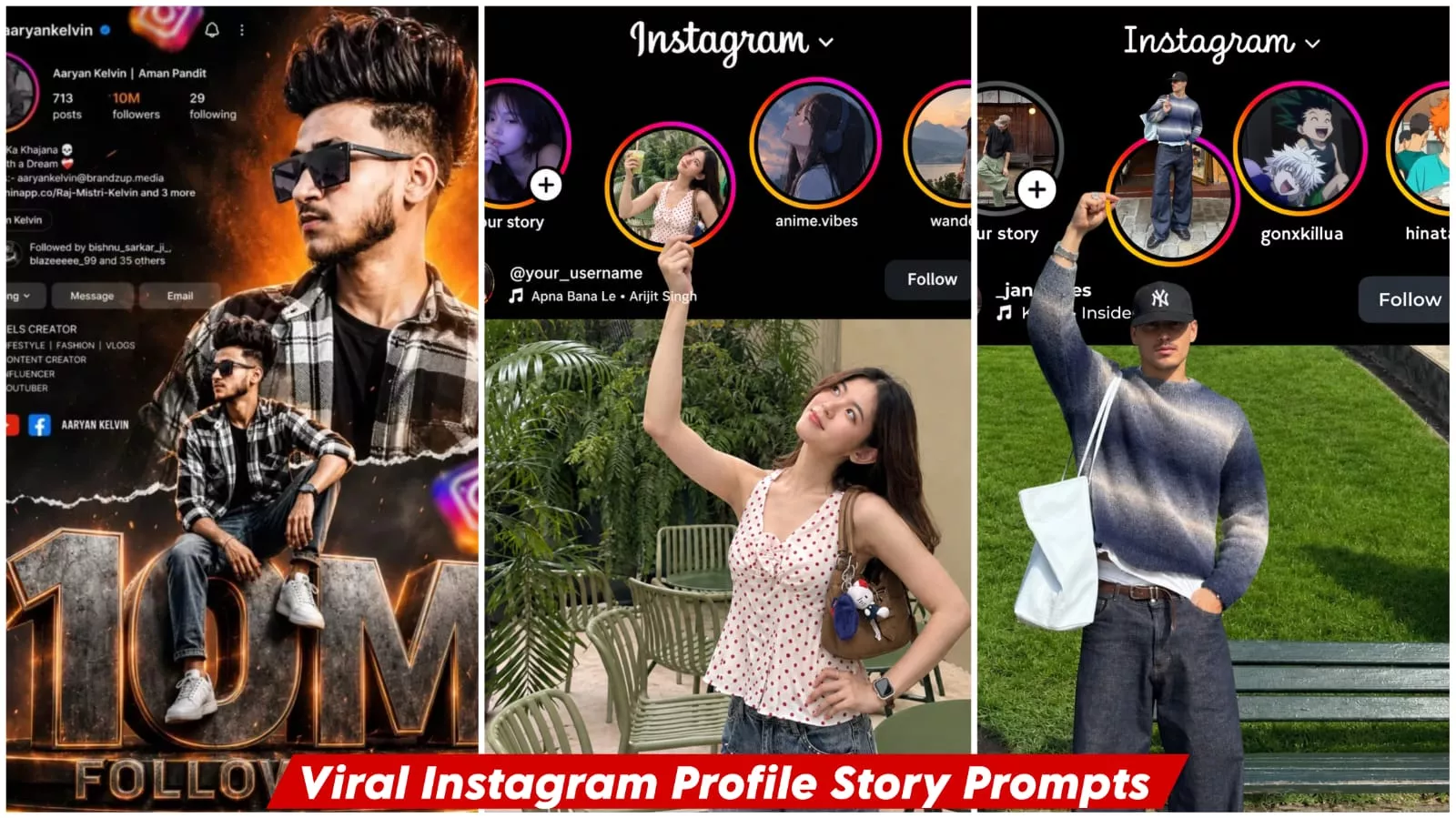
In this style, your photograph remains positioned right in the foreground, while your actual Instagram profile serves as the background. Now, we are going to recreate this very concept here, but in a completely unique manner. I previously shared a concept outlining how this idea would take shape. In this version, a model—representing you—will be featured within the frame. You could be standing, seated, or even leaning against a wall; various poses are possible. We have crafted this entire concept in a variety of styles to achieve a fully cinematic and professional aesthetic. The visual effect is such that it appears as though you are standing—in a completely realistic manner—directly in front of your own Instagram profile. If you have had a photograph taken in this style, we will now proceed to recreate that exact look, utilizing the assistance of Midjourney.
What You Need To Do This Editing
Regarding the requirements for editing—specifically concerning your photo—the first step is to capture a clear image of your face. You must ensure that your face is positioned centrally within the frame, and the image itself should be of high quality. Both the overall quality of the photograph and its lighting must be optimal. Next, you will need to take a screenshot of your Instagram profile; this screenshot should clearly display your follower count, your posts, and all other relevant profile details. Finally, you will utilize Google Gemini for this task. I will explain exactly how to use it in the following paragraph.
Update :- Instagram profile editing is trending right now, so I thought why not share the settings with you, and I’ve shared them in this article. You can use it to create your own amazing photos, and I’ve explained the simplest way to create it. I’ve covered this editing before, but I’m updating it now because some new editing techniques have become popular, so I thought why not share them with you as well.
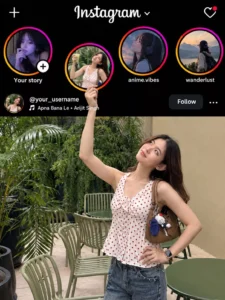
Create a highly realistic Instagram profile + Instagram post composition using the uploaded reference image as the EXACT visual reference for layout, positioning, proportions and interaction.

IMPORTANT:
Study the uploaded reference image carefully before generating.
Recreate the same visual concept and positioning.

The main FEMALE PERSON must remain inside the lower Instagram post/photo.
Only one raised arm and hand should extend upward into the black Instagram UI area to physically hold the slightly lowered Story circle.

Do NOT move the Story circle too far downward.
Do NOT place the entire woman over the Instagram interface.

━━━━━━━━━━━━━━━━━━━━
1. INSTAGRAM HEADER
━━━━━━━━━━━━━━━━━━━━

Create a realistic Instagram dark-mode interface at the top.

Include:
- Instagram wordmark at the top center
- Plus (+) icon at the upper left
- Heart/notification icon at the upper right
- Black/dark Instagram background
- Authentic Instagram-style typography
- Realistic spacing and proportions
- Clean and believable Instagram UI

━━━━━━━━━━━━━━━━━━━━
2. STORY ROW
━━━━━━━━━━━━━━━━━━━━

Create FOUR circular Instagram Story thumbnails.

Three Story circles must remain aligned normally in one horizontal row.

The SECOND Story circle is the special Story circle.

Move ONLY this second Story circle slightly downward from the normal Story row.

IMPORTANT:
Do NOT move it far downward.

Its position must remain close to the original Story row.

The bottom portion of the special Story circle should reach approximately the username/music area, matching the uploaded reference.

It should NOT extend deeply into the main photograph.

It should NOT cover the woman's body.

It should look like the Story circle has been slightly pulled down from the Story row.

━━━━━━━━━━━━━━━━━━━━
3. SPECIAL STORY CIRCLE
━━━━━━━━━━━━━━━━━━━━

Inside the special Story circle, use the SAME FEMALE PERSON from the uploaded reference photo.

Show the same woman sitting casually and holding a transparent cold drink with a straw.

Preserve her identity exactly:
- same face
- same facial structure
- same skin tone
- same hairstyle
- same recognizable facial features
- same natural body proportions

Do NOT create a different woman.

Do NOT change her facial identity.

The Story photo must look like a natural realistic photograph.

━━━━━━━━━━━━━━━━━━━━
4. HAND HOLDING THE STORY CIRCLE
━━━━━━━━━━━━━━━━━━━━

This is the main visual interaction.

The MAIN FEMALE PERSON is located inside the large photograph below.

Her complete body must remain inside the lower photograph.

ONLY ONE ARM / FOREARM / HAND should extend upward from the photograph into the black Instagram UI area.

The arm should naturally travel upward toward the slightly lowered Story circle.

The hand must physically HOLD the bottom edge of the special Story circle.

The fingers must visibly touch and naturally grip the lower edge of the circular Story frame.

The thumb and fingers must have realistic anatomy and positioning.

Do NOT make the hand point toward the Story.

Do NOT leave a gap between the hand and Story circle.

Do NOT make the hand float.

Do NOT put the woman's head or torso into the Instagram UI.

The visual impression must clearly be:

The woman is inside the Instagram post and has raised one hand upward to physically hold the Story circle.

━━━━━━━━━━━━━━━━━━━━
5. CRITICAL USERNAME + SONG POSITION
━━━━━━━━━━━━━━━━━━━━

THIS IS VERY IMPORTANT.

The username and music/song information must be positioned BELOW THE HAND.

The hand must NOT cover, cut through, overlap or hide the username or song text.

The hand should be ABOVE the username/music text.

Correct visual order:

SPECIAL STORY CIRCLE
        ↓
     HAND
        ↓
USERNAME / SONG TEXT
        ↓
MAIN INSTAGRAM PHOTO

The username and song row must remain clearly visible underneath the hand.

Do NOT place text on top of the hand.

Do NOT place text behind the hand.

Do NOT let the hand cut through the username.

Do NOT let the hand cut through the song title.

Do NOT hide any important part of the username or song behind fingers.

There must be a small natural amount of spacing between the bottom of the hand and the username/music text so the text remains clean and readable.

The hand can be close to the text, just like the reference, but the text must remain BELOW the hand and completely readable.

━━━━━━━━━━━━━━━━━━━━
6. USERNAME
━━━━━━━━━━━━━━━━━━━━

Display the customizable username:

@YOUR_USERNAME

The username must remain exactly as provided by the user.

Do NOT generate a random username.

Use realistic Instagram-style white typography.

Place the username below the raised hand.

Keep the complete username visible.

The fingers must NOT overlap any letter.

━━━━━━━━━━━━━━━━━━━━
7. MUSIC / SONG INFORMATION
━━━━━━━━━━━━━━━━━━━━

Below or directly beside the username, show realistic Instagram music information.

Example:

🎵 SONG NAME • ARTIST NAME

Generate a natural-looking song title and artist name.

The music text must also be BELOW THE HAND.

The hand must NOT overlap or cover the song text.

Keep the song title and artist readable.

Make it look like genuine Instagram music/audio information.

━━━━━━━━━━━━━━━━━━━━
8. FOLLOW BUTTON
━━━━━━━━━━━━━━━━━━━━

Place a realistic Instagram-style Follow button on the right side of the username/music area.

Also include a realistic three-dot menu icon.

Keep these elements positioned similarly to the uploaded reference.

The Follow button must not interfere with the raised hand.

━━━━━━━━━━━━━━━━━━━━
9. MAIN INSTAGRAM POST / PHOTOGRAPH
━━━━━━━━━━━━━━━━━━━━

Below the Instagram UI area, create the MAIN PHOTOGRAPH.

The lower photograph must look like an actual Instagram post.

The main female person's complete body must remain INSIDE this photograph.

Her:
- head
- shoulders
- torso
- legs/body

must remain within the lower photograph area.

Only her raised arm, forearm and hand may extend upward into the black Instagram UI.

Do NOT place her entire body above the photograph boundary.

Do NOT make her stand on top of the Instagram interface.

Do NOT make her appear behind the Story row.

━━━━━━━━━━━━━━━━━━━━
10. MAIN FEMALE PERSON IDENTITY
━━━━━━━━━━━━━━━━━━━━

Use the SAME FEMALE PERSON from the uploaded reference photo.

Preserve:
- exact facial identity
- facial structure
- skin tone
- hairstyle
- recognizable features
- natural body proportions

Do not face-swap.

Do not replace her with another woman.

Do not excessively beautify or alter her face.

Keep the woman realistic and recognizable.

Her pose should naturally allow one arm to reach upward and hold the Story circle.

━━━━━━━━━━━━━━━━━━━━
11. OTHER STORY CIRCLES
━━━━━━━━━━━━━━━━━━━━

The other Story circles should contain completely different randomly generated AI images.

Story 1:
Random realistic/aesthetic female profile image.

Story 3:
Random anime/illustration-style female image.

Story 4:
Another random realistic or anime-style female profile image.

Do NOT use the main woman's identity in these random Story images.

They should look like different Instagram users.

━━━━━━━━━━━━━━━━━━━━
12. EXACT SPATIAL RELATIONSHIP
━━━━━━━━━━━━━━━━━━━━

Follow this exact hierarchy:

TOP:
Instagram header

↓
NORMAL STORY ROW:
Three normal Story circles

↓
SPECIAL STORY:
One Story circle slightly lower than the others

↓
SPECIAL STORY CIRCLE:
Ends around the username/music area

↓
HAND:
Main woman's hand comes up from the lower photograph and holds the Story circle

↓
USERNAME + SONG:
Username and song are positioned BELOW the hand

↓
MAIN PHOTO:
The woman's entire body remains inside the photograph

IMPORTANT:
The hand must NEVER cover the username or song.

The text must NEVER be printed over the hand.

The hand must NEVER cut through the text.

The username and song must appear clearly BELOW the hand.

━━━━━━━━━━━━━━━━━━━━
13. REALISM AND ANATOMY
━━━━━━━━━━━━━━━━━━━━

Ultra photorealistic.

Professional DSLR photography.

Natural skin texture.

Realistic lighting.

Realistic shadows.

Accurate perspective.

Correct female hand anatomy.

Correct fingers.

Natural thumb placement.

Realistic contact between fingers and Story frame.

Natural depth of field.

High-resolution details.

Authentic Instagram interface.

No plastic skin.

No distorted face.

No distorted hands.

No extra fingers.

No missing fingers.

No extra arms.

No extra limbs.

No duplicate person.

No floating hand.

No floating Story circle.

No unnatural body position.

━━━━━━━━━━━━━━━━━━━━
14. FINAL REFERENCE-MATCHING INSTRUCTION
━━━━━━━━━━━━━━━━━━━━

The final image should closely reproduce the uploaded reference's visual concept.

The Story circle should be ONLY SLIGHTLY LOWER than the normal Story row.

The main female person should remain INSIDE the lower Instagram photograph.

Only her raised arm and hand should enter the black Instagram UI.

Her hand should physically hold the bottom of the special Story circle.

The username and song information must be BELOW the hand.

The hand must NOT cover, cut or overlap the username or song.

Keep the username and song fully readable.

The final result should look like a seamless real Instagram post where the woman has physically reached upward from her photograph, grabbed one Instagram Story circle, and is holding it naturally — while the username and music information remain cleanly visible underneath her hand.

Do not simplify the composition.
Do not change the positioning.
Do not move the Story circle excessively downward.
Do not put the woman's body into the Instagram UI.
Only her arm and hand should extend into the UI.
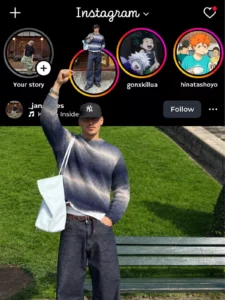
Create a highly realistic Instagram profile + Instagram post composition using the uploaded reference image as the EXACT composition and positioning reference.

IMPORTANT:
Study the uploaded reference image carefully before generating.
Do NOT redesign the layout.
Do NOT move the special Story circle too far downward.
Do NOT place the entire person over the Instagram interface.

The final composition must closely match the physical arrangement of the uploaded reference.

━━━━━━━━━━━━━━━━━━━━

1. INSTAGRAM HEADER
   ━━━━━━━━━━━━━━━━━━━━

Create a realistic Instagram dark-mode interface at the top.

Include:

- Instagram wordmark at top center
- Plus icon at top left
- Heart/notification icon at top right
- Black/dark background
- Authentic Instagram-style typography
- Realistic spacing and proportions

━━━━━━━━━━━━━━━━━━━━
2. STORY ROW
━━━━━━━━━━━━━━━━━━━━

Create FOUR circular Instagram Story thumbnails.

Three Story circles must remain in one normal horizontal row.

The special Story circle is the SECOND Story circle.

IMPORTANT:
The second Story circle should NOT be moved far downward.

Move it ONLY slightly downward compared with the other Story circles, exactly like the uploaded reference.

Its position should still remain within the upper Instagram UI area.

The bottom of this special Story circle should reach approximately the USERNAME + MUSIC/SONG ROW.

It should NOT extend deep into the main photograph.

It should NOT reach far down into the person's body.

The special Story circle should overlap the username/music area slightly, matching the reference.

━━━━━━━━━━━━━━━━━━━━
3. SPECIAL STORY CIRCLE
━━━━━━━━━━━━━━━━━━━━

Inside the special Story circle, show the SAME MALE PERSON from the uploaded reference photo.

He is sitting casually and holding a transparent cold drink with a straw.

Preserve his identity:

- same face
- same facial structure
- same skin tone
- same hairstyle
- same recognizable features

Do not create a different person.

The Story circle should look like a normal Instagram Story thumbnail that has been slightly pulled downward.

━━━━━━━━━━━━━━━━━━━━
4. HAND + STORY INTERACTION — MOST IMPORTANT
━━━━━━━━━━━━━━━━━━━━

The main male person is in the LARGE PHOTO BELOW the Instagram interface.

His BODY MUST REMAIN INSIDE THE MAIN PHOTOGRAPH.

Do NOT place his whole body inside the black Instagram UI.

Do NOT make the person stand over the Instagram interface.

Only ONE ARM should extend upward from the main photograph into the black Instagram UI.

The forearm travels upward naturally from the main photograph.

The hand reaches the bottom of the slightly lowered Story circle.

The hand must ACTUALLY HOLD the bottom edge of the Story circle.

The fingers should visibly touch/grip the lower part of the circular Story frame.

The hand should be positioned around the USERNAME + MUSIC/SONG ROW area, exactly like the uploaded reference.

The hand should NOT be far below the Story circle.

The hand should NOT simply point toward the Story.

The hand should NOT float.

The fingers should naturally overlap the lower edge of the Story circle.

The physical interaction should look like the person is holding the Story circle from underneath.

IMPORTANT POSITIONING:

Story circle
↓
slightly lowered
↓
username + music row
↓
hand/fingers around this same area
↓
main photograph begins
↓
person's body remains INSIDE the photograph

Do NOT push the Story circle into the main photograph.

Do NOT push the person into the Instagram UI.

━━━━━━━━━━━━━━━━━━━━
5. USERNAME + MUSIC ROW
━━━━━━━━━━━━━━━━━━━━

This is an IMPORTANT part of the reference.

Show the Instagram username and music information in the BLACK UI AREA directly around the hand.

Username:

@YOUR_USERNAME

Music:

🎵 SONG NAME • ARTIST NAME

The username and song row must look like a real Instagram interface.

The username should be visible naturally near the hand, just like the reference.

The hand may overlap/appear around this area naturally, but do NOT completely cover the username or song.

Keep enough of the username and music text visible to clearly read it.

The username must be customizable.

Do NOT generate a random username.

━━━━━━━━━━━━━━━━━━━━
6. FOLLOW BUTTON
━━━━━━━━━━━━━━━━━━━━

Place a realistic Instagram-style Follow button on the right side of the username/music area.

Also include a realistic three-dot menu icon.

Keep their position similar to the uploaded reference.

━━━━━━━━━━━━━━━━━━━━
7. MAIN INSTAGRAM POST / PHOTO
━━━━━━━━━━━━━━━━━━━━

Below the black Instagram UI area, create the MAIN PHOTOGRAPH.

The main photograph should begin at approximately the same position as the uploaded reference.

The MALE PERSON must be completely inside this photograph.

His torso, head and body must remain below the Instagram UI boundary.

Only his raised arm/forearm/hand extends upward into the black Instagram interface.

This distinction is VERY IMPORTANT.

Do NOT place his head or body over the Instagram Story section.

Do NOT make him appear to be standing behind the Instagram interface.

The photograph should look like an actual Instagram post/photo.

Use a realistic outdoor environment with natural lighting.

━━━━━━━━━━━━━━━━━━━━
8. MAIN PERSON
━━━━━━━━━━━━━━━━━━━━

Use the SAME MALE PERSON from the uploaded reference.

Preserve identity exactly:

- facial features
- face shape
- skin tone
- hairstyle
- body proportions
- recognizable appearance

Do not face-swap.
Do not beautify excessively.
Do not change his identity.

His pose should naturally match the reference:

- body inside the photo
- one arm raised upward
- hand reaching into the Instagram UI
- hand holding the lowered Story circle
- other arm/body naturally positioned

━━━━━━━━━━━━━━━━━━━━
9. OTHER STORY IMAGES
━━━━━━━━━━━━━━━━━━━━

The other Story circles should contain completely different randomly generated AI images.

Story 1:
A random realistic or aesthetic profile image.

Story 3:
A random anime/illustration-style image.

Story 4:
Another random realistic or anime-style image.

Do NOT use the main person's face in the random Story images.

They should look like different Instagram users.

━━━━━━━━━━━━━━━━━━━━
10. EXACT POSITIONING — CRITICAL
━━━━━━━━━━━━━━━━━━━━

Match the uploaded reference image's proportions and positioning.

DO NOT:

- move the special Story circle far downward
- put the Story circle in the middle of the main photograph
- put the person's body over the Instagram UI
- put the person's head above the photo boundary
- make the person stand on top of the Instagram interface
- make the person simply point at the Story
- leave a gap between the hand and Story circle

DO:

- keep three Stories in the normal row
- lower ONLY the special Story circle slightly
- keep that Story circle around the username/music row
- keep username and music visible
- place the hand around the username/music row
- extend only the forearm and hand into the UI
- keep the entire person inside the main photograph
- make the hand physically hold the bottom of the Story circle
- keep the main photograph below the Instagram UI
- reproduce the same visual illusion as the uploaded reference

━━━━━━━━━━━━━━━━━━━━
11. REALISM
━━━━━━━━━━━━━━━━━━━━

Ultra photorealistic.

Professional DSLR photography.

Natural skin texture.

Realistic hands.

Correct fingers.

Correct anatomy.

Natural perspective.

Realistic contact between fingers and Story frame.

Realistic shadows.

Natural lighting.

High detail.

Authentic Instagram interface.

No plastic skin.

No distorted hands.

No extra fingers.

No extra arms.

No extra limbs.

No duplicate person.

No floating hand.

No floating Story circle.

No unnatural body position.

FINAL VISUAL GOAL:

The finished image must look almost like the uploaded reference composition:

A normal Instagram interface at the top,
three Stories in their normal row,
one Story circle slightly lowered,
the lowered Story circle sitting around the username/music area,
the main person's hand coming upward from the photograph and physically holding that Story circle,
while the MAIN PERSON'S BODY remains completely INSIDE THE LOWER INSTAGRAM POST/PHOTOGRAPH.

The person must NOT come out of the photograph.
Only the raised arm and hand enter the Instagram UI.

The special Story circle must NOT be excessively lowered.
Keep it close to the username + song row, exactly like the reference.
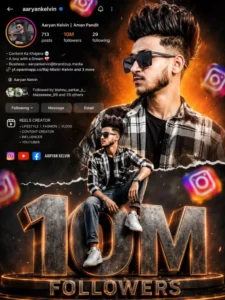
Ultra realistic Instagram design. A stylish Indian teenage boy wearing black sunglasses, black-white check shirt, blue jeans and white sneakers. Two different poses of the same person - one upper-body stylish portrait looking sideways at the top right, and one full-body sitting pose on giant metallic 3D "1.5M" text at the bottom center. Bright orange cinematic gradient background on top background at bottom Content Ke KhajareA boy with a Aaryan Kelvin Followed by bishnu sarka with smoky dark greyand Mes separated by torn paper effect. Include realistic Instagram profile Ul on left side with username, followers count, Following reels creator details, bio text and social icons. Add floating 3D Instagram logos around the scene with depth blur. Add glowing orange sparks, cinematic lighting, dramatic shadows, high contrast, ultra HD 8K quality, realistic skin texture, DSLR depth of field, stylish influencer vibe.The giant "1.5M" text should look metallic steel with orange glowing edges and circular platform below it. Add "FOLLOWERS" text below. Add handwritten signature style FOLLOWERS
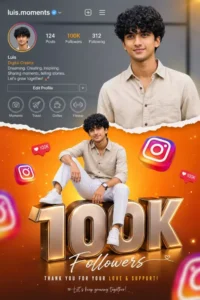
Vibrant Instagram milestone poster celebrating 100k followers. The main subject (Luis) is stylishly posing in two different positions - one full-body sitting pose on top of a big 3D metallic "100K" text with floating Instagram icons, and another half-body stylish photo above with torn paper effect transition between orange gradient and grey background. The top section shows an Instagram profile interface with username , Editing Prompt follower 100k count, bio, and icons.
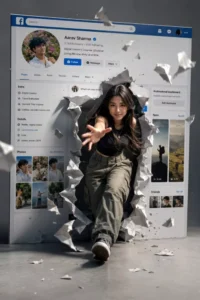
"CREATE A SURREAL, CINEMATIC IMAGE IN HIGH 4K RESOLUTION." KEEP THE PERSON'S FACE IN THE ORIGINAL PHOTO UNCHANGED. WITHOUT ALTERING ANY FACIAL FEATURES OR STRUCTURE AN ASIAN WOMAN, AS PICTURED, IS STRIDING CONFIDENTLY OUT OF A GIANT SOCIAL MEDIA SCREEN (A FACEBOOK-STYLE PROFILE INTERFACE)THE 3D PAPER-TEARING EFFECT IS INCREDIBLY REALISTIC: THE SCREEN IS RIPPED OPEN. AND PIECES OF TORN PAPER FLY AROUND, CREATING A SENSE OF SPATIAL DEPTH. THE WOMAN SEEMS TO BREAK FREE FROM THE DIGITAL WORLD AND STEP INTO REAL LIFE DYNAMIC POSE: ONE FOOT STEPS FORWARD. ONE ARM REACH ES TOWARDS THE CAMERA, CREATING A SENSE OF MOVEMENT AND STRONG DEPTH. BEHIND IT IS THE PERSONAL PROFILE INTERFACE WITH DETAILS AS SHOWN IN THE IMAGEAVATARUSER NAMENUMBER OF FOLLOWERSCONTROL BUTTONS (DASHBOARD. REELS. IMAGES... MINIMALIST GRAY STUDIO BACKGROUND, CINEMATIC LIGHTING.STRONG. HIGH CONTRAST. SHARP SHADOWS HIGHLIGHTING THE CHARACTER. STYLE PHOTOREALISTIC. CINEMATIC. SURREAL. HIGH-END ADVERTISING. ULTRA-DETAILE
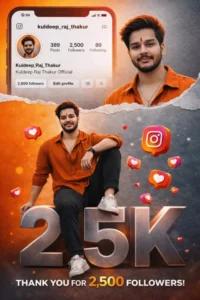
Vibrant Instagram milestone poster celebrating 500 followers. The main subject (Luis) is stylishly posing in two different positions - one full-body sitting pose on top of a big 3D metallic "10K" text with floating Instagram icons, and another half-body stylish photo above with torn paper effect transition between orange gradient and grey background. The top section shows an Instagram profile interface with username , Rathva ravi follower 10k count, bio, and icons.
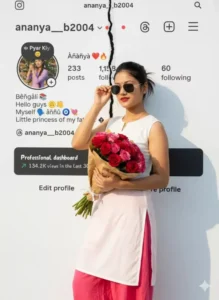
Women standing confidently in front of a white Instagram-themed background, The Instagram page is presented in a torn-in-half effect. holding a bouquet of colorful flowers in one hand and adjusting his sunglasses with the other. He's wearing a crisp white kurti and black trouser, illuminated by warm natural sunlight. Replace the woman's face with the uploaded face, matching lighting, shadows, and skin tone perfectly for a natural, seamless portrait...
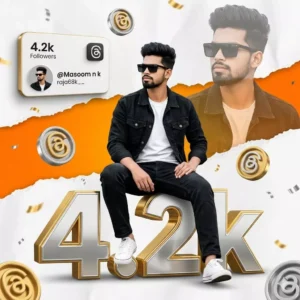
A hyper-realistic, highly detailed celebratory composite portrait of a stylish 18-year-old slim-fit boy[keep the face 100% same as saved in the reference image] with thick, dark styled upward well settled short voluminous hair with faded sides. Main Subject & Pose: In the foreground, the boy is sitting casually on top of massive, hyper-realistic 3D typography that reads "4.2k". He is sitting with his legs slightly apart, one foot resting lower than the other, hands relaxed on his la
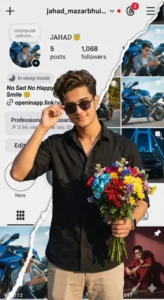
man standing confidently in front of a white Instagram-themed background, The Instagram page is presented in a torn-in-half effect. holding a bouquet of colorful flowers in one hand and adjusting his sunglasses with the other. He's wearing a crisp white Black shirt and beige pants, illuminated by warm natural sunlight. Replace the man's face with the uploaded face, matching lighting, shadows, and skin tone perfectly for a natural, seamless portrait.
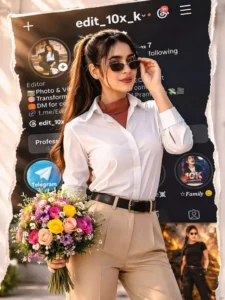
Woman standing confidently in front of a Transtorm white Instagram-themed background, The Instagram page is presented in a torn-in-half effect. holding a bouquet of colorful flowers in one hand and adjusting his sunglasses with the other. He's wearing a crisp white Black shirt and beige pants, illuminated by warm natural sunlight. Replace the man's face with the uploaded face, matching lighting, tad shadows, and skin tone perfectly for a ___natural, seamless portrait. Please the background image of the Insta profile should be clearly visible so that the followers can be seen well. No crop full image keep my face same 100% as in the reference image
How To Create With Chatgpt ?
Our previous editing tutorial was powered by Google Gemini; however, this time we are going to switch things up completely. We will be demonstrating an entirely different approach to editing this time around. We will also learn how to create content using ChatGPT. You will have the opportunity to observe both processes. All you need to do is simply select whichever method appeals to you the most. Here is what you need to do: first, open ChatGPT and paste the required prompt into the interface. To paste the prompt into ChatGPT, begin by copying it from our website. Next, click on the “plus” icon to upload a reference photo, and then hit “Generate.” Your photo will be ready in no time. This process will feel quite familiar to you, as it is very similar to the workflow used with Google Gemini.
How Can You Enhance Your Editing Skills?
Look, if you want to improve your editing—specifically, if you want to make it look absolutely polished and professional—and if your current editing feels somewhat amateurish, you must incorporate the following elements. First and foremost, add “depth.” What does this entail? It involves keeping the background blurred while ensuring the subject remains perfectly sharp and clear. This highlights the subject—which is the focal point of the image—and makes it stand out prominently. Next, you need to incorporate specific lighting techniques; specifically, utilize “soft lighting.” Ensure that highlights are focused on the subject’s face. Regarding color grading, apply a consistent color tone—such as a cool or warm palette—throughout the image. Since a white background is being used here, you must pay close attention to this detail and apply a “glow effect.” Add a subtle blue-tinted glow around the perimeter of the Instagram profile image to make the final result look even more impressive.
Conclusion
There are certain mistakes you should strictly avoid. If you are performing any kind of editing, never use low-quality photos. You must not misuse prompts, and you should strictly refrain from over-editing. Furthermore, do not always keep the background excessively sharp; instead, maintain a natural look—as I have already explained in the preceding paragraphs. If you are simply generating content via prompts, you do not need to focus on these specific editing aspects.