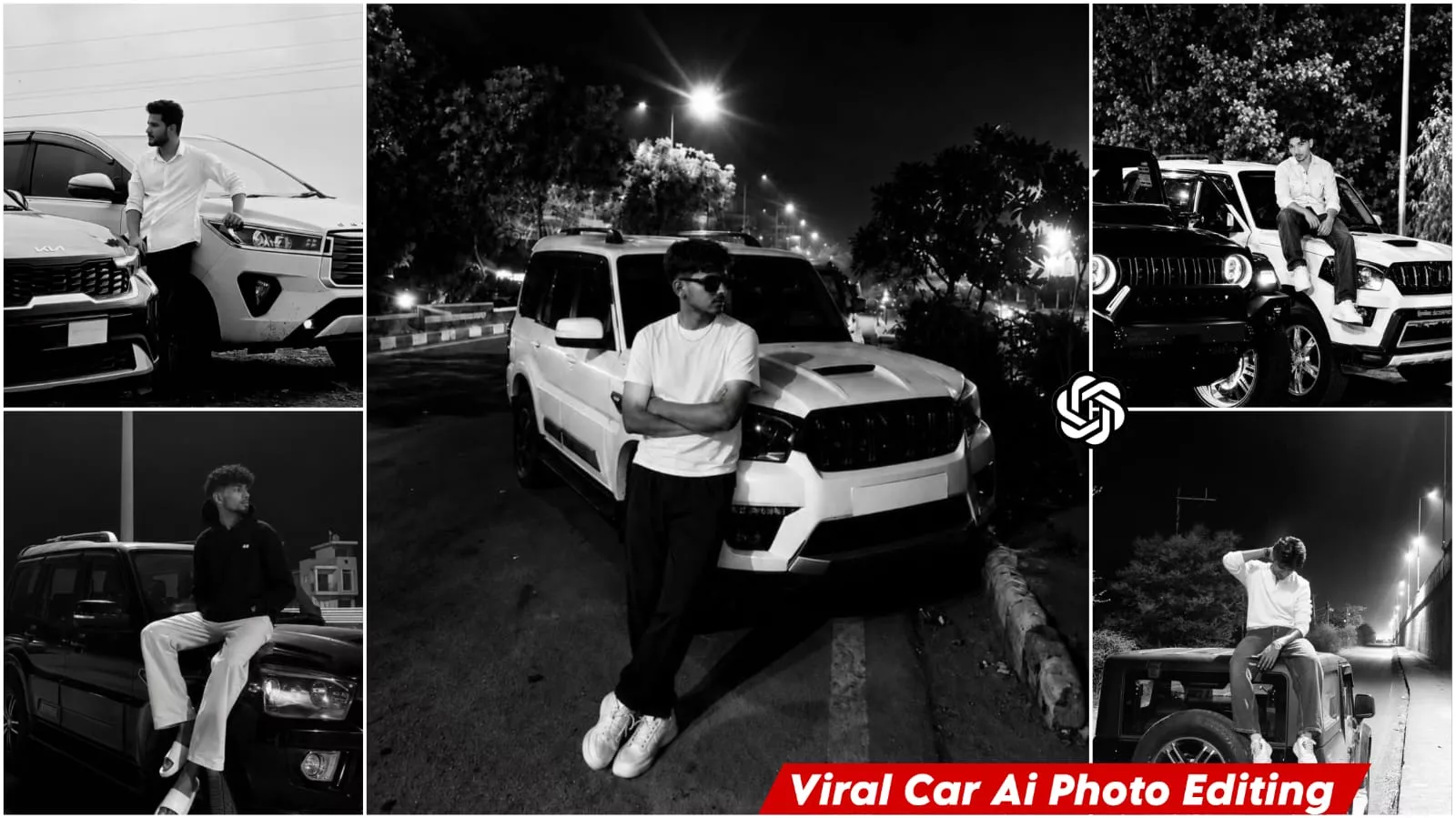
Viral B&W Car Ai Photo Editing Prompts – You can see such money and luxury photos on social media or Instagram that reel and photos are trending a lot in other fields. People create this with the help of prompts. You can also convert your normal photos into accessories luxury type photos. You can use this prompt in Google Gemini. You can use it in Chatgpt. I will tell you about either of the two. You simply use it there and generate this photo of yours. If you think it is right then I will tell you in this article how it can be done. After following them step by step you will get excellent results.
Details Of Viral B&W Car Ai Photo Editing Prompts
In this type of photo, a luxury photo is created with the help of prompts. Here you will see that your photo will be made luxurious, which will be full of money. Consider that a completely rich environment will be created in it, in which cinematic lighting will be added and a complete setup will be created. The blur will be completely normal, just like in professional photography. Such things are added here and you will see them. It looks exactly like a photo suite. Now we can create such a photo in high quality. Which you can also make viral by posting it on social media.
How To Create Image With Prompts
It’s crucial to understand the purpose of prompts properly. If you don’t understand them, you’ll never get good results. Now, we’ll explain what you can do to create more photos like this. Simply copy this prompt. Then, open Google Gemini. For a direct link, I’ve added a button here that says “Create Image.” You can use the Google Gemini application. You can get good results there too. Click on it directly. There, you’ll need to sign up with your email address. You’ll then find “Create Image” and several other options. Select “Create Image.” Then, paste the image you’ve copied. Then, go to the “Plus” option below and upload the photo you want to generate. Upload the photo, then “Generate.” Your photo will be ready in just a few seconds, with a good result.
Update – The ‘car-style’ editing I’m telling you about is currently trending heavily. That’s why I’m sharing this update—so you can create this viral-style edit and make your own photos go viral too. You could certainly create it using the old methods, but I’m going to share a slightly different approach that you can follow to get great results.
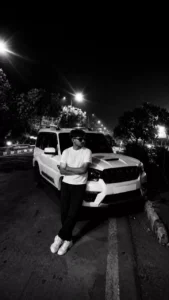
Create a premium black-and-white cinematic portrait of a young man leaning casually against a white Mahindra Scorpio SUV parked on an empty city road at night. Preserve the exact pose with folded arms, hairstyle, sunglasses, white oversized T-shirt, black pants, white sneakers, and relaxed expression. Keep the SUV’s aggressive front view and hide the number plate. Enhance facial sharpness while maintaining natural skin texture. Add dramatic high contrast, deep blacks, crisp whites, soft streetlight glow, realistic reflections on the vehicle, subtle film grain, and a moody urban atmosphere. Include bright streetlights with cinematic light flares and soft bokeh in the background. Use a shallow depth of field while keeping the subject and SUV perfectly sharp. The composition should be ultra-realistic, luxury lifestyle photography, editorial fashion style, HDR quality, 8K resolution, vertical 9:16 aspect ratio, with clean shadows and premium monochrome grading.”
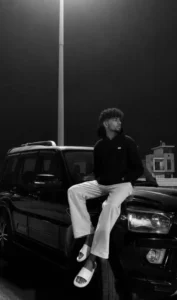
High-contrast black and white night photograph. A young man with curly dark hair and a neat beard sits casually on the hood of a black Mahindra Scorpio SUV, looking to the side. He wears a black hoodie, loose light-colored pants, and white slide sandals. A single tall street lamp directly overhead casts a dramatic downward spotlight, sharply illuminating him and the car hood while leaving the dark background in deep shadow with faint architectural silhouettes. Cinematic, moody, low-key lighting with high contrast.
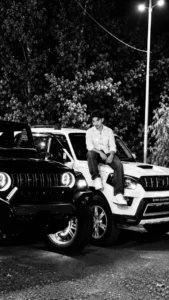
Use the uploaded image as the only and exclusive reference. Preserve the subject’s facial identity 100% exactly—do not alter the face shape, hairstyle, beard, skin tone, expression, body proportions, pose, or gaze. Keep the subject wearing the same white striped button-up shirt, blue jeans, sunglasses, and maintain the natural sitting pose on the white Mahindra Scorpio. Preserve both SUVs in the composition: the modified black Mahindra Thar in the foreground with its amber halo headlights illuminated and the white Mahindra Scorpio parked behind it. Maintain the same camera angle, perspective, and vehicle proportions.

Create an ultra-realistic luxury automotive editorial at night with a premium cinematic atmosphere. The scene takes place on a clean road surrounded by dense green trees under modern streetlights. Enhance the environment with subtle mist, soft volumetric lighting, realistic reflections on the paintwork, and gentle atmospheric depth. Keep the black Thar dominant in the foreground while the subject sits confidently on the Scorpio’s bonnet, creating a bold luxury SUV lifestyle composition.

Improve every detail with photorealistic HDR lighting, realistic metallic reflections, crisp body panel textures, glossy paint, detailed alloy wheels, premium tire textures, and ultra-sharp headlights. Add soft cinematic rim lighting around the subject, natural skin texture, realistic fabric folds, and balanced contrast without changing any facial features. The background should feature creamy depth of field while preserving the trees, road, and streetlight ambience.

Apply ARRI Alexa 35 color science, Kodak Portra-inspired cinematic color grading, rich blacks, warm amber highlights from the Thar’s lights, cool moonlit shadows, realistic global illumination, subtle lens bloom, and premium magazine-quality automotive photography.

Camera: Sony A1, 35mm lens, f/2.8, low-angle composition, HDR, ultra-detailed, razor-sharp focus, realistic reflections, professional automotive commercial style, 8K resolution, 9:16 aspect ratio.

Negative Prompt: Cartoon, CGI, illustration, painting, anime, low resolution, blurry, overprocessed skin, extra limbs, distorted face, altered facial identity, incorrect vehicle proportions, duplicate objects, unrealistic reflections, oversaturated colors, watermark, logo, text, noise, artifacts.
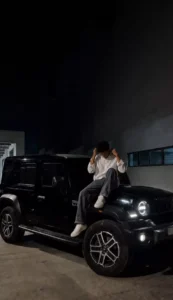
Ultra-realistic cinematic night portrait of a young man sitting confidently on the hood of a glossy black Mahindra Thar Roxx, one knee raised, adjusting his shirt collar with both hands. Wearing a crisp white full-sleeve shirt with sleeves casually folded, charcoal grey wide-leg trousers, and clean white sneakers. Face remains identical to the reference with natural skin tone and subtle horizontal motion blur for privacy. Sharp LED DRLs and headlights illuminate the SUV, creating dramatic reflections on the paint. Industrial parking area with minimalist architecture, deep black sky, soft ambient lighting, realistic shadows, high contrast, moody atmosphere, 35mm lens, f/1.8, shallow depth of field, HDR, ultra-detailed textures, photorealistic DSLR quality, luxury automotive editorial, premium Instagram aesthetic, clean composition, natural color grading, 8K resolution.
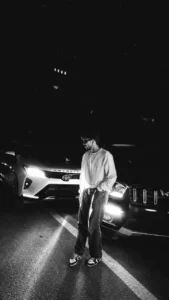
Create an ultra-realistic, premium cinematic night portrait using the uploaded image as the only reference. Preserve the subject’s facial identity, hairstyle, skin tone, body proportions, pose, outfit (oversized white sweatshirt, loose blue jeans, and white-red sneakers), and overall composition exactly as in the original image. The subject stands casually on the center road line with one hand in the pocket, looking to the side between two SUVs.

The scene takes place on a deserted highway at night. On the left is a white Toyota Fortuner with bright white LED headlights on, and on the right is a black Mahindra Scorpio-N with glowing DRLs and amber parking lights, creating dramatic cross-lighting on the subject. Hide or blur both vehicle number plates while keeping the vehicle designs fully recognizable.

Enhance the lighting with cinematic high-contrast HDR, realistic headlight glow, soft volumetric light beams, subtle lens flare, natural bloom, and realistic reflections on the road surface. Improve facial sharpness while maintaining natural skin texture. Add premium teal-and-orange cinematic color grading with deep blacks, rich contrast, crisp details, realistic shadows, and soft atmospheric haze.

Maintain a clean black night sky with minimal stars, realistic depth, and a luxury automotive editorial aesthetic. Capture with a full-frame DSLR, 35mm lens, f/1.8, ISO 400, ultra-detailed, magazine-quality automotive photography, hyper-realistic, 8K resolution, razor-sharp focus, realistic textures, and natural dynamic range.

Negative Prompt: low quality, blurry, noise, oversaturated colors, cartoon, CGI, painting, illustration, anime, artificial skin, distorted face, changed hairstyle, altered pose, extra limbs, duplicate subject, incorrect vehicle proportions, text, watermark, logo, visible number plates, motion blur, compression artifacts.
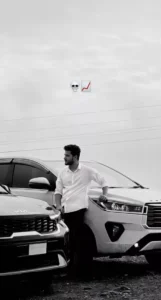
Create a minimalist luxury automotive portrait on an open roadside during a late afternoon under an overcast sky. A confident man with thick, messy black hair, light stubble, medium warm skin, and an athletic build stands centered between two glossy white modern SUVs. He wears a white button-up shirt with rolled sleeves, black trousers, and dark shoes. His body is slightly angled, looking to the left, with his left hand in his trouser pocket and his right hand resting on the headlight of a Kia SUV. Capture a full-body vertical composition at eye level with deep depth of field, using the SUVs as a natural symmetrical frame and leaving generous negative space in the cloudy sky. Include gravel ground, power lines, and an open horizon. Use soft diffused daylight, low contrast, minimal shadows, and a high-key monochrome color grade with subtle gold tones in the sky, high clarity, sharpness, a soft matte finish, slightly lifted blacks, and a clean, aspirational luxury aesthetic.
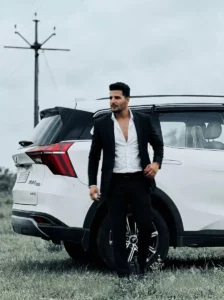
Create a luxury lifestyle editorial portrait of an athletic man with medium warm skin, short black pompadour hair with faded sides, and a short trimmed beard. He wears a tailored black blazer over a white dress shirt with the top buttons open, black tailored trousers, black formal loafers, a black belt, and a smartwatch. Capture him walking beside a glossy white modern luxury SUV with a black roof, tinted windows, multi-spoke alloy wheels, and LED taillights. He is centered, slightly angled left, looking left, holding a smartphone in his left hand while adjusting his blazer with his right. Set the scene on an open grassy roadside in late afternoon under an overcast sky with a utility pole, power lines, and a minimal rural landscape. Use an eye-level, full-body vertical composition with moderate depth of field, the SUV as the backdrop, and generous negative sky space. Apply soft diffused daylight from the front-left, low contrast, minimal shadows, warm monochrome black-and-white grading, high clarity and sharpness, medium-high contrast, subtle vignette, light film grain, lifted blacks, a soft matte finish, and a clean cinematic premium look.
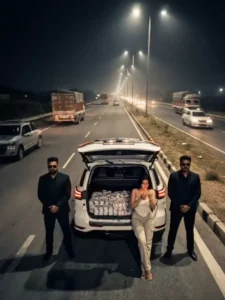
Uploaded image only reference. Person 100% identical (all features, pose, clothes, lighting, camera, composition exact). Night cinematic Indian highway, high top-down from behind/above open trunk. White SUV left shoulder, trunk fully packed with Indian cash bundles. Person right of trunk, leaning bumper, legs crossed, lighting cigarette with match, calm confident. 2 male bodyguards black suits + sunglasses, symmetric (car left, person right). Long straight highway, divider, tall streetlights leading lines, moving traffic blur only far, hazy night sky. Ultra-real cinematic film still, sharp subject, bokeh background, strong streetlight top glow, real shadows + reflections. 24mm high wide, vertical frame, subject lower center, trunk lower center, road vanish top center. Neutral cinematic grade, warm highlights, cool shadows, HDR. 8K photoreal, no crop, no tilt, no extra people/near cars/text/logo/watermark/artifacts.
How To Create Image With Chatgpt?
To get started, first open ChatGPT. Copy the prompt provided in this article and paste it into ChatGPT. Next, upload a reference photo; choose a high-quality image where your face is clearly visible and the lighting is excellent. Finally, hit the generate button; within a few seconds, it will create and ready a fantastic image for you.
Customization tips will definitely require customization.
For example, if you want, you can change the look of the entire photo by changing something in the prompt. For example, if we want to change the name of the car here, for example, we’ll replace the car’s name in the prompt and add our favorite car there. If we want to change the lighting here, we’ll simply write about the lighting. We want night. We want cinematic. We want golden numbers. Whatever we want, we’ll add it. Then comes the outfit. If we want to customize the outfit to our liking, for example, whether we want traditional or modern, we can add that by adding it there. You can also change your background. If you want your background to be in a park, simply enter the park details there and it will be added. You can add something like a city mansion, a water park, or a garden flower. Your photo will be ready, and you can customize it this way.
Some Mistakes That You Should Always Avoid
There are some mistakes that you should always avoid, you should never use these. Whenever you create a photo, you should never upload a low quality image. Do not use a photo in which your face is blurred or there is a mask on your face or your face is not visible properly from there. After that, do not use a very complex background i.e. a photo in which there are three-four people. If you want to generate your own photo, then the prompt is made for a single person. There you just use a single photo and you have to keep the ratio selected well here because the ratio also matters a lot. If you want to generate your photo with a perfect face?