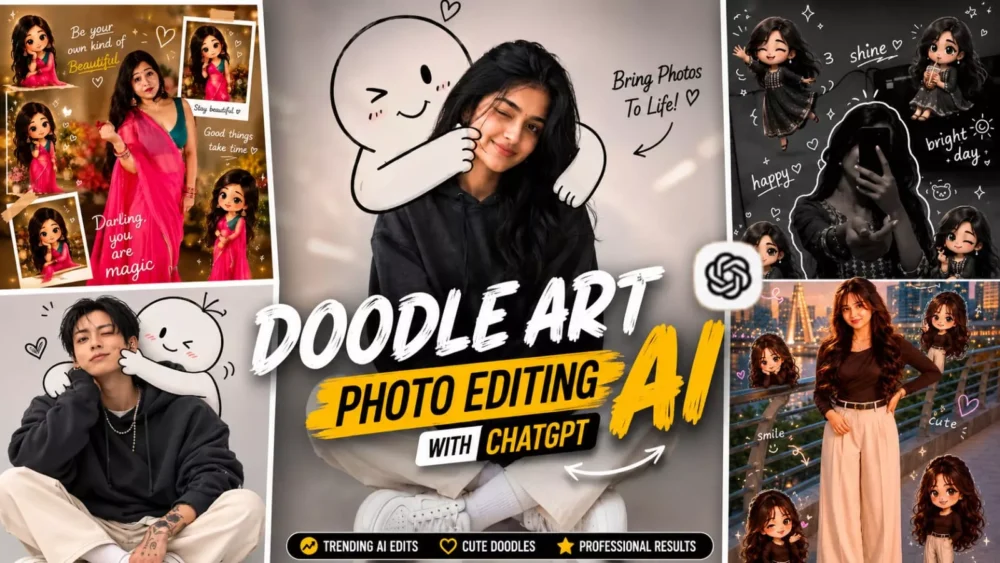
Doodle Art Ai Photo Editing Prompts – You have likely noticed photos on Instagram or other social media platforms where doodle art characters are integrated into realistic images. These photos present a unique blend—combining realistic imagery with doodle art characters—and they are widely appreciated by audiences. I found this style fascinating myself, so I decided to share the editing process with you. If you are interested in creating this kind of unique, viral-worthy edit—where a charming doodle character is added to your photo or a new image is generated featuring such a character—then this article is for you. You will find all the details here.
Details Of Doodle Art Ai Photo Editing Prompts
What is doodle art editing? Nowadays, this type of editing involves using AI to add a sketch-like element to your photo—something that looks as if it were created by an artist. Since AI integration, these elements are blended so realistically that the final image looks completely natural. The drawing effect appears authentic, as the image is generated with the help of ChatGPT, ensuring absolute perfection in the result. It is currently the best model available; if you want to generate images, use ChatGPT for the best results—though, of course, another tool might offer superior results in the future.
Why is this “doodle art” editing style going so viral
Why is this “doodle art” editing style going so viral thanks to ChatGPT? One reason is that this editing style is truly unique. While people usually create professional, luxury, or hyper-realistic edits, this style incorporates sketched characters that blend seamlessly to look realistic. Furthermore, on Instagram and other social media platforms, such photos instantly grab attention. This is ideal for these platforms because the longer people linger on your photo, the more your engagement and reach increase—leading to the photo going viral. That is precisely why users are currently loving this style so much.
The key features of this doodle editing
Let me highlight the key features of this doodle editing style. The most significant aspect is that your face remains completely unchanged; it retains a natural, realistic look. Meanwhile, the doodle elements are designed to resemble hand-drawn sketches, making your photo look incredibly attractive. This style is highly effective for boosting social media engagement. Thanks to AI, these images can be created easily in just a few seconds, which is why they are so popular. Even beginners who have just started editing are creating these viral-style photos.
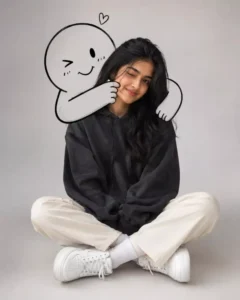
A cute minimalist portrait of a young woman sitting casually on the floor in a clean studio setting with a light grey background. She wears an oversized dark charcoal hoodie, cream straight-leg pants, white socks, and chunky white sneakers. Relaxed seated pose with crossed legs, one eye slightly closed in a playful wink and a soft smile. Behind her, a large black-and-white doodle character hugs her from behind, wrapping its cartoon arms around her shoulders and gently squeezing her cheek.
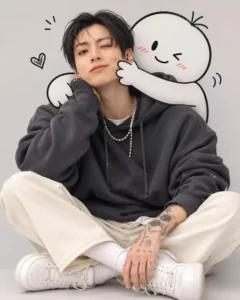
A cute minimalist portrait of a young man sitting casually on the floor in a clean studio setting with a light grey background. he wears an oversized dark charcoal hoodie, cream straight-leg pants, white socks, and chunky white sneakers. Relaxed seated pose with crossed legs, one eye slightly closed in a playful wink and a soft smile. Behind her, a large black-and-white doodle character hugs her from behind, wrapping its cartoon arms around her shoulders and gently squeezing her cheek.
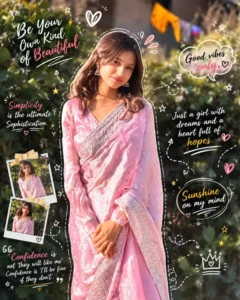
Turn your gym photo into a trendy doodle-art masterpiece. Add hand-drawn outlines, motion strokes, arrows, stars, swirls, comic accents, and playful handwritten notes layered naturally over the image. Keep the original physique, pose, and lighting intact while enhancing the scene with a clean aesthetic, subtle grain, soft morning glow, artistic annotations, and a premium Instagram editorial vibe. High-detail, creative, and visually balanced.
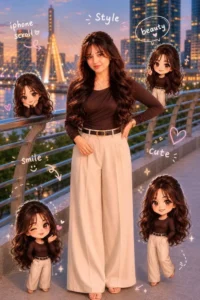
🤎🤎Use a real face as a reference photo. The background is the same as in the photo.The lighting is warm, soft, and clean, with subtle shadows.Around the image, add several mini chibi (4D cute style) versions of the character, while maintaining the original facialaesthetic handwriting such as: "style," "iphone scroll," "beauty," "smile," "cute"..etc. (casual doodle font)🤎🤎
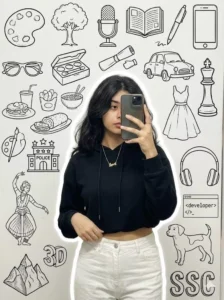
A stylish young woman taking a mirror selfie, wearing a black crop hoodie l and white pants, holding the shirt casually with one hand, minimal jewelry(love symbol), wavy hair, realistic lighting, and soft white outline glow around him. The background wall os doodle is a modern [black] aesthetic collage with elements like art palette , a tree, microphone, books, pen,mobile, specs, makeup box, car, food, dress, a kinh piece of chess board, a base of police 3 star, classical dance, headphones, developer, , dog, 3D Moutain and "SSC" doodle text in a background white solid wall., a mirror selfie. Face is slight hidden for the mobile.
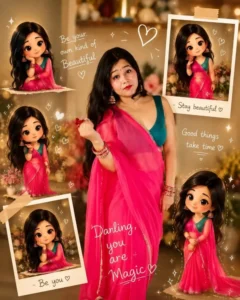
Use reference photo to create a ultra-realistic cinematic portrait of a beautiful Indian woman in elegant white saree with embroidered blouse, jasmine flowers in long black hair, looking back with sweet smile, warm aesthetic lighting, surrounded by cute 3D chibi doll versions of herself in different poses, white doodle hearts and sparkles, handwritten words, dreamy scrapbook,
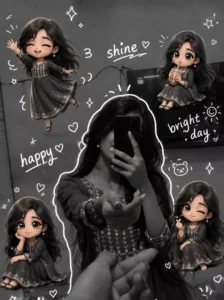
Around the image, add several mini chibi (3D cute style) versions of the character, While maintaining the original facial features. expressions: jumping cheerfully waving sitting relaxed holding a drink cute and playful expressions Add hand-drawn white doodle elements: outline around the main body stars, hearts, sparkles motion lines small cute icons Add aesthetic handwriting such as: "shine, "bright day,"happy,"smile" etc. (casual doodle font) Overall style: clean & aesthetic composition White
Some tips to make such doodle photos look attractive.
First, ensure that any reference photo you use is of high quality; this ensures the final result is also high quality. Avoid a cluttered background in your photo; if you are generating the image, keep the subject singular. Regarding the doodle art you add—if you are adding it yourself, don’t overdo it, as the prompt specifies a limited scope. Avoid adding too many elements, or the photo will look unnatural. Finally, ensure the pose in your photo looks completely natural to make the image look perfect.
How To Create Image Using Chatgpt?
We have already shared the prompt for creating these photos; please use it, as it will yield the best results. Simply copy the prompt and open ChatGPT, as that is where we will generate the image. Paste the prompt there, then click the ‘plus’ icon to upload your reference photo—make sure it is a high-quality image, as we discussed earlier. Finally, hit generate, and it will create the photo for you with perfect precision.