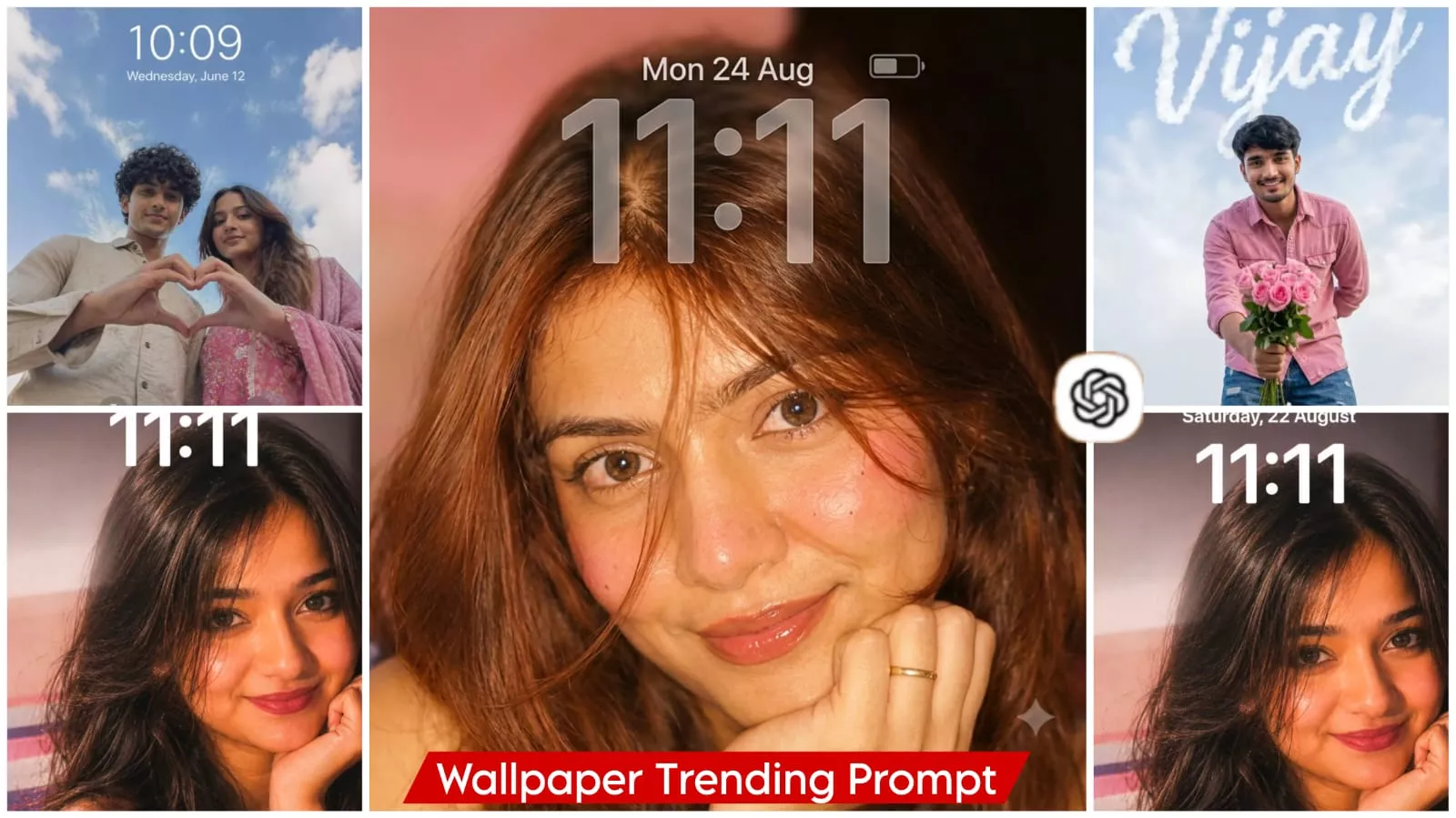
AI Lockscreen Wallpaper Editing Prompts – You must have surely noticed a new trend on Instagram featuring photos that mimic the look of a lock screen UI. These images resemble actual lock screen screenshots, displaying your chosen photo alongside the current time and various widgets. However, you don’t create these by simply setting a picture as your lock screen and taking a screenshot; instead, you generate them. The reason for doing so is that this specific style is trending in a unique way—and simply uploading any ordinary photo won’t make it go viral. That is not how it works. We will create these images with the help of AI, resulting in a look that is quite distinctive. Today, I will explain exactly what you need to create this viral new style, and how you can generate it using AI tools such as Google Gemini.
Details Of AI Lockscreen Wallpaper Editing Prompts
So, what exactly is this “Lock Screen UI Editing”? It employs a specific style that creates an optical illusion. At first glance, it appears as though you have simply taken a screenshot of your lock screen and posted it. However, in reality—visually speaking—this image is actually generated using AI. And that is precisely the point: when viewers see this, they are left confused—wondering whether it is a genuine screenshot or a real-life photograph. This confusion is what drives virality; people share these types of images with one another, debating whether they are screenshots or actual photos. But there is no need for you to worry about any of that. I will show you exactly how to create these images using AI—because capturing photos this spectacular through conventional means is a rare feat, one that would typically require hiring a professional photographer and spending a significant amount of money.
WHY IS THIS STYLE OF EDITING GOING VIRAL?
It is going viral precisely because people are enjoying it. Let me explain: first and foremost, the UI—specifically the mobile screen interface I am referring to—looks familiar. Everyone wants to display similar photos on their own lock screens—images that look truly unique. This style creates a blend where it is difficult to distinguish between what is real and what is fake. This captures the viewers’ attention and prompts them to start thinking about how they, too, can create such photos. Upon seeing this, they pause and ponder. Subsequently, you will notice that they leave comments and ask how they can apply similar photos to their own lock screens. It is this very aspect that people are finding so appealing, which is why it has gone viral.
Update – Here is how Gemini can be a game-changer for you. Let me explain: it generates UI designs that look so realistic, they give you the distinct impression that you’ve simply taken a screenshot from a mobile device. It adds such depth to the image that the elements you’ve incorporated appear completely natural. In other words, you no longer need Photoshop skills; simply hone your skills in prompt engineering, and watch as you generate truly impressive results.
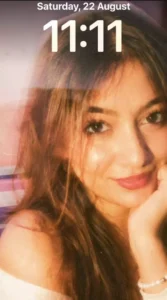
Use same face stricity and create A vertical 9:16 frame, close-up portrait photograph captures a same young woman with a warm, tan complexion and long, dark brown hair that cascades in loose waves around her face and shoulders. She is gazing directly at the camera with a calm, slightly intense expression, her dark brown eyes wide and reflective with distinct catchlights. Her eyebrows are dark and naturally shaped, framing eyes that look straight ahead, conveying a sense of intimacy. She wears a glossy, deep berry-colored lipstick on her full lips, which are slightly closed. Her left hand is raised to her face, resting gently under her chin with fingers curled inward against her jawline, adorned with a simple gold band ring on the finger. She is dressed in a white, off-the-shoulder top made of a soft, ribbed fabric that reveals her right shoulder and collarbone, emphasizing the softness of the scene. A delicate bracelet with small white beads and a dark accent bead is visible on her left wrist at the bottom right of the frame. Her hair is dark brown, almost black, with subtle reddish-brown highlights, and several loose strands fall across her forehead and right cheek, partially obscuring her face and adding a sense of casual, unstyled movement. The background is softly blurred with a shallow depth of field, featuring a solid, matte pink wall on the left side and a deep, dark shadow on the right side, creating a strong contrast and framing her face. In the lower left corner, out-of-focus horizontal stripes in purple, grey, and white suggest a bedspread or blanket, placing the subject in a casual, indoor setting like a bedroom. The lighting is warm and somewhat directional, illuminating her face and shoulder from the front-left while casting the right side of her hair and the background into deep shadow, creating a soft chiaroscuro effect. The image possesses a strong vintage aesthetic, heavily textured with visible film grain and noise, reminiscent of high-ISO 35mm film photography such as Kodak Portra 400 or a similar film stock scan. The color palette is dominated by warm pinks, golden skin tones, and deep browns, with a slightly desaturated, nostalgic, and lo-fi feel. The composition is tight, filling the frame with her face and upper body to create an intimate atmosphere. The overall quality is soft and dreamy, with a retro 1990s snapshot vibe and high analog film texture. Make it look realistic not fake or edited
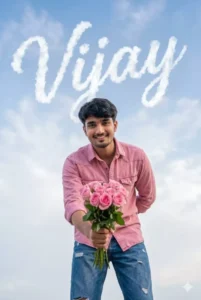
Without changing the facial features of above image man ,create an ultra realistic extreme low angle ground level point of view portrait of man standing .he should bend towards the camera .he should be showing pink rose bouquet towards camera .he should be in smile .he should wear pink denim button down shirt and blue jeans .only clouds background.There should be wordings in English font "Vijay" in the form of white clouds in sky .wordings should be slanting running letters . composition should exactly match such that wordings should form exactly from clouds .pls don't make spelling mistakes in .no other things /objects/floorings visible .aspect ratio 2:3 . preserve exact face of the uploaded image man.
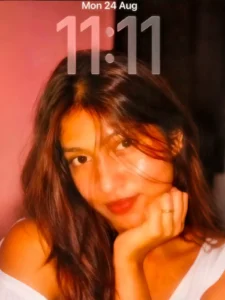
Transform the uploaded photo into a dreamy iPhone lock-screen wallpaper inspired by the reference image. Keep the person’s face 100% identical to the reference image, preserving the exact facial identity, facial structure, face shape, eyes, eyebrows, nose, lips, cheeks, jawline, skin tone, proportions, and all recognizable facial features unchanged. Keep the person’s hairstyle and outfit unchanged. Create a close-up, natural late-night iPhone selfie composition with the person positioned mainly in the lower portion of the frame. The face should be close to the camera, with the head slightly tilted and one hand naturally resting against the cheek/chin, matching the intimate composition of the reference. Use warm direct iPhone camera-flash lighting, a soft golden glow, gentle highlights on the skin, subtle dreamy motion blur, and a dark reddish-brown background. Keep the iPhone lock-screen time and status bar exactly the same as the reference image: “Jio” at the top left, “Thu 27 Aug” centered above the time, large “11:11” in the upper portion, signal bars, “5G,” and the battery icon showing “27” at the top right. Preserve their exact placement, appearance, proportions, and overall iPhone lock-screen style. Make the image look like an authentic late-night iPhone photo rather than a studio portrait, with realistic skin texture, natural lighting, soft focus, photorealistic details, and an aesthetic nostalgic appearance. Use a vertical 9:16 composition.
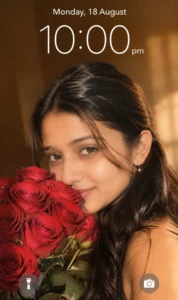
Create an ultra-realistic smartphone lock-screen wallpaper that matches the reference image as closely as possible in composition, framing, lighting, colors, subject placement, and overall visual appearance. IMPORTANT — 100% FACE IDENTITY LOCK: Use the uploaded reference image as the ONLY source for the woman's face and identity. Preserve her face 100% exactly as shown in the uploaded reference image. Do not change, beautify, enhance, stylize, regenerate, reinterpret, or modify her facial identity in any way. Preserve the exact facial structure, face shape, eyes, eyebrows, nose, lips, cheeks, jawline, skin tone, proportions, expression, and all recognizable facial characteristics from the uploaded reference. The face must remain unmistakably the same person as in the reference image. Do not add anything extra to the face or identity. Canvas: vertical 9:16 smartphone wallpaper, approximately 864 × 1536. Subject A beautiful young South Asian woman in a close-up portrait, positioned slightly toward the right side of the frame. She is looking directly toward the camera with a soft, playful, slightly mysterious expression. She has: - Long, thick, naturally straight-to-slightly-wavy black hair - Hair parted naturally near the center/left and flowing over her shoulders - Realistic individual hair strands - Warm medium-brown skin with completely natural skin texture - Dark expressive eyes - Natural eyebrows - Minimal natural makeup - Soft lips - No artificial beauty filter - Realistic facial proportions and authentic DSLR/iPhone-camera detail Her face should remain the main focal point. Her head is tilted slightly downward and toward the camera. Roses In the lower-left and center-left foreground, she is holding a large bouquet of fresh deep red roses close to her face. The bouquet should contain many realistic roses with: - Rich crimson-red petals - Clearly visible layered petals - Natural green leaves - Realistic stems - Slight variation between individual flowers The roses partially cover the lower half of her face, especially around her mouth and chin, exactly like the reference composition. Pose & Composition Use a very tight portrait crop. The woman's face occupies the central-upper area, while her long hair fills much of the right side and lower-right portion of the image. Her bare shoulder/upper arm is visible in the lower-right area. Keep the bouquet large in the lower-left foreground. Maintain the same visual balance: - Woman: center/right - Face: upper-middle - Roses: lower-left - Hair: flowing across the right and bottom-right - Shoulder: lower-right - Background: visible mainly around the upper portion Lighting Warm golden-hour indoor lighting. Use soft sunlight coming from the right side, creating warm highlights on her face, hair, shoulder, and roses. Add realistic natural shadows and subtle highlights. The lighting should look like a real smartphone photograph rather than an AI-generated image. Background Simple warm beige/tan interior background with a softly blurred shallow depth of field. The background should have a warm brown-golden tone with subtle natural light variation. No furniture, decorations, people, text, or distracting objects. Use realistic photographic bokeh. Camera & Realism Photorealistic smartphone-camera portrait photography. Natural skin pores, fine facial details, realistic hair strands, realistic rose petals, physically accurate shadows, natural depth of field, subtle lens characteristics, high dynamic range, realistic exposure, and authentic photographic imperfections. Do NOT make it look like digital art, CGI, illustration, painting, or an overly polished AI portrait. Lock Screen Overlay Recreate the lock-screen appearance shown in the reference. At the top center, add: Monday, 18 August Below it, very…
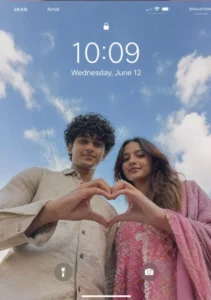
Use the uploaded selfie/selfies as the ONLY identity reference. Do not invent or change faces.
Preserve exact face structure - face shape, jawline, nose, eyes, lips, forehead, skin tone, facial hair, skin texture, and natural smile.Keep real imperfections.
Do NOT beautify, stylize, smooth skin, slim, reshape, or enhance features.
Create a realistic SMARTPHONE
LOCK SCREEN WALLPAPER
Create a realistic SMARTPHONE LOCK Camera &Angle:
Low-angle shot from below, as if the phone is placed beneath the subjects.
Wide camera distance.
Medium-wide framing
Upper body visible.
NO zoom.
NO portrait-mode blur
Pose:
Two people standing close together, looking down at the camera, forming a heart shape together with their -hands in the foreground.
hands in the foreground. Natural, casual, unposed expression.
Framing:
Centered subjects
Hands forming the heart clearly visible.
Enough empty space above heads for lock screen text.
Background:
Open sky with soft daylight and light clouds.Natural colors only. No dramatic or cinematic sky
Lighting:
Natural daylight.
Slight uneven lighting like a real phone photo.No studio light.
No glow.
Style & Texture: Raw phone-camera realism.Natural skin texture. a Slight realistic noisel grain. Balanced contrast. No filters.
Lock Screen Ul:
iPhone-stvle lock screen lavout
Large centered time and date visible at the top.
Wallpaper-style composition, not edited text.
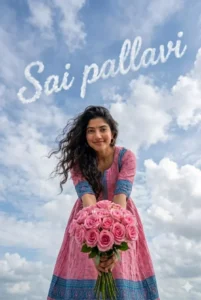
Without changing the facial features of above image woman ,create an ultra realistic extreme low angle ground level point of view portrait of woman standing .she should bend towards the camera .she should be showing pink rose bouquet towards camera .she should be in smile .she should wear anarkali pink with blue border design churidar. Her hair is open .only clouds background.There should be wordings in English font "Sai pallavi" in the form of white clouds in sky .wordings should be slanting running letters . composition should exactly match such that wordings should form exactly from clouds .pls don't make spelling mistakes in .no other things /objects/floorings visible .aspect ratio 2:3 . preserve exact face of the uploaded image woman.
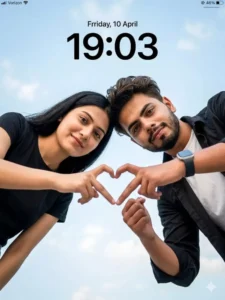
Upload 2 person image
(Keep my face 100% same as in the reference image)

Ultra-realistic cinematic low-angle couple portrait, 8K DSLR quality, extremely sharp focus, zero blur, no artificial smoothing, no CGI look, no cartoon effect, hyper-realistic skin texture, hair detail, and fabric texture.

ASPECT RATIO
3:4 vertical

SCENE
Open outdoor environment with a bright blue sky and soft scattered white clouds filling the entire background. Clean minimal sky backdrop with no distractions.

SUBJECT
A young couple leaning forward toward the camera, captured from a low-angle perspective (camera placed below them).

FACE & LOOK DETAILS
Male: Wheatish skin tone, short styled hair, trimmed beard, sharp jawline, natural skin texture with visible pores.
Female: Fair to wheatish skin tone, smooth natural skin, straight shoulder-length hair, soft facial features.
Both faces completely natural, no smoothing, no beautification.

POSE DETAILS
Cheek to Cheek Pose
Dono ka chehra ek dusre se bilkul chipka hua (cheek to cheek), dono smile kar rahe hain aur camera mein dekhte hain.
Vibe: Playful, happy aur close couple energy.


OUTFIT DETAILS
Male: White inner t-shirt with black open shirt (casual style, natural folds), smartwatch on wrist.
Female: Black t-shirt (simple minimal style, soft fabric).


BACKGROUND DETAILS
Full sky background with soft clouds.
No buildings or objects visible.
Clean and airy composition.

LIGHTING DETAILS
Natural daylight from above.
Soft even light on faces.
Subtle highlights on cheeks and forehead.
No harsh shadows.
Balanced exposure with natural skin tones.
Everything extremely sharp (NO blur).

CAMERA & COMPOSITION
Low-angle shot (camera below subjects facing upward).
Close-up framing (faces + hands).
50mm realistic lens perspective.
Hands forming shape centered in frame.
Ultra sharp focus on faces, hands, and sky.

STYLE
Hyper-realistic outdoor couple photography.
Clean, minimal, aesthetic social media style.
Natural vibrant tones.

EXPRESSION DETAILS
Soft smile, calm and romantic vibe.
Relaxed facial expressions.

FACE RULES
Face must remain 100% natural.
No beautification, no reshaping, no AI artifacts.

NEGATIVE PROMPT
blur, motion blur, soft focus, background blur, CGI look, cartoon style, over-smooth skin, distorted fingers, extra fingers, watermark, low resolution
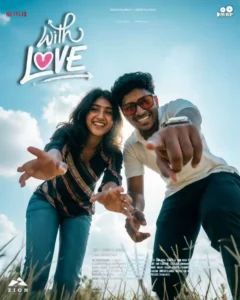
Extreme low angle worm's eye view shot of a smiling young couple leaning toward the camera, ultra wide angle lens (18mm), dramatic perspective distortion, foreground hands reaching toward the camera, one person pointing directly at the lens, confident happy expressions, bright blue sky background with soft clouds, I want same face as I uploaded no alteration 100 percent same strong natural sunlight from behind creating sun flare and rim lighting around hair, cinematic cool tone color grading, teal and blue atmosphere, high dynamic range, ultra realistic skin texture, sharp focus, DSLR quality, natural shadows, modern casual clothing, dynamic composition, powerful perspective, ultra HD 8K, professional photography, dramatic sunlight glow, vibrant sky, energetic mood. Young man and women same hairstyle and same all.
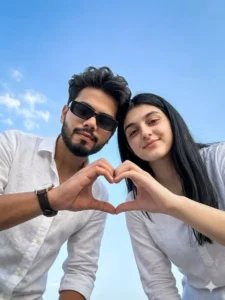
Upload 2 person image
(Keep my face 100% same as in the reference image)

Acpact ratio 3:4
Ultra-realistic cinematic low-angle couple selfie photograph, 8K DSLR quality, extremely sharp focus, zero blur, no artificial smoothing, no CGI look, no cartoon effect, hyper-realistic skin texture, fabric detail, and natural lighting.

ASPECT RATIO
3:4 vertical

SCENE
Open outdoor environment with a clear blue sky background and soft natural clouds. Minimal environment with no distractions, only sky filling the frame.

SUBJECT
A young couple leaning slightly forward toward the camera, captured from a low-angle perspective (camera placed below).

FACE & LOOK DETAILS
Male: Wheatish skin tone, short styled hair, trimmed beard, sharp jawline, natural skin texture with pores visible.
Female: Fair to wheatish skin tone, smooth natural skin, long straight hair, soft facial features, minimal makeup look.
Both faces natural, no beautification, no smoothing.

POSE DETAILS
Both subjects leaning toward camera from above.
Heads slightly tilted inward toward each other.
Male forming a heart shape with fingers using both hands in front of camera.
Female relaxed with hands down or slightly forward.
Both looking directly into camera.


Male: OUTFIT DETAILS:
White casual linen shirt,
top button open,
sleeves slightly rolled,
natural fabric folds visible,
Rectangle black sunglasses
minimalist wristwatch with dark leather strap on left wrist.

BACKGROUND DETAILS
Clear sky with light clouds.
No buildings, no objects.
Clean minimal aesthetic.

LIGHTING DETAILS
Natural daylight coming from above and front.
Soft even lighting on both faces.
No harsh shadows.
Balanced exposure with natural skin tones.
Bright outdoor lighting.

CAMERA & COMPOSITION
Low-angle shot (camera below subjects looking upward).
Close-up framing (head and upper torso).
50mm lens realistic look.
Subjects centered symmetrically.
Ultra-sharp focus on faces and hands (NO blur anywhere).

STYLE
Hyper-realistic outdoor lifestyle photography.
Clean, minimal, aesthetic look.
Natural colors with slight brightness.

EXPRESSION DETAILS
Soft smile and calm expression.
Romantic, friendly vibe.
Natural relaxed faces.

FACE RULES
Face must remain 100% natural.
No beautification, no reshaping, no AI artifacts.

NEGATIVE PROMPT
blur, motion blur, soft focus, background blur, CGI look, cartoon style, over-smooth skin, distorted hands, extra fingers, watermark, low resolution
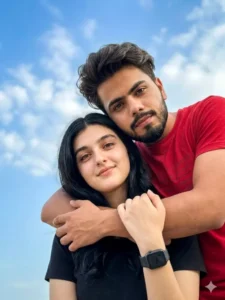
Upload 2 person image
(Keep my face 100% same as in the reference image)

Ultra-realistic cinematic low-angle couple portrait, 8K DSLR quality, extremely sharp focus, zero blur, no artificial smoothing, no CGI look, no cartoon effect, hyper-realistic skin texture, hair detail, and fabric texture.

ASPECT RATIO
3:4 vertical

SCENE
Open outdoor environment with a bright blue sky and soft scattered white clouds filling the entire background. Clean minimal sky backdrop with no distractions.

SUBJECT
A young couple leaning forward toward the camera, captured from a low-angle perspective (camera placed below them).

FACE & LOOK DETAILS
Male: Wheatish skin tone, short styled hair, trimmed beard, sharp jawline, natural skin texture with visible pores.
Female: Fair to wheatish skin tone, smooth natural skin, straight shoulder-length hair, soft facial features.
Both faces completely natural, no smoothing, no beautification.

POSE DETAILS
Back Hug Pose
Ladka ladki ko peeche se hug karta hai, dono camera ki taraf dekh rahe hote hain, ladki thodi si muskurati hai.
Vibe: Warm, intimate aur possessive love feel.

OUTFIT DETAILS
Male: Red t-shirt with printed text (casual fabric, natural folds),
Female: Black t-shirt, simple minimal style, soft fabric texture.
Black Apple smart watch

BACKGROUND DETAILS
Full sky background with soft clouds.
No buildings or objects visible.
Clean and airy composition.

LIGHTING DETAILS
Natural daylight from above.
Soft even light on faces.
Subtle highlights on cheeks and forehead.
No harsh shadows.
Balanced exposure with natural skin tones.
Everything extremely sharp (NO blur).

CAMERA & COMPOSITION
Low-angle shot (camera below subjects facing upward).
Close-up framing (faces + hands).
50mm realistic lens perspective.
Hands forming shape centered in frame.
Ultra sharp focus on faces, hands, and sky.

STYLE
Hyper-realistic outdoor couple photography.
Clean, minimal, aesthetic social media style.
Natural vibrant tones.

EXPRESSION DETAILS
Soft smile, calm and romantic vibe.
Relaxed facial expressions.

FACE RULES
Face must remain 100% natural.
No beautification, no reshaping, no AI artifacts.

NEGATIVE PROMPT
blur, motion blur, soft focus, background blur, CGI look, cartoon style, over-smooth skin, distorted fingers, extra fingers, watermark, low resolution
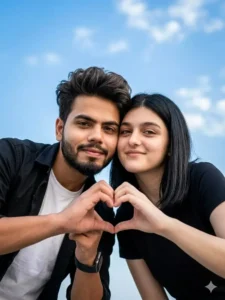
Upload 2 person image
(Keep my face 100% same as in the reference image)

Ultra-realistic cinematic low-angle couple portrait, 8K DSLR quality, extremely sharp focus, zero blur, no artificial smoothing, no CGI look, no cartoon effect, hyper-realistic skin texture, hair detail, and fabric texture.

ASPECT RATIO
3:4 vertical

SCENE
Open outdoor environment with a bright blue sky and soft scattered white clouds filling the entire background. Clean minimal sky backdrop with no distractions.

SUBJECT
A young couple leaning forward toward the camera, captured from a low-angle perspective (camera placed below them).

FACE & LOOK DETAILS
Male: Wheatish skin tone, short styled hair, trimmed beard, sharp jawline, natural skin texture with visible pores.
Female: Fair to wheatish skin tone, smooth natural skin, straight shoulder-length hair, soft facial features.
Both faces completely natural, no smoothing, no beautification.

POSE DETAILS
Cheek to Cheek Pose
Dono ka chehra ek dusre se bilkul chipka hua (cheek to cheek), dono smile kar rahe hain aur camera mein dekhte hain.
Vibe: Playful, happy aur close couple energy.

OUTFIT DETAILS
Male: White inner t-shirt with black open shirt (casual style, natural folds), smartwatch on wrist.
Female: Black t-shirt (simple minimal style, soft fabric).

BACKGROUND DETAILS
Full sky background with soft clouds.
No buildings or objects visible.
Clean and airy composition.

LIGHTING DETAILS
Natural daylight from above.
Soft even light on faces.
Subtle highlights on cheeks and forehead.
No harsh shadows.
Balanced exposure with natural skin tones.
Everything extremely sharp (NO blur).

CAMERA & COMPOSITION
Low-angle shot (camera below subjects facing upward).
Close-up framing (faces + hands).
50mm realistic lens perspective.
Hands forming shape centered in frame.
Ultra sharp focus on faces, hands, and sky.

STYLE
Hyper-realistic outdoor couple photography.
Clean, minimal, aesthetic social media style.
Natural vibrant tones.

EXPRESSION DETAILS
Soft smile, calm and romantic vibe.
Relaxed facial expressions.

FACE RULES
Face must remain 100% natural.
No beautification, no reshaping, no AI artifacts.

NEGATIVE PROMPT
blur, motion blur, soft focus, background blur, CGI look, cartoon style, over-smooth skin, distorted fingers, extra fingers, watermark, low resolution
Note –
One thing you must always keep in mind is never to copy a prompt blindly—such as the editing techniques I’ve demonstrated here. It is perfectly fine—and indeed, a good idea—for you to observe and utilize what you see here. However, you should also closely examine the contents of the prompt itself. Pay attention to the specific details outlined within it—such as the UI elements mentioned, the intended style of the final image (e.g., whether it should be realistic or something else), and all other relevant specifications. In essence, you need to analyze the prompt thoroughly; only then can you proceed to customize its elements to suit your own preferences. If, however, you currently find yourself unable to grasp these nuances—perhaps because you are a complete beginner—then feel free to simply copy the prompt and use it as is.
HOW GEMINI CAN BE A GAME-CHANGER FOR YOU
Here is how Gemini can be a game-changer for you. Let me explain: it generates UI designs that look so realistic, they give you the distinct impression that you’ve simply taken a screenshot from a mobile device. It adds such depth to the image that the elements you’ve incorporated appear completely natural. In other words, you no longer need Photoshop skills; simply hone your skills in prompt engineering, and watch as you generate truly impressive results.
How To Create Image Using Google Gemini
To create a photo, the first step is to carefully select a suitable image to serve as your reference—ensuring that the chosen photo is appropriate for the task. Next, open Google Gemini and paste your prompt into the designated field. I have already provided the necessary prompt; simply copy it and paste it there. Then, click on the ‘+’ icon to upload your reference photo, hit ‘Generate,’ and your processed image will be ready for you to view and save. Note that if you feel the initial attempt does not yield a satisfactory result, you can try generating it two or three times; this will help you achieve an even better outcome.