Lookbook Ai Photo Prompts – Nowadays, images that depict individuals in various outfits—set against different backgrounds and styled like professional fashion models—are gaining immense popularity on social media. You no longer need expensive cameras or a professional studio to create such striking images; you can easily achieve this using nothing more than your smartphone. If you are interested in creating content like this, you have come to the right place. In this article, I will explain how you can easily replicate these viral social media-style edits. We will walk through the entire process with a comprehensive, step-by-step guide.
Details Of Lookbook Ai Photo Prompts
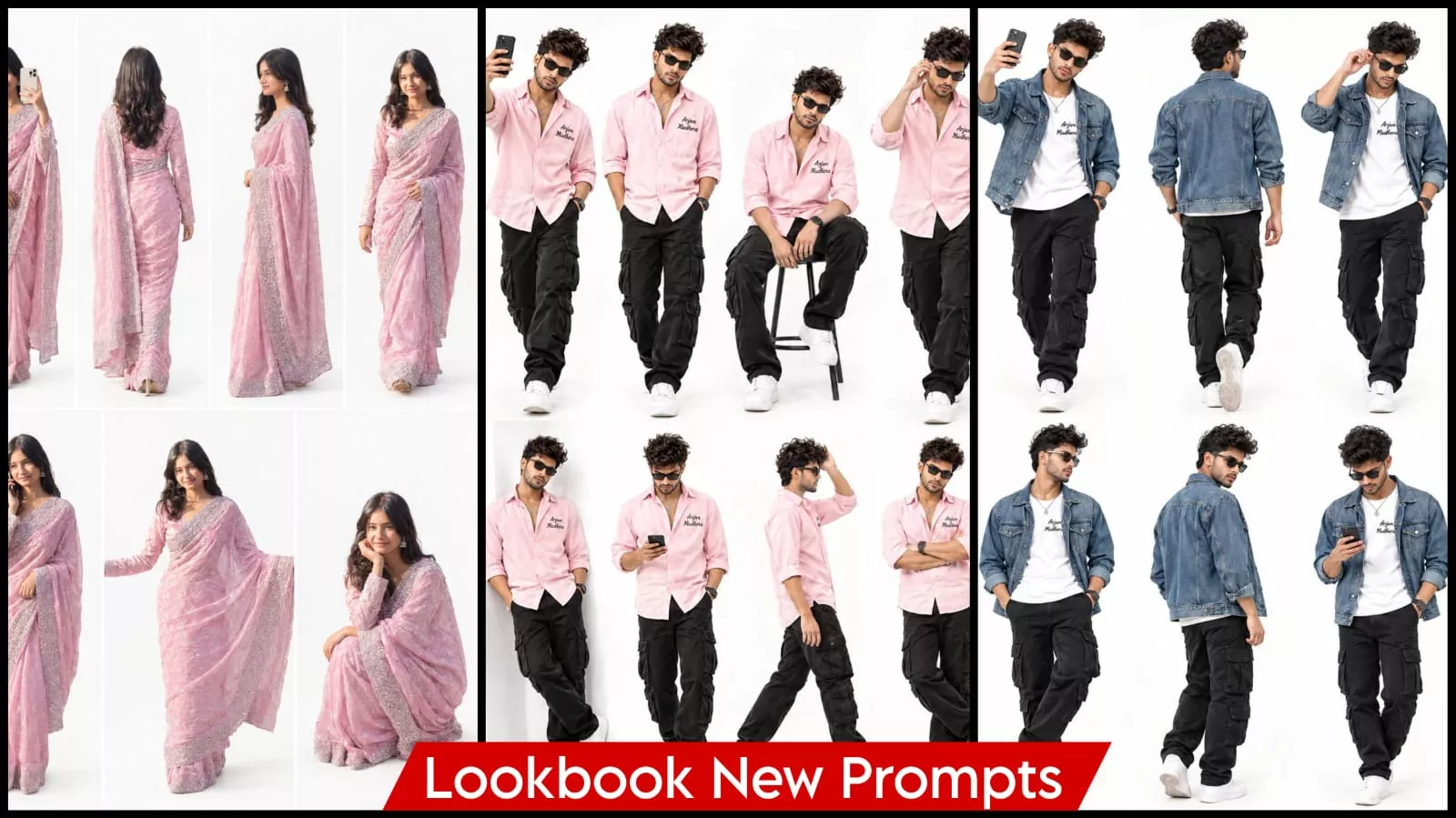
Let me explain how this type of photo editing is done. It is important to understand what you are looking at. If you want to create high-quality videos with great results, you need to understand the nature of these images. In this style, you will see various characters presented against a white background—some shown in motion from different angles, while others are depicted standing still. Everything is presented in this specific manner, and you can easily replicate this yourself by following the right approach.
Why should you use ChatGPT for this kind of photo editing?
Well, while there are various other tools available for editing, if you want high-quality results that truly enhance your photos, this is the best approach. It allows you to edit your photos easily and completely free of charge—no extra effort required. If you are a beginner looking to get started with photo editing, this tool will transform your images and present them in an entirely new way. The key is simply to provide the right instructions—or “prompts”—and I have already provided those for you. I will explain exactly how to use them in the next part.
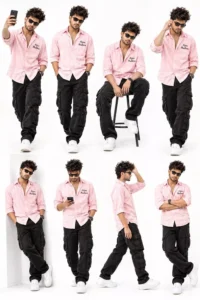
Create an ultra-realistic 8K fashion collage using my uploaded photo as the exact face identity reference. Preserve my original face hairstyle, and skin tone. Show 8 separate full-body
poses on a pure-white studio background: (1) walking while taking a selfie, (2) standing with both hands in pockets, (3) sitting on a modern stool, (4) adjusting sunglasses with one hand, (5) leaning casually against a white wall, (6) looking at a smartphone, 7) walking sideways with one hand fixing hair, (8)standing with arms crossed and one leg forward.Stylish pink shirt right name 'Arjun Mudhera, black cargo pants, white sneakers, black sunglasses. All poses must be different, realistic shadows,
professional fashion photography.
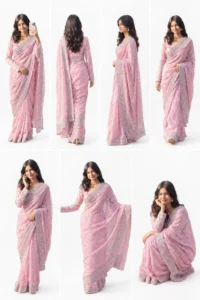
Create an ultra-realistic AI fashion lookbook using the uploaded reference photo. Preserve the exact same face, hairstyle, beard, skin tone, body proportions, and identity. Strictly maintain the exact clothing worn in the reference photo. Do not change, replace, recolor, redesign, or add any clothing or accessories. Keep every garment identical in color, pattern, style, and fit across all seven poses: taking a selfie, back-view walking, side profile, casual walking, talking on the phone, arms spread confidently, and stylish squatting. Pure white background, generous spacing, professional DSLR photography, soft lighting, realistic shadows, sharp details, accurate anatomy, full-body visibility, vertical 2:3 ratio.
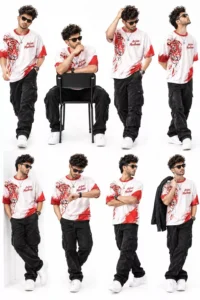
Generate a photorealistic 8K fashion collage of the exact same person from my uploaded reference photo. Do not change my face or hairstyle. Display 8 different full-body poses: (1) walking confidently toward the camera, (2) sitting backward on a chair, (3) one hand in pocket and the other adjusting hair, (4) looking at the sky with hands behind the back, (5) leaning against a wall with crossed ankles, (6) checking a wristwatch, (7) standing in a three-quarter turn with arms crossed, (8) holding a jacket over one shoulder. Wear a white and red tige oversized T-shirt right name 'Arjun Mudhera', black cargo pants, white sneakers, and black sunglasses. Pure-white studio background, sharp details, realistic lighting.
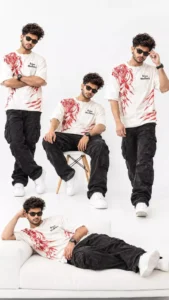
create an ultra-realistic 8k seamless fashion collage featuring the exact same young indian man from my uploaded reference photo. preserve his original facial identity, hairstyle, beard, skin tone, and natural skin texture. show exactly 4 full-body versions of the same person together in one continuous pure-white studio photograph: 1. standing with arms crossed and a confident attitude. 2. sitting casually on a designer chair with one leg forward. 3. walking toward the camera while adjusting his sunglasses. 4. lying comfortably on a modern white daybed in a relaxed fashion pose. outfit: oversized white and red tiger-print t-shirt with the exact text "Arjun Mudhera" on the right chest, black cargo pants, white sneakers, black sunglasses, and a black wristwatch.exactly 4 poses, all visible in the same photograph. no frames, no borders, no boxes, no grid, no separate photos. identical face and outfit, natural anatomy, realistic fabric texture, premium fashion photography, clean white studio, ultra-realistic 8k, vertical 9:16.
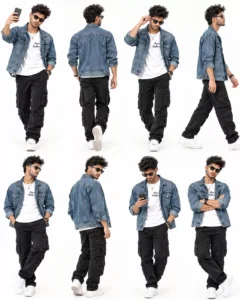
Create an ultra-realistic 8K fashion collage using my reference photo as the exact face identity. Keep my facial features, hairstyle, and skin tone unchanged.Show 8 separate full-body poses against a pure-white studio background: walking with a selfie, walking away,adjusting sunglasses, side-profile walking, hands in
pockets, looking over shoulder, using a smartphone, and
standing confidently with crossed arms.Outfit: blue denim jacket over a white T-shirt right name 'Arjun Mudhera, black cargo pants, white sneakers, black sunglasses, and smartwatch.
Premium urban fashion photography, realistic denim
texture, crisp focus, professional studio lighting,
vertical 4:5.
How To Create This Lookbook Ai Image?
To create this image, you will first need a prompt—we have provided several options in this article. Choose the one that works best for you and copy it. Next, open ChatGPT, click the plus (+) icon, and upload your reference image. Once the image is uploaded, paste the prompt you copied and hit generate. Your image will then be created in the style specified by the prompt. I have explained everything in detail; just make sure to follow the steps correctly.
Conclusion
The editing process I have described is accurate and precise, making it easy for you to follow. You won’t need to do anything else; if you create your content in the right way, you will achieve better results. Furthermore, there is no need for any additional editing steps. However, please keep one thing in mind: whenever you use AI, ensure that you never use someone else’s photo without their permission. Also, when generating your own photos, there may be instances where the face doesn’t look quite right—simply regenerating the image once or twice should result in a high-quality outcome.