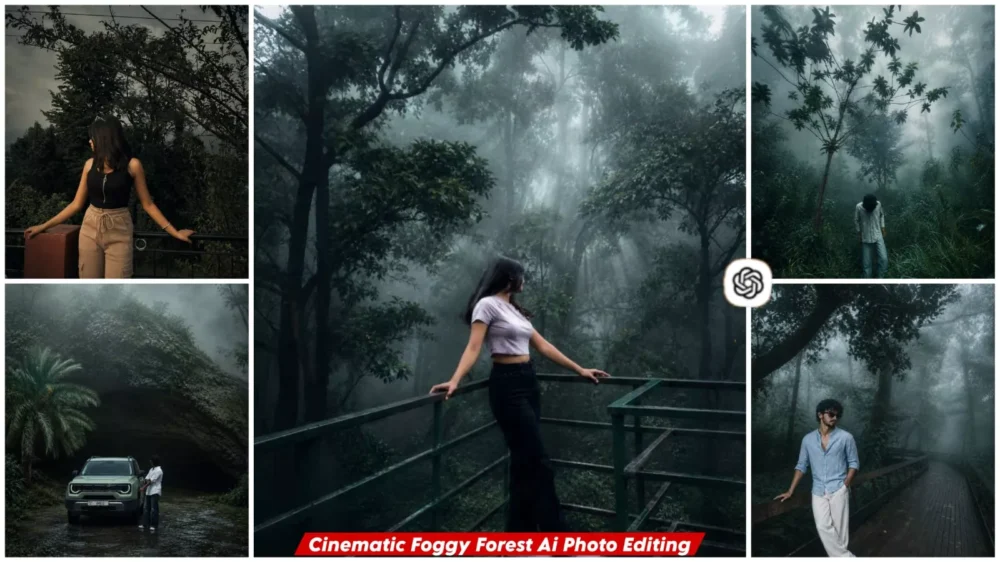
Cinematic Foggy Forest Ai Photo Editing Prompt – You might have noticed the trend of “cinematic fog” editing taking over Instagram and other social media platforms. When I saw it, I wondered how such an effect is created. Realizing how easily this look can be achieved, I decided it was worth sharing with my audience so you could create it too. If you want to create this viral “cinematic forest fog” edit, this article will teach you exactly how to transform any ordinary photo into a cinematic, fog-filled image. If you’re even slightly interested in trying this out, follow along with this article, and I’ll show you how it’s done.
Details Of Cinematic Foggy Forest Ai Photo Editing Prompt
What exactly is this “forest cinematic fog” AI photo editing? Let me explain. It is a style of editing that transforms your ordinary photo into a scene set in a dense forest; however, the background isn’t just a standard forest backdrop. Instead, you get a truly cinematic atmosphere—complete with white fog swirling through the trees. This creates a captivating, mysterious vibe that makes the image look like a unique movie poster. You should definitely try this editing style, as the results look incredibly cool.
Why Is This AI Editing Trending So Much?
People on social media love photos that make an instant impression, and this editing style is a guaranteed hit because of its “fog effect,” which gives your images a cinematic feel. It transforms ordinary snapshots into mysterious, premium-looking photos reminiscent of Hollywood cinema, offering an aesthetic of dense forests and natural mist. It creates visually captivating content perfect for Instagram Reels—delivering AI-generated results that still look completely natural. Best of all, anyone can easily create this viral edit without needing to use Photoshop.
What Makes This Prompt Special?
It is unique because the instructions ensure your face remains 100% authentic. The forest setting will look completely natural, and the fog will appear entirely realistic. Sunlight streaming through creates a cinematic feel, resulting in an overall image that looks like a genuine, natural photograph—all generated by AI.
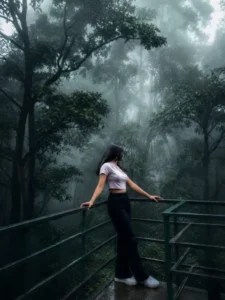
Transform this image into a breathtaking ultra-realistic foggy forest masterpiece. Add dense natural white fog covering the entire environment, creating a mysterious and cinematic atmosphere. Apply rich forest-inspired color grading with deep emerald green, dark teal, moss green, and earthy brown tones. Enhance the trees, foliage, and background elements to resemble a lush enchanted forest hidden in the mist. Introduce soft volumetric light rays subtly penetrating through the fog, creating depth and realism.Increase overall image quality to ultra-high-definition 4K resolution with razor-sharp details, HDR enhancement, realistic textures, balanced contrast, and natural color harmony. Improve shadows, highlights, and dynamic range while maintaining a realistic appearance. Add a moody woodland aesthetic, dreamy fog layers, atmospheric perspective, and professional cinematic photography grading. The final result should look like a premium DSLR forest photograph captured during a cold misty morning, with ultra-realistic details, immersive depth, soft natural lighting, and stunning visual quality.Style: Cinematic Forest Photography, Moody Nature, Dense Fog Weather, Volumetric Lighting, HDR, Ultra Realistic, Professional Color Grading, 4K Quality, DSLR Shot, Atmospheric Depth, Photorealistic.
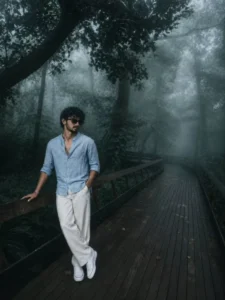
A young man with same hair and , wearing a light blue linen shirt and white wide-leg pants, leaning casually on a wooden bridge in a dense forest. The scene is enveloped in soft fog, creating a moody, cinematic atmosphere. The wooden pathway curves into the mist, adding depth and leading lines. The color grading is cool and desaturated with gren-tela tones, enhancing the misty forest vibe. Natural diffused lighting, ultra-realistic, high detail, shallow haze, cinematic composition, 4K, DSLR quality.
Camera & Composition: full-body shot, subject positioned on the
left third, leading lines from the wooden pathway, eye-level angle, rule of thirds, deep depth with fog layers.
Lighting & Atmosphere: soft diffused light, overcast/misty mood, low contrast shadows, volumetric fog, cool color temperature.
Color Grading: muted greens, deep shadows, cool teal tones, desaturated cinematic grade.
Details: crisp textures on wood and leaves, realistic fog depth, subtle highlights, natural skin tones, ultra-detailed environment.
Style: cinematic, moody, editorial, natural, realistic.
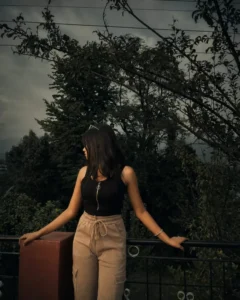
ROLEYou are a senior film colorist and cinematic still-image retoucher. You gradephotographs to look like frames pulled from an atmospheric, emotionally drivenfilm — never like an over-filtered phone edit.TASKApply a dark, moody, cinematic color grade to the photo I provide. TransformONLY color, light, and tone. Do not alter, regenerate, reframe, or reinterpretthe subject in any way.NON-NEGOTIABLE PRESERVATION RULES (highest priority)Keep the subject's face, facial features, identity, expression, and pose exactly as in the original.Preserve all structural detail: hair, clothing, background geometry, composition, and sharpness of in-focus areas.This is a GRADE, not a generation. Do not add, remove, or move objects. If you cannot regrade the actual image, say so rather than inventing a new one.THE GRADE — apply these as a layered, balanced look1. SHADOWS: Crush toward deep, rich black with a subtle green-teal tint. Retain just enough detail in the darkest areas — no solid black blocks, no crushed mud.2. MIDTONES: Lower contrast for a soft, atmospheric falloff. Avoid flatness; keep gentle dimensionality.3. HIGHLIGHTS: Soft and muted, slightly rolled off. No harsh blown-out whites.4. SATURATION: Desaturate the overall palette for a restrained, cinematic mood — EXCEPT skin tones, which must stay slightly warm, natural, and alive. Never let skin go gray, green, or sickly.5. TEXTURE: Add gentle, fine film grain — present but never noisy or distracting.6. ATMOSPHERE: Build a heavy, emotional, contemplative mood reminiscent of moody dramatic cinema (low-key lighting, teal-shadow / warm-skin separation).INTENSITYAim for a refined, professional grade at roughly 70–80% strength — dramaticand emotional, but believable. Restraint beats overprocessing.SELF-CHECK BEFORE DELIVERING (run silently)Is the face identical to the original? ✔️Are skin tones warm and natural, not desaturated? ✔️Do shadows retain detail (no pure-black clipping)? ✔️Are highlights soft, not blown out? ✔️Does it read as a cinematic film still, not a heavy Instagram filter? ✔️Only output the result once all checks pass.OUTPUTReturn the regraded image.
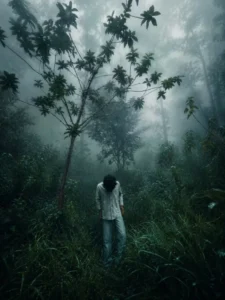
Dark teal green tones, desaturated colors, misty atmosphere, moody forest aesthetic, cold cinematic look, rainy season vibe, soft contrast, deep shadows, realistic fog diffusion, dark emerald green background.
What Do You Need To Do To Achieve Excellent Results?
If you want good results, you must keep a few things in mind. Always use high-resolution photos where your face is clearly visible. Use a half-body portrait—one that shows your face and the upper half of your body. Avoid using heavily blurred photos, as they will not yield good results.
How To Create Image Using Chatgpt?
We have already shared the prompt for creating these photos, and you are going to love it because it allows you to generate the images easily—all you have to do is copy the prompt. Open ChatGPT (I have provided the direct link here for you to access it), paste the prompt, and hit generate; it will create a professional-quality photo that you will absolutely love.