Instagram Profile Ai Photo Editing Prompts – In today’s digital age, standing out on social media has become a necessity for everyone. This is especially true on platforms like Instagram, where people upload photos daily; to make an impact, you must consistently post images with a unique style. After all, unless your content is distinctive, it won’t go viral or reach a wider audience. Using AI, we are going to create a special kind of image—one capable of transforming even an ordinary snapshot into something truly spectacular. The concept involves an Instagram profile serving as the background, with you positioned in the foreground—either standing or sitting. It promises to be a truly stylish photo! So, let’s learn exactly how to create such an image.
What Exactly Is This “Instagram Profile Trend”?
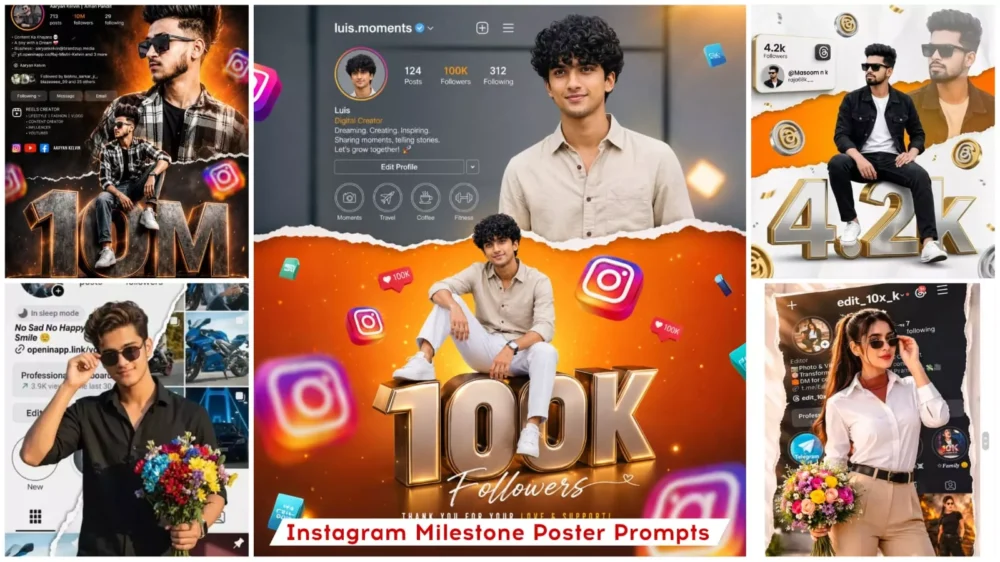
In this style, your photograph remains positioned right in the foreground, while your actual Instagram profile serves as the background. Now, we are going to recreate this very concept here, but in a completely unique manner. I previously shared a concept outlining how this idea would take shape. In this version, a model—representing you—will be featured within the frame. You could be standing, seated, or even leaning against a wall; various poses are possible. We have crafted this entire concept in a variety of styles to achieve a fully cinematic and professional aesthetic. The visual effect is such that it appears as though you are standing—in a completely realistic manner—directly in front of your own Instagram profile. If you have had a photograph taken in this style, we will now proceed to recreate that exact look, utilizing the assistance of Midjourney.
What You Need To Do This Editing
Regarding the requirements for editing—specifically concerning your photo—the first step is to capture a clear image of your face. You must ensure that your face is positioned centrally within the frame, and the image itself should be of high quality. Both the overall quality of the photograph and its lighting must be optimal. Next, you will need to take a screenshot of your Instagram profile; this screenshot should clearly display your follower count, your posts, and all other relevant profile details. Finally, you will utilize Google Gemini for this task. I will explain exactly how to use it in the following paragraph.
How To Create Image Using prompt?
To create this image, the first step is to copy a prompt for a specific style from here. There are various styles available—for instance, the subject could be standing or sitting—but the common theme is that the image features a person with an Instagram profile displayed in the background. So, simply copy any one of these prompts from here. Next, click on “Create Image.” You will then be redirected to a Google webpage where you need to paste the copied prompt. After that, look for the “+” option and upload your photo there. As I mentioned earlier, ensure you upload the appropriate type of photo, along with a screenshot. Once done, click “Generate,” and within a few seconds, you will see that your image—featuring the Instagram profile background—is ready. You can now easily save it and post it wherever you like.
Update :- Instagram profile editing is trending right now, so I thought why not share the settings with you, and I’ve shared them in this article. You can use it to create your own amazing photos, and I’ve explained the simplest way to create it. I’ve covered this editing before, but I’m updating it now because some new editing techniques have become popular, so I thought why not share them with you as well.
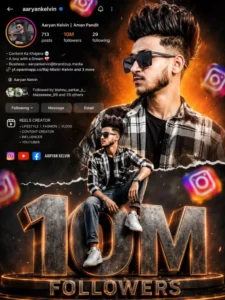
Ultra realistic Instagram design. A stylish Indian teenage boy wearing black sunglasses, black-white check shirt, blue jeans and white sneakers. Two different poses of the same person - one upper-body stylish portrait looking sideways at the top right, and one full-body sitting pose on giant metallic 3D "1.5M" text at the bottom center. Bright orange cinematic gradient background on top background at bottom Content Ke KhajareA boy with a Aaryan Kelvin Followed by bishnu sarka with smoky dark greyand Mes separated by torn paper effect. Include realistic Instagram profile Ul on left side with username, followers count, Following reels creator details, bio text and social icons. Add floating 3D Instagram logos around the scene with depth blur. Add glowing orange sparks, cinematic lighting, dramatic shadows, high contrast, ultra HD 8K quality, realistic skin texture, DSLR depth of field, stylish influencer vibe.The giant "1.5M" text should look metallic steel with orange glowing edges and circular platform below it. Add "FOLLOWERS" text below. Add handwritten signature style FOLLOWERS
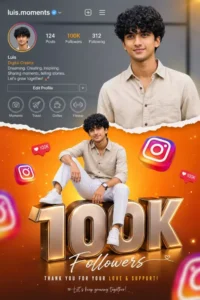
Vibrant Instagram milestone poster celebrating 100k followers. The main subject (Luis) is stylishly posing in two different positions - one full-body sitting pose on top of a big 3D metallic "100K" text with floating Instagram icons, and another half-body stylish photo above with torn paper effect transition between orange gradient and grey background. The top section shows an Instagram profile interface with username , Editing Prompt follower 100k count, bio, and icons.
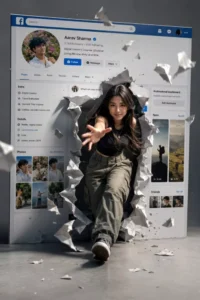
"CREATE A SURREAL, CINEMATIC IMAGE IN HIGH 4K RESOLUTION." KEEP THE PERSON'S FACE IN THE ORIGINAL PHOTO UNCHANGED. WITHOUT ALTERING ANY FACIAL FEATURES OR STRUCTURE AN ASIAN WOMAN, AS PICTURED, IS STRIDING CONFIDENTLY OUT OF A GIANT SOCIAL MEDIA SCREEN (A FACEBOOK-STYLE PROFILE INTERFACE)THE 3D PAPER-TEARING EFFECT IS INCREDIBLY REALISTIC: THE SCREEN IS RIPPED OPEN. AND PIECES OF TORN PAPER FLY AROUND, CREATING A SENSE OF SPATIAL DEPTH. THE WOMAN SEEMS TO BREAK FREE FROM THE DIGITAL WORLD AND STEP INTO REAL LIFE DYNAMIC POSE: ONE FOOT STEPS FORWARD. ONE ARM REACH ES TOWARDS THE CAMERA, CREATING A SENSE OF MOVEMENT AND STRONG DEPTH. BEHIND IT IS THE PERSONAL PROFILE INTERFACE WITH DETAILS AS SHOWN IN THE IMAGEAVATARUSER NAMENUMBER OF FOLLOWERSCONTROL BUTTONS (DASHBOARD. REELS. IMAGES... MINIMALIST GRAY STUDIO BACKGROUND, CINEMATIC LIGHTING.STRONG. HIGH CONTRAST. SHARP SHADOWS HIGHLIGHTING THE CHARACTER. STYLE PHOTOREALISTIC. CINEMATIC. SURREAL. HIGH-END ADVERTISING. ULTRA-DETAILE
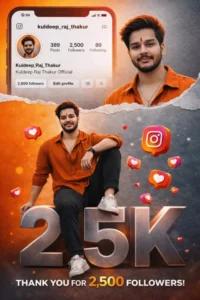
Vibrant Instagram milestone poster celebrating 500 followers. The main subject (Luis) is stylishly posing in two different positions - one full-body sitting pose on top of a big 3D metallic "10K" text with floating Instagram icons, and another half-body stylish photo above with torn paper effect transition between orange gradient and grey background. The top section shows an Instagram profile interface with username , Rathva ravi follower 10k count, bio, and icons.
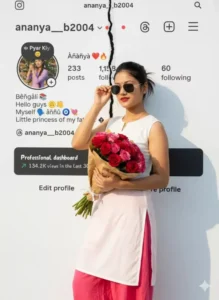
Women standing confidently in front of a white Instagram-themed background, The Instagram page is presented in a torn-in-half effect. holding a bouquet of colorful flowers in one hand and adjusting his sunglasses with the other. He's wearing a crisp white kurti and black trouser, illuminated by warm natural sunlight. Replace the woman's face with the uploaded face, matching lighting, shadows, and skin tone perfectly for a natural, seamless portrait...
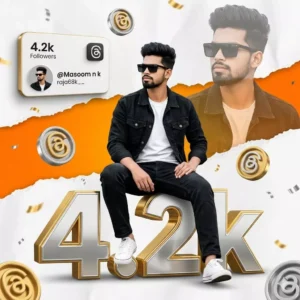
A hyper-realistic, highly detailed celebratory composite portrait of a stylish 18-year-old slim-fit boy[keep the face 100% same as saved in the reference image] with thick, dark styled upward well settled short voluminous hair with faded sides. Main Subject & Pose: In the foreground, the boy is sitting casually on top of massive, hyper-realistic 3D typography that reads "4.2k". He is sitting with his legs slightly apart, one foot resting lower than the other, hands relaxed on his la
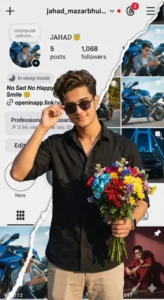
man standing confidently in front of a white Instagram-themed background, The Instagram page is presented in a torn-in-half effect. holding a bouquet of colorful flowers in one hand and adjusting his sunglasses with the other. He's wearing a crisp white Black shirt and beige pants, illuminated by warm natural sunlight. Replace the man's face with the uploaded face, matching lighting, shadows, and skin tone perfectly for a natural, seamless portrait.
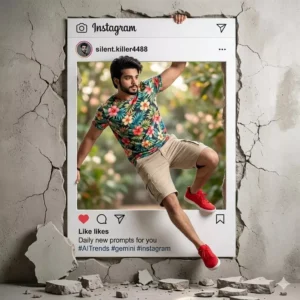
Create a high-resolution creative, hyper-realistic scene of a handsome man ( as attached image ) dramatically emerging from a giant Instagram post frame embedded in a cracked wall, as if breaking out of social media into the real world. The man has styled dark hair, a trimmed beard, and a confident expression. He is wearing a vibrant tropical floral t-shirt, beige cargo shorts, and bright red sneakers. One handgrips the top edge of the Instagram frame while his body swings outward in a dynamic pose, with one leg extended and the other bent as if mid-jumpThe Instagram interface frame shows a profile named “silent.killer4488” with the caption “Daily new prompts for you #AITrends #gemini #instagram,”including visible like, comment, and share icons. Pieces of broken wall and debris scatter on the floor beneath him, emphasizing the illusion of him bursting through the wall. The background is a soft
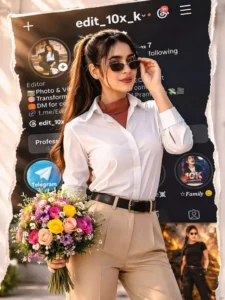
Woman standing confidently in front of a Transtorm white Instagram-themed background, The Instagram page is presented in a torn-in-half effect. holding a bouquet of colorful flowers in one hand and adjusting his sunglasses with the other. He's wearing a crisp white Black shirt and beige pants, illuminated by warm natural sunlight. Replace the man's face with the uploaded face, matching lighting, tad shadows, and skin tone perfectly for a ___natural, seamless portrait. Please the background image of the Insta profile should be clearly visible so that the followers can be seen well. No crop full image keep my face same 100% as in the reference image
How To Create With Chatgpt ?
Our previous editing tutorial was powered by Google Gemini; however, this time we are going to switch things up completely. We will be demonstrating an entirely different approach to editing this time around. We will also learn how to create content using ChatGPT. You will have the opportunity to observe both processes. All you need to do is simply select whichever method appeals to you the most. Here is what you need to do: first, open ChatGPT and paste the required prompt into the interface. To paste the prompt into ChatGPT, begin by copying it from our website. Next, click on the “plus” icon to upload a reference photo, and then hit “Generate.” Your photo will be ready in no time. This process will feel quite familiar to you, as it is very similar to the workflow used with Google Gemini.
How Can You Enhance Your Editing Skills?
Look, if you want to improve your editing—specifically, if you want to make it look absolutely polished and professional—and if your current editing feels somewhat amateurish, you must incorporate the following elements. First and foremost, add “depth.” What does this entail? It involves keeping the background blurred while ensuring the subject remains perfectly sharp and clear. This highlights the subject—which is the focal point of the image—and makes it stand out prominently. Next, you need to incorporate specific lighting techniques; specifically, utilize “soft lighting.” Ensure that highlights are focused on the subject’s face. Regarding color grading, apply a consistent color tone—such as a cool or warm palette—throughout the image. Since a white background is being used here, you must pay close attention to this detail and apply a “glow effect.” Add a subtle blue-tinted glow around the perimeter of the Instagram profile image to make the final result look even more impressive.
Conclusion
There are certain mistakes you should strictly avoid. If you are performing any kind of editing, never use low-quality photos. You must not misuse prompts, and you should strictly refrain from over-editing. Furthermore, do not always keep the background excessively sharp; instead, maintain a natural look—as I have already explained in the preceding paragraphs. If you are simply generating content via prompts, you do not need to focus on these specific editing aspects.
![Kedarnath Ai Photo Generator [2024]](https://editingprompt.com/wp-content/uploads/2024/05/Kedarnath-Ai-Photo-Generator-2024.jpg.webp)