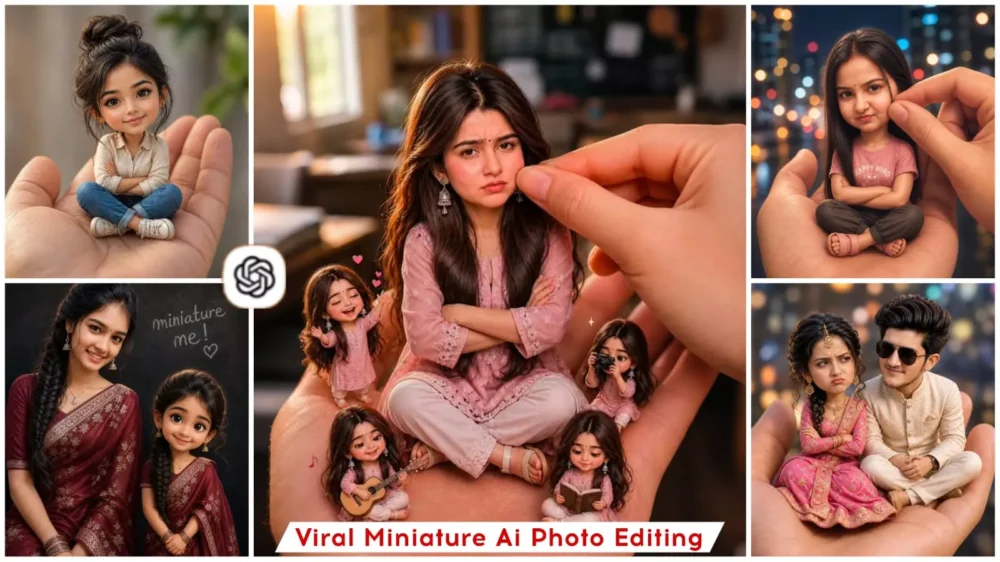
Miniature Ai Photo Editing Prompts – The “miniature” style of photo editing is currently going viral on social media at a rapid pace. People are using AI to generate these types of images, easily transforming any standard photograph into a 3D-cut miniature style—resembling a doll or a cartoon figure. While the facial features remain exactly the same, the overall image is rendered as a miniature version.
This process transforms your photo into a highly captivating image—essentially creating a “mini-me” avatar of yourself—which you can generate using ChatGPT. To do so, you will need to utilize specific prompts. I will walk you through the exact process of how to create these images, and explain why this particular editing trend is going viral and why people are finding it so appealing.
Details Of Miniature Ai Photo Editing Prompts
You might be wondering why this particular editing style is currently going viral. I am going to explain the reasons right here, which will help you understand exactly why. First and foremost, it offers a cute and aesthetic look. It gives your photos a distinct “3D toy” vibe; your standard images are transformed into 3D-style visuals, making them absolutely perfect for your Instagram profile. If you are looking to post a cute photo, this style is ideal, and it is also bound to boost engagement on your Reels and Shorts. By utilizing this technique, you can generate these unique images featuring your own realistic face. These are precisely the reasons why people are loving this trend so much.
What Exactly will You Need To Perform This Editing?
Since this involves a specific editing trend, the very first thing you will require is a clear photograph. In this photo, your face must be clearly and distinctly visible. A full-body shot would not be ideal; instead, you should use a half-body photograph. This ensures that your face is clearly displayed, thereby increasing the likelihood of achieving superior results. Furthermore, your face will match the output with 100% accuracy. Next, you will need to utilize the ChatGPT tool, which is currently delivering truly excellent results. Alternatively—or in addition to this—you can use Google Gemini; you will find that it, too, yields impressive results.
How Do You Perform This Miniature Photo Editing?
First, you need to upload your photo to the ChatGPT tool. Now, how exactly do you do that? Let me explain the process. You need to open either the ChatGPT application or its browser version; there, you will find a “plus” icon. By clicking on it, you can upload your photos. Next, you need to paste a prompt into the interface. You will find a wide variety of prompts available—specifically, those provided within this article—and you are free to use any one of them. Once you generate the result, you will receive a version of your photo featuring an outstanding outcome—one that is sure to leave you absolutely delighted.
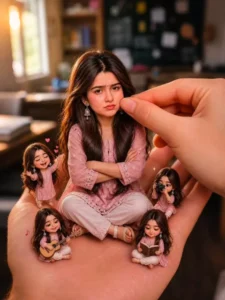
Create a stylized big-head miniature portrait of her. She appears as a tiny character with a slightly enlarged head and small body, sitting inside a large women hand. Pose: seated cross-legged, hands crossed,slightly pouty, angry but very cute expression. looking at the camera. Environment:blurred school classroom background with bokeh. Add a second hand gently pinching/ adjusting the person's cheek for a playful effect. Also add some 3d mini chibi characters of her around, doing funny stuffs. Outfit: same as herreference image. Lighting: softcinematic light, shallow depth of fieldr high detail, ultra-realistic, clean focus
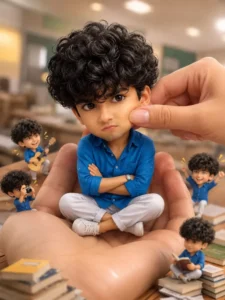
Create a stylized big-head miniatureportrait of her. She appears as a tiny character with a slightly enlarged head and small body, sitting inside a large women hand. Pose: seated cross-legged, hands crossed, slightly pouty, angry but very cute expression. looking at the camera.Environment:blurred school classroom background with bokeh. Add a second hand gently pinching/adjusting the person's cheek for a playful effect. Also add some 3d mini chibi characters of her around, doing funnystuffs. Outfit: same as her 32reference image. Lighting: soft cinematic light, shallow depth of fieldr high detail, ultra-realistic, clean focus
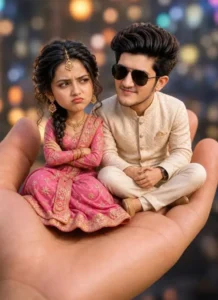
Create a stylized big-head miniature portrait in a 9:16 aspect ratio. Two persons appear as tiny characters with slightly enlarged heads and small bodies, sitting together inside a single large human hand. Pose: Both are seated close together, cross-legged on the palm. The girl has a pouty, angry expression (muh fula hua), looking slightly away from the boy.
The boy has a soft, gentle smile and is leaning slightly toward her, trying to calm her (mana raha ho),looking at her with a caring expression. Interaction: The boy’s body language should feel soft and apologetic. The girl looks cute but clearly upset. Environment: Blurred city night background with colorful bokeh lights.
Outfit:  woman is wearing a vibrant pink traditional outfit (lehenga or saree), adorned with elegant gold jewelry ,mang teeka, soft glam makeup, expressive eyes, and a calm, slightly serious expression.
Her hair is styled in a loose braided updo with soft curls framing her face.Beside her stands a handsome young Indian man wearing a stylish traditional outfit (cream or black sherwani). well-groomed hair, light beard Lighting: Soft cinematic lighting, shallow depth of field, ultra-realistic, high detail, clean focus. Face not change 100% face lock.@niwas.panwar
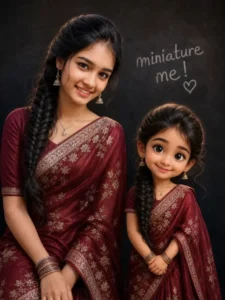
cinematic portrait above girl as her miniature version. Side by side against textured dark wall, handwritten "miniature me!" text. Both in matching dresses hands are folding. Women leans with soft smile; child has cartoon-style face, large expressive eyes. Ultra-realistic skin texture, warm soft lighting, shallow depth of field, sharp focus, studio quality.
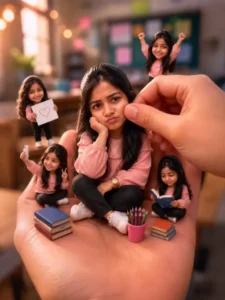
Create a stylized big-head miniature portrait of her. She appears as a tiny character with a slightly enlarged head and small body, sitting inside a large women hand. Pose: seated cross-legged, hands crossed,slightly pouty, angry but very cute expression. looking at the camera. Environment:blurred school classroom background with bokeh. Add a second hand gently pinching/ adjusting the person's cheek for a playful effect. Also add some 3d mini chibi characters of her around, doing funny stuffs. Outfit: same as herreference image. Lighting: softcinematic light, shallow depth of fieldr high detail, ultra-realistic, clean focus
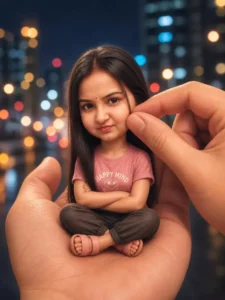
Create a stylized big-head miniature portrait in a 3:4 aspect ratio. Person appears as a tiny character with a slightly enlarged head and small body, sitting inside a large human hand. Pose: seated cross-legged, hands crossed,slightly pouty, angry but very cute expression, looking at the camera. Environment: blurred city night background with bokeh lights. Add a second hand gently pinching/adjusting the person’s cheek for a playful effect. Outfit: casual t-shirt, pants, sandals.
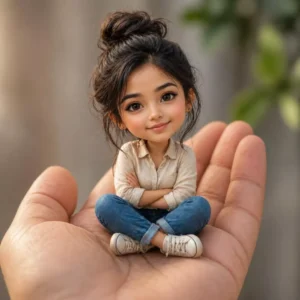
Create a stylized big-head miniature portrait in a 1:1 aspect ratio. Person appears as a tiny character with a slightly enlarged head and small body, sitting inside a large human hand.
Pose: seated cross-legged, hands crossed,
What Do You Need To Do To Achieve High-Quality Results?
f you want your photo to be generated in HD resolution, the first step is to use a high-quality source image. Next, utilize a prompt. (I have already done this myself.) It is crucial to use the right prompt, because if you do not select the appropriate one, you will not obtain good results. For instance, you must include terms like “3D” and “cinematic” in your prompt. Additionally, add the keyword “ultra-realistic”; this ensures that your photo is rendered in a 3D style while appearing completely lifelike. You can also customize other elements within the prompt to suit your specific preferences.
Conclusion
Using this prompt, you can create a great viral photo, the result of which I’ve already shown in this article. Your photos will be ready just like that.