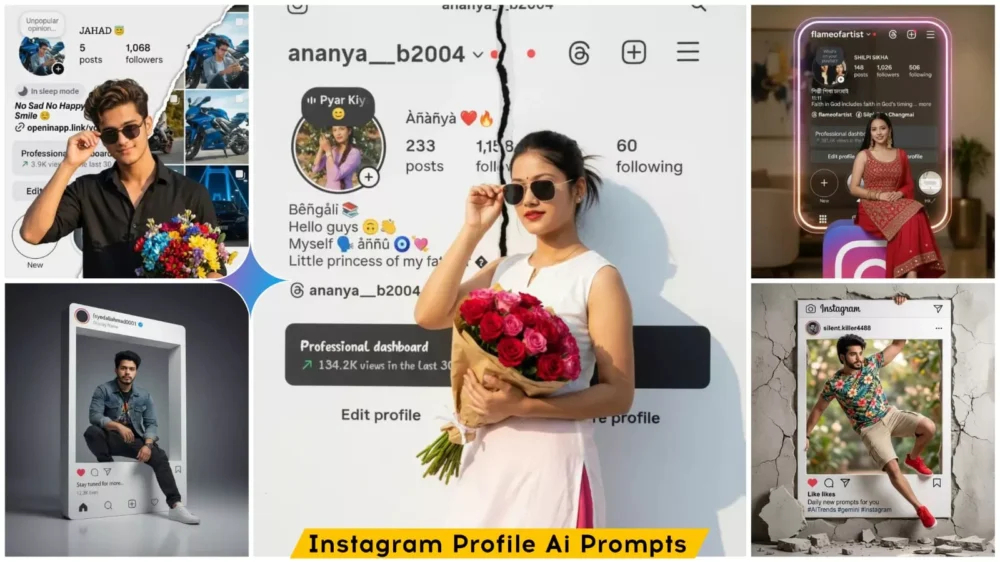
Instagram Profile Ai Photo Editing Prompts – In today’s digital age, standing out on social media has become a necessity for everyone. This is especially true on platforms like Instagram, where people upload photos daily; to make an impact, you must consistently post images with a unique style. After all, unless your content is distinctive, it won’t go viral or reach a wider audience. Using AI, we are going to create a special kind of image—one capable of transforming even an ordinary snapshot into something truly spectacular. The concept involves an Instagram profile serving as the background, with you positioned in the foreground—either standing or sitting. It promises to be a truly stylish photo! So, let’s learn exactly how to create such an image.
What Exactly Is This “Instagram Profile Trend”?
In this style, your photograph remains positioned right in the foreground, while your actual Instagram profile serves as the background. Now, we are going to recreate this very concept here, but in a completely unique manner. I previously shared a concept outlining how this idea would take shape. In this version, a model—representing you—will be featured within the frame. You could be standing, seated, or even leaning against a wall; various poses are possible. We have crafted this entire concept in a variety of styles to achieve a fully cinematic and professional aesthetic. The visual effect is such that it appears as though you are standing—in a completely realistic manner—directly in front of your own Instagram profile. If you have had a photograph taken in this style, we will now proceed to recreate that exact look, utilizing the assistance of Midjourney.
What You Need To Do This Editing
Regarding the requirements for editing—specifically concerning your photo—the first step is to capture a clear image of your face. You must ensure that your face is positioned centrally within the frame, and the image itself should be of high quality. Both the overall quality of the photograph and its lighting must be optimal. Next, you will need to take a screenshot of your Instagram profile; this screenshot should clearly display your follower count, your posts, and all other relevant profile details. Finally, you will utilize Google Gemini for this task. I will explain exactly how to use it in the following paragraph.
How To Create Image Using prompt?
To create this image, the first step is to copy a prompt for a specific style from here. There are various styles available—for instance, the subject could be standing or sitting—but the common theme is that the image features a person with an Instagram profile displayed in the background. So, simply copy any one of these prompts from here. Next, click on “Create Image.” You will then be redirected to a Google webpage where you need to paste the copied prompt. After that, look for the “+” option and upload your photo there. As I mentioned earlier, ensure you upload the appropriate type of photo, along with a screenshot. Once done, click “Generate,” and within a few seconds, you will see that your image—featuring the Instagram profile background—is ready. You can now easily save it and post it wherever you like.
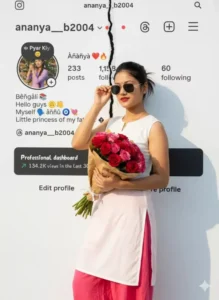
Women standing confidently in front of a white Instagram-themed background, The Instagram page is presented in a torn-in-half effect. holding a bouquet of colorful flowers in one hand and adjusting his sunglasses with the other. He's wearing a crisp white kurti and black trouser, illuminated by warm natural sunlight. Replace the woman's face with the uploaded face, matching lighting, shadows, and skin tone perfectly for a natural, seamless portrait...
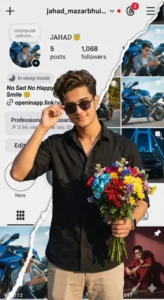
man standing confidently in front of a white Instagram-themed background, The Instagram page is presented in a torn-in-half effect. holding a bouquet of colorful flowers in one hand and adjusting his sunglasses with the other. He's wearing a crisp white Black shirt and beige pants, illuminated by warm natural sunlight. Replace the man's face with the uploaded face, matching lighting, shadows, and skin tone perfectly for a natural, seamless portrait.
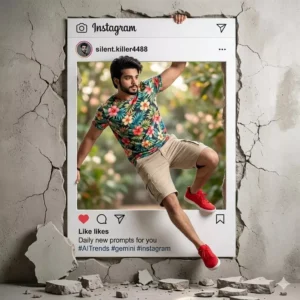
Create a high-resolution creative, hyper-realistic scene of a handsome man ( as attached image ) dramatically emerging from a giant Instagram post frame embedded in a cracked wall, as if breaking out of social media into the real world. The man has styled dark hair, a trimmed beard, and a confident expression. He is wearing a vibrant tropical floral t-shirt, beige cargo shorts, and bright red sneakers. One handgrips the top edge of the Instagram frame while his body swings outward in a dynamic pose, with one leg extended and the other bent as if mid-jumpThe Instagram interface frame shows a profile named “silent.killer4488” with the caption “Daily new prompts for you #AITrends #gemini #instagram,”including visible like, comment, and share icons. Pieces of broken wall and debris scatter on the floor beneath him, emphasizing the illusion of him bursting through the wall. The background is a soft
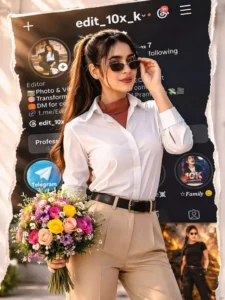
Woman standing confidently in front of a Transtorm white Instagram-themed background, The Instagram page is presented in a torn-in-half effect. holding a bouquet of colorful flowers in one hand and adjusting his sunglasses with the other. He's wearing a crisp white Black shirt and beige pants, illuminated by warm natural sunlight. Replace the man's face with the uploaded face, matching lighting, tad shadows, and skin tone perfectly for a ___natural, seamless portrait. Please the background image of the Insta profile should be clearly visible so that the followers can be seen well. No crop full image keep my face same 100% as in the reference image
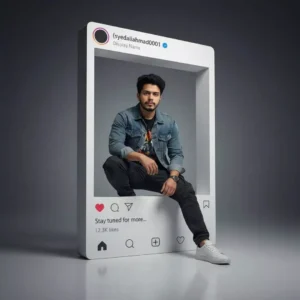
Hyper-realistic 8K portrait of the uploaded photo inside a giant 3D Instagram frame with authentic UI, verified badge, profile pic, and caption “Stay tuned for more..”. Face unchanged, ultra-sharp details, natural skin tone. Stylish streetwear, confident pose, right elbow on knee, one leg breaking the frame. Cinematic lighting, rim light, soft depth blur, HDR, 85mm lens, studio background, realistic shadows.
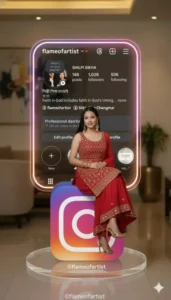
Use my first uploaded image and keep exact face from the reference image. A hyperealistic woman in a realistic sits casually on a large 3D INSTAGRAM logo icon. The she is wearing a red shimmery kurta set with dupatta, with red and golden stilletos. The person real sits on a round, transparent acrylic base with no text. In the background, a large Instagram profile card with the username. Original Creator: © @flameofartist. Mention me, if you want to use my prompt. Do follow. 2/2[your username]is displayed, along with the character's profile photo with red kurta set with dupatta . The card should be rectangular with rounded corner, mode of clear glossy glass or acrylic with glowing neon edges with pink, purple, orange gradient inspired by the instagram palette. Display the following exact profile information on the card from the uploaded second image.
How Can You Enhance Your Editing Skills?
Look, if you want to improve your editing—specifically, if you want to make it look absolutely polished and professional—and if your current editing feels somewhat amateurish, you must incorporate the following elements. First and foremost, add “depth.” What does this entail? It involves keeping the background blurred while ensuring the subject remains perfectly sharp and clear. This highlights the subject—which is the focal point of the image—and makes it stand out prominently. Next, you need to incorporate specific lighting techniques; specifically, utilize “soft lighting.” Ensure that highlights are focused on the subject’s face. Regarding color grading, apply a consistent color tone—such as a cool or warm palette—throughout the image. Since a white background is being used here, you must pay close attention to this detail and apply a “glow effect.” Add a subtle blue-tinted glow around the perimeter of the Instagram profile image to make the final result look even more impressive.
Conclusion
There are certain mistakes you should strictly avoid. If you are performing any kind of editing, never use low-quality photos. You must not misuse prompts, and you should strictly refrain from over-editing. Furthermore, do not always keep the background excessively sharp; instead, maintain a natural look—as I have already explained in the preceding paragraphs. If you are simply generating content via prompts, you do not need to focus on these specific editing aspects.