Google Gemini Dual Exposure Ai Photo Editing Prompts – You know that trending photos on Instagram are going viral. You should know that the photos that are going viral are couple-type photos, because if you’re a boy, the boy’s photo appears in the foreground, and if you’re a girl, the opposite appears. These photos have become quite easy to create, because previously, these dual-exposure photos were quite difficult to create. People used to tell you how to do them using Snapseed or various other applications, but what I’m saying is that the editing we’re showing you is quite simple. You can create a similar photo using just one photo. We’ll explain it to you in this article. You’ll find it easy to understand.
About This Dual Exposure Ai Photo Editing
I’ll share the details of these photos with you. It’s crucial to know about photography, and you can create a good photo. First, you need prompts and good recommendations. Without good suggestions, you can’t create a good photo. In the photo I’m providing here, you’ll see your photo in the front. If you’re a boy, your photo will be in the front. Behind it, there’ll be a shadow, like you see in the sky: a girl’s shadow. Similarly, there’ll be a photo of a girl there. That’s what we’re going to create here. I saw someone upload this photo on Instagram, and it went viral. The prompt they shared included the wrong prompt. People started commenting, saying, “Brother, give me this prompt,” even though the person hadn’t created it. So, I thought, why not share it on our website so you can easily create it.
How To Select Photos?
Now, to create this, do we have to add the girl who appears in the sky? This is the biggest question, because people here are wondering this. Look, you can add her here, or you can’t. If you don’t, they will create an AI photo. Which is absolutely correct, and it will only be free because they will find a suitable male or female there. Otherwise, there will be no problem. But if you add someone’s photo, it must be someone you know. Otherwise, if you use anyone’s photo, you must get permission. After that, you can use their photo, or you can simply upload a single photo of yourself. You can create your face by uploading a photo of your face there and using the prompt. We’ll explain the rest of the creation process in the next paragraph.
Update – You’ve all probably noticed that dual exposure editing is trending right now, so I’ve already learned how to edit it. But I thought I’d share this new viral edit with you. In this article, we’ll share it and show you how you can easily create this viral edit. If you follow these steps correctly, right?
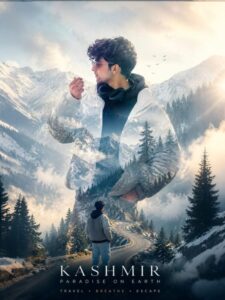
Create a cinematic double-exposure travel poster for “Manali, Himachal” using my uploaded photo. Keep the same face, pose, outfit, sunglasses, and natural features unchanged. Blend Himalayan valleys, pine forests, misty mountains, winding roads, rivers, and clouds inside the portrait silhouette. Add a small full-body version beside a scooter/bike on a mountain road. Style: luxury Himalayan tourism campaign, dreamy matte tones, soft fog, atmospheric depth, realistic blending, minimal typography, clean white background, ultra-realistic editorial aesthetic. Text: “Manali”. “Himachal”. “TRAVEL• BREATHE• ESCAPE”
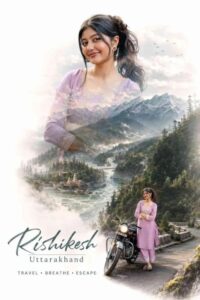
Create a cinematic double-exposure travel poster for “Rishikesh, Uttarakhand” using my uploaded photo. Keep the same face, pose, outfit, and natural features unchanged. Blend Himalayan valleys, pine forests, misty mountains, winding roads, rivers, and clouds inside the portrait silhouette. Add a small full-body version beside a bike on a mountain road. Style: luxury Himalayan tourism campaign, dreamy matte tones, soft fog, atmospheric depth, realistic blending, minimal typography, clean white background, ultra-realistic editorial aesthetic. Text. “Rishikesh” “Uttarakhand”. “TRAVEL • BREATHE • ESCAPE” don’t change face
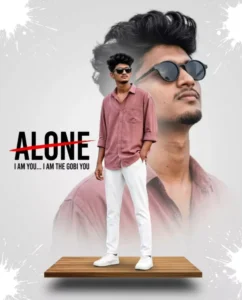
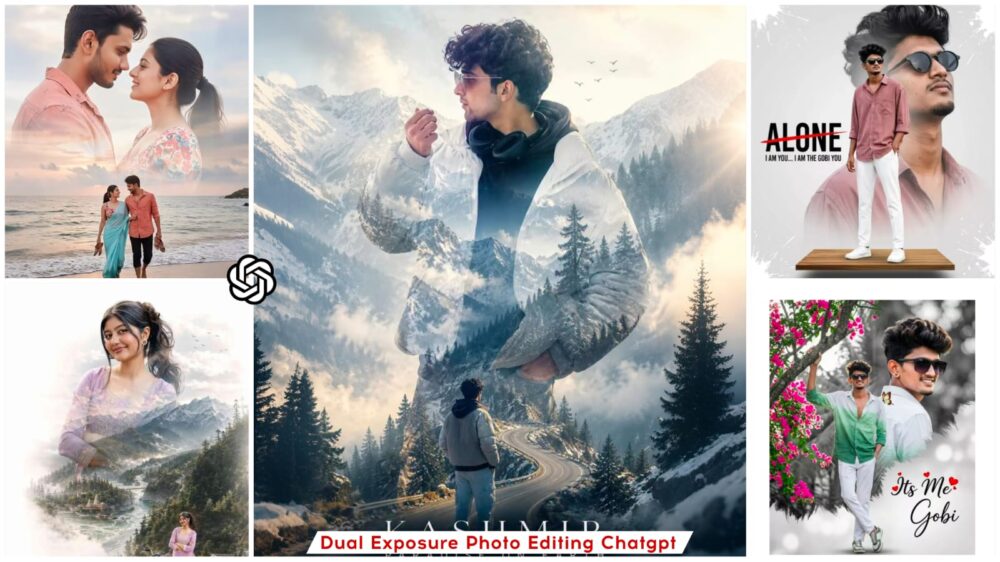
A high-fashion, cinematic double-exposure composite. A stylish young man with voluminous dark hair and a groomed goatee is the subject. In the foreground, he stands full-body on a floating wooden platform, wearing a dusty rose oversized button-down shirt with rolled-up sleeves, crisp white trousers, and clean white sneakers. In the background, a massive, RowSemi-transparent close-up portrait of the same man wearing black circular sunglasses, looking upward. The background is a minimalist light grey with white artistic paint splatter effects framing the edges. To the left, bold black typography reads "ALONE" with a striking red strike-through line, and smaller text below says "I AM YOU... I AM THE gobi YOU". Hyper-realistic, 8k resolution, sharp focus, professional studio lighting, 100% my face same, I need this prompt picture, zoom 4:5, man one hand in pocket,
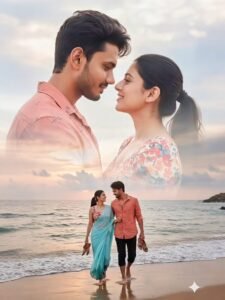
A romantic beach couple photoshoot with a creative double-exposure effect. The background shows a close-up of the couple lovingly embracing, faces touching, smiling softly with deep affection. The man has a neatly trimmed beard and short hair, wearing a light reddish-orange patterned casual shirt, while the woman has long dark hair tied back in a ponytail, wearing a colorful floral top in shades of pink, red, and white. In the lower part of the composition, the couple is walking barefoot along the sandy beach, holding their shoes in their hands, walking arm in arm, gazing at each other with joy. The atmosphere is natural, bright, and romantic with a soft pastel sky and calm seaside vibes. The style is cinematic, dreamy, and vibrant, emphasizing intimacy, togetherness, and the beauty of love."
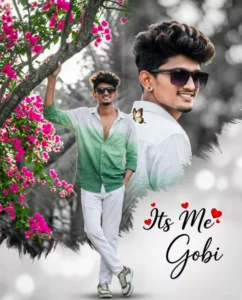
Create A romantic digital photo edit featuring a young handsome man with dark styles hair and a gentle smile, looking back over he's shoulder. The background is a soft black-and-white blurred outdoor scene with bokeh effect creating a dreamy atmosphere. In the foreground, a full-body version of the same man stands gracefully, wearing a gradient green and white button-down shirt with the top buttons undone and fitting white trousers. And sunglasses, sneakers, conveying elegance and innocence. The composition blends monochrome and color contrast, with soft feathered edges separating the layers. Decorative text reads "Its Me" with small red heart accents, along with a stylish handwritten name "Mahi" A small butterfly graphic adds a delicate artistic touch: Soft lighting, high detail, romantic edit style, Instagram aesthetic, photo manipulation, layered composition.
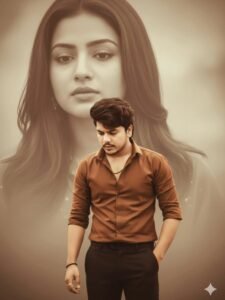
A cinematic portrait of a young man standing thoughtfully with head slightly down, wearing a brown shirt and black pants, soft light and warm tones. Behind him, a large faded monochrome portrait of a beautiful woman with long hair and a calm expression, symbolizing memory or lost love. Background is dreamy and blurred with sepia effect, emotional and artistic lighting, depth-of-field focus, realistic photography style.
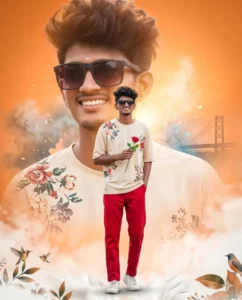
Create A dreamy, artistic portrait of a young handsome man same face upload image smile face, wearing a light cream floral tshirt, and Red trousers with dark hair. The composition features a large, softly blurred close-up of he's face in the background, while a smaller full-body version of his stands in the foreground holding a red rose. wearing white sneakers,The background has a warm orange gradient with a soft glow, blended with abstract smoke effects and light splashes. A faint silhouette of a bridge appears on one side, adding a romantic urban touch. Decorative elements like birds, leaves, and soft white textures are placed near the bottom. 9:16 vartical ratio 8k Quality
How To Create Image In ChatGpt?
Now, to create a photo like this, the first step is to copy the prompt provided in the article. You can use any of these prompts in either ChatGPT or Gemini. While the results may differ slightly between the two—since they utilize distinct image generation models—you should proceed by opening ChatGPT. Once there, click on the ‘+’ icon to upload an image. Simply select the photo option and choose the desired image from your gallery. Next, paste the prompt into the chat box. Upon initiating the generation process, it will take just a few moments—mere seconds—to create and deliver your awesome new photo.
How To Use Google Gemini Dual Exposure Ai Photo Editing Prompts
To create this, first copy the prompt I shared with you. I’ve also shared a copy button there so that when you click on it, the prompt will be copied. No other system offers such an advanced option, because no one gives you the option to copy the prompt in the details I just described. After that, you need to find the Google Gemini button, which you’ll find on the front panel. As our frame ends, you’ll see a button. Click on it. Your Google Gemini website will open. First, paste it there, then go to the “Plus” option and upload the photo you want to generate. No matter what color clothes you’re wearing, it will generate in the exact same color because that’s what’s written in the prompt. If you want to change the color of the clothes, click on it. You change it there and then generate it and your photo will be ready.
Conclusion
This is how you can create these viral photos using the details I’ve shared. I don’t think you’ll find them lacking in anything else. Partly because I’ve explained all the details very clearly, and you won’t encounter any problems. If you don’t understand something or can’t do it, just ask what you need to understand and how.