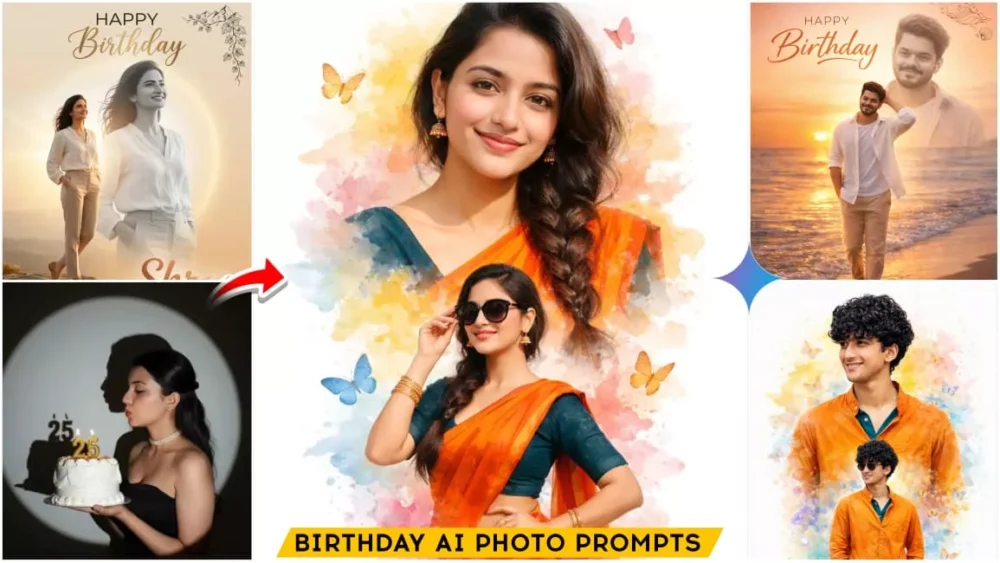
Google Gemini Birthday Ai Photo Editing Prompts – You all know that people are loving these birthday photos. I’ll tell many of you that this birthday editing, even those who don’t have their birthday right now, are creating such photos and posting them on Instagram. Why are they posting it because this trend has come up and it’s going viral because of it. I’ll teach you that if you want to make a birthday photo like this, you can make it in one click because the editing we’ve taught here is a very simple method of editing and you can do that editing whenever your birthday comes.
Google Gemini Birthday Ai Photo Editing Prompts
For example, these are birthday photos. What will you need to create them? How will you create them? All the details will be given to you in this article itself. After seeing this photo created in such a way, you will not believe that this photo has been created from this. After seeing such photos, it seems that these photos have been clicked by our photographer as if you are celebrating your birthday with a cake. After that, such Happy Birthday text is written. People want such photos in real life. We want our photos to come like this, but that does not come. Now is the time of AI, so you can create it absolutely free with AI. I will explain it here.
Google Gemini 2.5 Flash Version
Now I will tell you how to create these birthday photos and what you will need. The most important thing for this is. For this we will use Google application, so you have to install it from the browser or if you want you can install it from the Play Store, in this you get two options, 2.5 Flash version and a Pro version, so here you have to use the Flash version, after going into it, first of all you have to select the Google Banana option. With the help of that you can create your photo, you will get a very strong result from it and your photo video will also go viral.
Update – In this article, I am updating some AI image prompts—specifically for birthday photos—as this style of imagery is going viral once again. Due to their high demand, I am providing you with a fresh collection of birthday image prompts below. These include options for both boys and girls; feel free to browse through them.
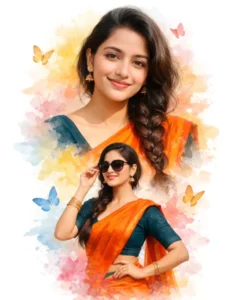
A beautiful Indian girl with a long braid, wearing a vibrant orange saree and a dark teal blouse. The image is a double exposure creative edit on a clean white background. Top half shows a close-up portrait with a warm smile, and the bottom half shows her in a stylish pose wearing sunglasses. Surrounded by soft watercolor splashes in shades of yellow, blue, and pink, with delicate butterflies floating around. At the bottom, 'Happy Birthday' is written in elegant black cursive calligraphy.
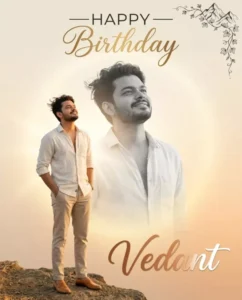
Create an ultra-detailed, professional birthday graphic design in a photo collage style. ratio 4:5. The composition features me as the central subject in two layers. The primary subject in the lower-left quadrant is a sharp full-color cutout of me standing on a cliff edge at golden hour, both hands in pockets, head slightly tilted back looking up with a serene, hopeful smile, wearing a cream open linen shirt, beige chinos, tan leather loafers, hair gently windswept. The second layer is a much larger, semi-transparent, desaturated black-and-white version of the same me, positioned behind and above, creating a dreamlike echo effect. The overall background is a clean warm beige-to-soft-orange gradient with subtle sun flare. Soft volumetric golden glow emanating from center behind the subjects. Lighting on color subject is warm golden hour with gentle rim light and long soft shadows. Top center text: 'Happy Birthday' — 'HAPPY' in clean modern sans-serif, 'Birthday' in elegant gold script. Top-right corner: delicate black ink mountain vine illustration. Bottom center: name 'Vedant' in warm copper-to-white gradient script. 8K resolution, photorealistic skin texture, hyper-detailed fabric physics, perfect text legibility. Avoid harsh shadows, cluttered backgrounds, distorted text, unnatural blending.
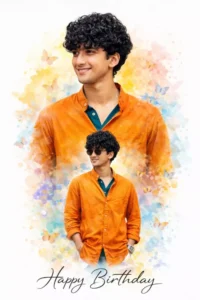
A handsome Indian young man with a modern stylish hairstyle, wearing a vibrant orange kurta or fashionable shirt with a dark teal inner layer. The image is a double exposure creative birthday edit on a clean white background. The upper half features a close-up portrait with a charming smile, while the lower half shows him in a confident stylish pose wearing sunglasses. The composition is enhanced with soft watercolor splashes in shades of yellow, blue, and pink, along with delicate butterflies floating around for a dreamy artistic touch.
At the bottom, 'Happy Birthday' is written in elegant black cursive calligraphy. Ultra realistic, high detail, vibrant colors, premium poster design, soft glow, professional studio finish, modern creative birthday artwork. Use the exact same person from the reference image, preserve identity 100%, keep exact face, same age, same body shape, same physique, no face change, no body change, no beautification changes.
A GLAMOROUS YOUNG WOMAN WITH ELEGANT MAKEUP AND A CONFIDENT, SENSUAL FACIAL EXPRESSION, WEARING A STRAPLESS BLACK EVENING DRESS WITH PEARL JEWELRY AND LONG PEARL EARRINGS. SHE IS HOLDING A SMALL PLATE WITH A SLICE OF PINK MOUSSE CAKE TOPPED WITH STRAWBERRIES IN ONE HAND. WITH THE OTHER HAND, SHE HOLDS A LIGHTER CLOSE TO A LONG GOLDEN CANDLE THAT SHE HAS BETWEEN HER LIPS AS IF ABOUT TO LIGHT IT. HER HAIR IS STYLED IN A LOOSE ELEGANT BUN. THE BACKGROUND SHOWS A LUXURIOUS CHANDELIER AND A BEAUTIFULLY DECORATED CHRISTMAS TREE WITH WHITE AND GOLD ORNAMENTS, SOFT WARM LIGHTING, AND A FESTIVE INTERIOR ATMOSPHERE. THE STYLE IS CINEMATIC, HIGH-RESOLUTION, FASHION PHOTOGRAPHY. FOR MAKING THIS PHOTO USE THE ABOVE PHOTO AND DON'T CHANGE HER FACE IT SHOULD BE THE EXACT SAME 100%
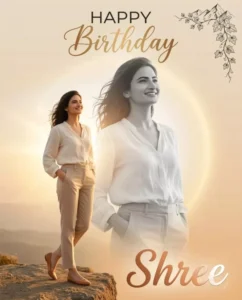
Create an ultra-detailed, professional birthday graphic design in a photo collage style, ratio 4:5. The composition features me as the central subject in two layers. Subject in center of portrait
The primary subject in the lower-left quadrant is a sharp full-color cutout of me standing gracefully on a cliff edge at golden hour, both hands softly resting in pockets, head slightly tilted back looking upward with a calm, hopeful smile, wearing a soft cream flowing linen blouse, tailored beige trousers, elegant tan leather flats, natural windswept look.
The second layer is a much larger, semi-transparent, desaturated black-and-white version of the same me, positioned behind and above, creating a dreamy echo effect with smooth blending.
The overall background is a clean warm beige-to-soft-orange gradient with subtle sun flare. Soft volumetric golden glow radiates from the center behind the subjects. Lighting on the color subject is warm golden hour with gentle rim light and long soft shadows.
Top center text: “Happy Birthday” — “HAPPY” in clean modern sans-serif, “Birthday” in elegant gold script.
Top-right corner: delicate black ink mountain vine illustration.
Bottom center: name “Shree” in warm copper-to-white gradient script (editable if needed).
8K resolution, photorealistic skin texture, hyper-detailed fabric physics, perfect text legibility. Avoid harsh shadows, cluttered backgrounds, distorted text, unnatural blending.
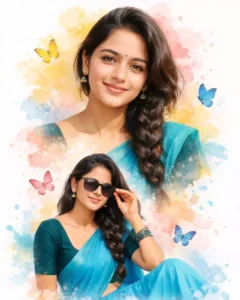
A beautiful Indian girl with a long braid, wearing a vibrant sky blue saree and a dark teal blouse. The image is a double exposure creative edit on a clean white background. Top half shows a close-up portrait with a warm smile, and the bottom half shows her in a stylish pose wearing sunglasses. Surrounded by soft watercolor splashes in shades of yellow, blue, and pink, with delicate butterflies floating around. At the bottom, 'Happy Birthday' is written in elegant black cursive calligraphy.
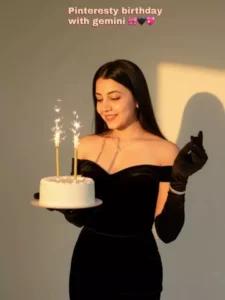
This is my face and body. Please make a half-body portrait of me without changing my facial features and appearances, around 29 years old, with fair white skin and a beautiful body. She has a smiling softly with a closed-mouth smile (no teeth visible), while looking straight at the camera. Her long, wavy black hair flows naturally. She is wearing an elegant off-shoulder black gown with black opera gloves. She is standing gracefully slightly toward to left, holding a white birthday cake decorated with medium-sized straight golden candles that have spiral patterns, proportionate to the cake. And her right hand is posing gracefully under her chin. She wears a subtle necklace and a bracelet as her only accessory. The scene is set in a professional indoor photo studio with plain background and warm golden hour sunlight casting dramatic shadow on a plain wall ensuring the strong shadow of the face on the wall is visible ratio 9:16 overall cinematic tone.
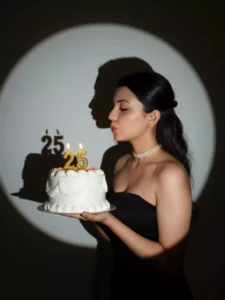
Create a glamorous birthday photoshoot portrait with flash. The backdrop is a plain neutral wall illuminated by a round spotlight, casting a sharp, dramatic shadow behind me for a cinematic effect. I am posed in profile, leaning slightly forward as if blowing out the candles on a strawberry cake I hold delicately with both hands. The cake is topped with lit number candles 30, their warm glow adding a celebration touch. I am wearing a elegant ball gown in pink color
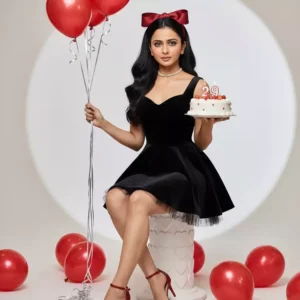
This is a photo of me. Please create a full-body 9:16 vertical birthday portrait of a stunning young woman, around 29 years old. She has long, silky, naturally black hair styled in soft, loose cascading waves that flow neatly over her shoulders and down her back, with subtle volume at the crown. A large deep red satin ribbon headpiece is placed slightly to the side, blending seamlessly with her hair for a balanced, elegant look. Her makeup is simple and natural, with light foundation, soft blush, defined brows, subtle eyeliner, long lashes, and nude-pink lips. She wears a sleeveless, fit-and-flare mini dress made of rich black velvet with a sweetheart neckline, fitted bodice, and soft tulle hem peeking underneath. On her feet are glittering red ankle strap high heels. Around her neck is a delicate pearl choker necklace. She stands gracefully against a clean white studio backdrop. In her left hand, she holds a round white plate with a beautifully decorated strawberry birthday cake topped with fresh strawberries, "29" birthday candles and tiny red cherry motifs on the icing. In her right hand, she holds a bunch of glossy metallic red balloons with long silver ribbons. Additional red balloons are scattered on the floor for decoration. She

sits on a sculpted white pedestal with embossed heart patterns chair. The lighting setup includes a bright key light from the front and a soft, round spotlight behind her, creating a subtle dark halo shadow effect on the backdrop for depth. The overall photography style is clean and high-key with balanced contrast, sharp focus, and no heavy filters, emphasizing the vibrant reds and soft skin tones.
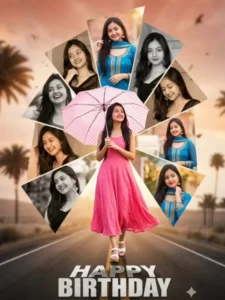
A highly detailed and dynamic digital photo collage for a birthday greeting. The overall composition features a central, full-body image with a beautiful young woman with long, dark hair, wearing a flowing pink dress and white platform sandals, holding a light pink polka-dotted umbrella.She is smiling and looking slightly upwards, positioned as if walking down the center of a stylized, slightly blurred asphalt road with faded yellow double lines, leading into the foreground. Surrounding this central figure is an abstract, geometric arrangement of multiple additional images of the same woman, integrated as collage elements. These surrounding images are presented in various angled, trapezoidal, and triangular segments, some in full color (wearing a vibrant blue traditional Indian outfit like a salwar kameez with a dupatta, smiling or posing), and others in black and white or sepia tones (wearing a darker outfit). These segments are layered and overlap subtly, creating a starburst or fragmented glass effect around the central figure. Some of these segments show close-ups or different poses, looking to the side or down. The very top background behind the collage segments is a soft, warm, faded light brown/orange gradient, possibly suggesting a sunset or soft light.In the bottom section of the "road," large, bold, textured white letters spell out "HAPPY BIRTHDAY," keeping the same original face (99% likeness, no alteration
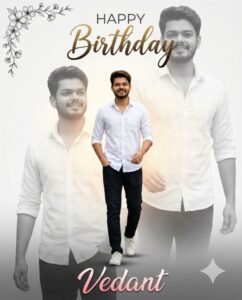
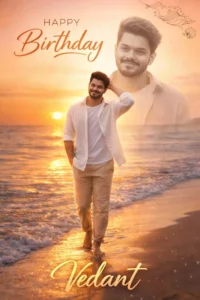
Create an ultra-detailed, professional birthday graphic design in a photo collage style. ratio 4:5, The composition features a me as the central subject, presented in two layers. The primary subject in the lower-right quadrant is a full-color, sharp cutout of the me walking forward one step ahead, one hand in pocket and one hand ahead, he is wearing a stunningly whit shirt and black jeans, white sneakers. The second layer is a much larger, semi-transparent, desaturated black-and-white version of the same me, positioned in the midground, creating a dreamlike echo effect. The overall background is a clean, minimalist white-to-light-grey gradient, with a soft, warm, volumetric glow emanating from the center, behind the subjects. The lighting on the color subject is soft and diffused, as if from an overcast day, creating gentle shadows and emphasizing his happy expression. In the top center, include the text 'Happy Birthday'; the word 'HAPPY' should be in a clean, modern sans-serif font, and 'Birthday' in an elegant, flowing script font with a gold-to-dark-brown gradient. In the top-left corner, add a delicate black ink floral vine illustration. At the bottom, place the name 'Vedant' in a beautiful, feminine script font with a pink-to-white gradient. Ensure the final image is 8K resolution, with photorealistic skin texture, hyper-detailed fabric physics, and perfect text legibility. Avoid harsh shadows, cluttered backgrounds, distorted text, or unnatural blending between the layers.
How To Use Google Gemini Birthday Ai Photo Editing Prompts
For this, first of all we have used prompts, so I will tell you about the prompts also. The simplest way is that you should understand such things properly and after that you will have to create your photo, so you should use the photo with your face, after using the photo with your face, you will have to go to Google Gemini and first of all paste the prompt which you have copied from here, there is a button to copy the prompt as well. As soon as you click on it, it gets copied. After that you have to upload your photo there and after that click on the generate button. You have the photo here and the photo which is created is absolutely perfect, you will not find any kind of error in it.
Conclusion
This is how you can create viral birthday photos. What I’ve explained is a completely different method, and it will make your editing 100% accurate. If you have any doubts, just ask us; we’ll help you with that too. We want you to learn how to create these kinds of AI photo editing techniques and make your photos go viral.