Chibi Cartoon Style Ai Photo Editing Prompts – As you may have noticed on Instagram, photos featuring the “chibi” art style are currently gaining immense popularity. First, let’s understand what that entails. It is a Japanese art style characterized by making characters look small and cute—a look that people find incredibly endearing. The head is slightly oversized, the body remains small, and the face is highly expressive—meaning you will often see exaggerated expressions of joy or emotion. People on Instagram are really loving this trend; notably, it doesn’t simply convert your existing photo into a chibi version, but rather generates a unique character based on your photo. If you’d like to learn the details behind this process, I will walk you through it so that you, too—if you wish to create one of these viral photos—can do so with absolute ease. The creation process is quite simple, and I will now show you exactly how it’s done.
Details Of Chibi Cartoon Style Ai Photo Editing Prompts
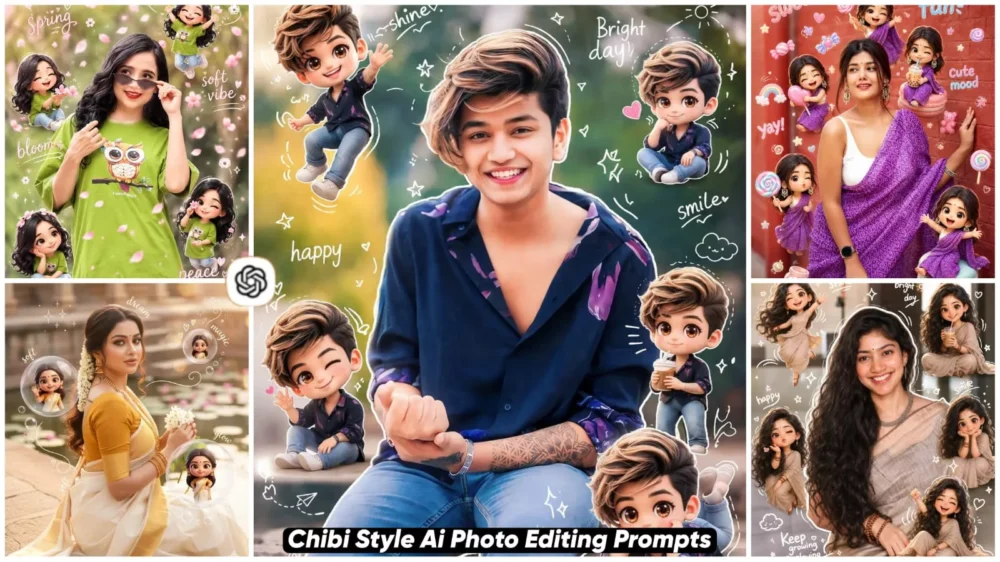
First, let’s understand what these photos will look like. You will see an original image featuring a central character—specifically, the character you choose to use. For instance, suppose you use a photo in which you are seated; the system will then generate an outline around your body—specifically, a white-colored outline. Following that, small, TV-style characters will appear surrounding your body. Additionally, some text will be visible encircling your body. You have the option to customize this text; by modifying the prompt, you can alter the specific text that appears to create different variations.
Instagram Trending Image Prompts
How Do You Perform This Chibi Style Editing?
Let me walk you through the steps—explaining exactly how it’s done and how you can achieve excellent results. First and foremost, you will need the necessary prompts; I have already shared these within the article. Simply copy the one that appeals to you the most. Next, open ChatGPT. Once there, upload your chosen photograph. It is advisable to use a photo that has already been well-edited beforehand, as the AI will not make any further modifications to the image itself; it will merely add the specific characters and text elements you requested. As illustrated by the example photos in this article, you will observe only the external characters being added to your image. These are the only elements that will be incorporated; simply upload your photo and hit “Generate.” This process will transform your image into a polished, professional-style masterpiece.
You Can Also Customize Editing
In today’s world, style customization is paramount. If you present your photos in the right aesthetic, they stand a high chance of going viral. However, if you simply create content using the same styles as everyone else, your chances of going viral are significantly lower. By making slight tweaks to the standard 3D Chibi style, you can create something truly unique. For instance, you can transform it into an Android TV-style illustration. Furthermore, you have the option to convert it into an Anime style, a watercolor painting, or even a standard realistic image. I have now provided you with a wide array of options; you are free to create whatever you desire. All you need to do is add the specific style name—whether it be “3D Style,” “Anime Style,” or any other—to your prompt. Your photo will then be generated with a remarkably realistic finish.
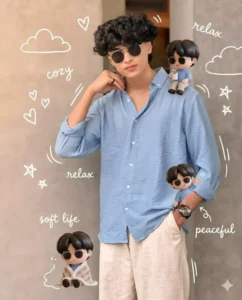
Use a real face as reference. Keep background. Warm cozy lighting (slightly golden tone). Add mini 3D chibi characters doing cozy activities (holding coffee, sitting, relaxing, smiling). Add doodles like clouds, hearts, tiny stars, soft lines. Include handwritten text like “cozy,” “relax,” “soft life,” “peaceful.” Style: soft muted pastel tones, glossy chibi, Korean cozy aesthetic, clean layout, 4:5 ratio.
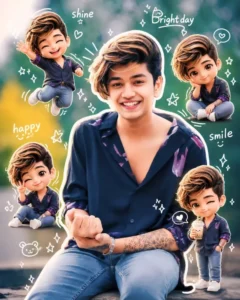
Use a real face as a reference photo.The background is the same as in the photo. The lighting is warm, soft, and clean, with subtle shadows. Around the image, add several mini chibi (3D cute style) versions of the character, while maintaining the original facial features.expressions: jumping cheerfully waving sitting relaxedholding a drink cute and playful expressions Add hand-drawn white doodle elements: outline around the main body stars, hearts, sparkles motion lines small cute icons Add aesthetic handwriting such as: "shine," "bright day," "happy," "smile," etc. (casual doodle font) Overall style: clean & aesthetic composition white sticker outline soft pastel color tone high detail 3D chibi glossy look cute Korean style instagrammable 4:5 ratio
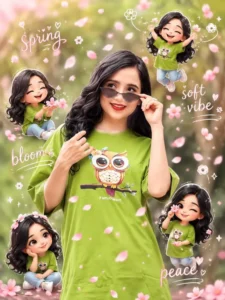
Use a real face as reference. Keep original background. Soft warm lighting with gentle pink tint. Add 3D chibi mini characters playing with falling sakura petals (jumping, catching petals, sitting). Add hand-drawn white doodles like petals, wind swirls, hearts, sparkles. Include handwritten words like “spring,” “soft vibe,” “bloom,” “peace.” Style: Korean aesthetic, pastel pink tones, glossy chibi, soft romantic feel, sticker outline, 4:5 ratio.
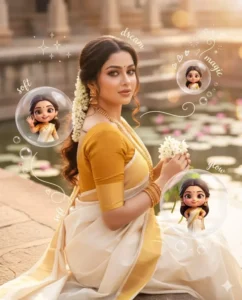
Use a real face as reference. Keep original background. Warm soft lighting with a dreamy glow. Add multiple 3D chibi mini versions of the character interacting with floating transparent bubbles (inside bubbles: smiling, posing, waving). Add glossy reflections and light flares. Include white doodle elements like sparkles, tiny hearts, swirl lines, and bubble trails. Add aesthetic handwritten words like “dream,” “soft,” “glow,” “magic.” Style: pastel dreamy tones, glossy 3D chibi, soft blur highlights, clean Instagram aesthetic, 4:5 ratio.
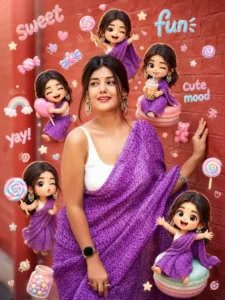
Use a real face as reference. Same background. Bright soft lighting with candy-color highlights. Surround with mini 3D chibi versions holding lollipops, candies, drinks, making playful expressions. Add doodles like candy shapes, stars, swirls, cute icons. Include handwritten text like “sweet,” “fun,” “yay,” “cute mood.” Style: vibrant pastel palette, glossy chibi texture, playful Korean Instagram vibe, clean layout, 4:5 ratio.
Why Is This “Chibi” Style Going Viral?
Well, there could be numerous reasons for something to go viral. However, I have a few theories—based on my own observations—that I’d like to share with you. I am simply offering my personal opinion here. First and foremost, consider the engagement it generates on Instagram Reels; people are watching these videos in huge numbers, which is driving their popularity through the roof. Additionally, this style is absolutely perfect for use as a DP (Display Picture) or profile picture—you can easily utilize it for that purpose. It is incredibly simple to create; you don’t need any kind of editing skills whatsoever to produce it. The result is content that is both unique and eye-catching.
Pro tips For Achieve Better Result
Here are a few pro tips to help you achieve even better results with your photos: if you aim to create a high-quality image, always start with a high-resolution source photo. Keep the background simple, and be sure to include details regarding lighting and facial expressions in your prompts—there is no need to worry about how to phrase these, as I have already explained and provided examples for them. Furthermore, do not expect to get the perfect result on your very first attempt; try two or three times, and you will eventually achieve excellent results.