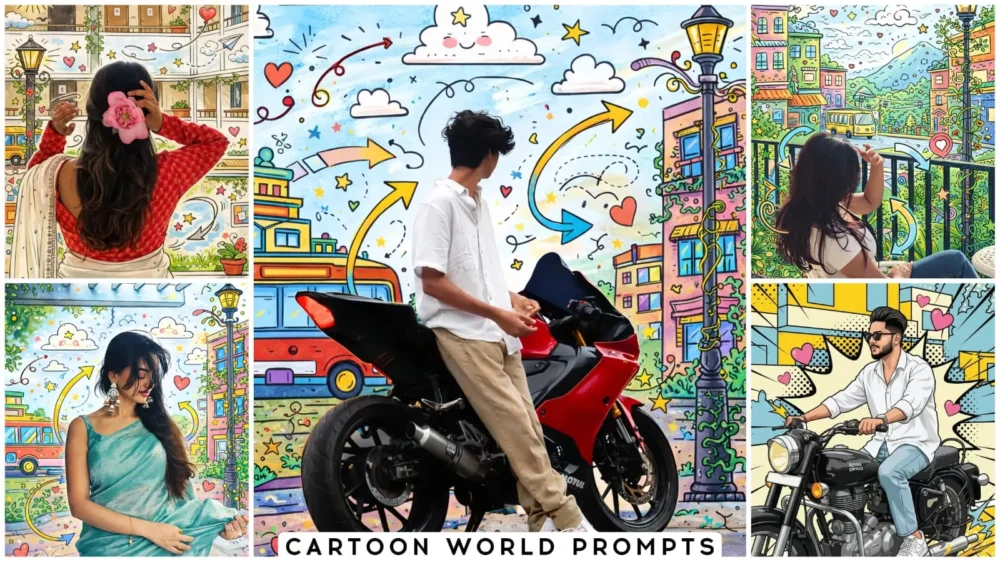
Cartoon World Ai Photo Prompts – Right now, social media is flooded with these kinds of cartoon photos. You’ll see that everyone is converting their normal photos into these cartoon-style images. The normal photos are transformed with such realistic backgrounds that it’s hard to believe something like this is possible, but ever since this technology came out, you can generate anything you can imagine. I’ve noticed that this is trending a lot on Instagram, so I thought I’d tell you about it so you can easily create these viral edits yourself. I’m going to explain how in this article. If you follow the instructions correctly, you’ll get 100% the best results.
Why Are These Cartoon-style Photos Trending ?
The main reason they’re trending is that they create a professional-looking version of your photo. For example, you can create a profile picture like this. If you’re an anime fan, you can create that kind of photo using this. The result is exactly as you’d expect; it takes a normal photo, like one you’ve taken with a background, and modifies that background. It simply adds cartoon-like elements. Just like how some artists create realistic paintings, replicating everything from a photo, this converts your photo into a cartoon version, and it looks very unique. You can also use this for creating creative posters and thumbnails. You’ll see that it looks even more eye-catching than real photos. People are really loving it.
Editing Process Of Cartoon World Ai Photo Prompts
Let’s understand the editing process. This is Gemini. Here’s what you need to do. First, open Google Gemini. Upload a normal photo there. Then, use the prompt. The prompt describes the type of photo that will be created. For demonstration purposes, I’ve included a sample photo so you can see what the final image will look like. We will copy this prompt. Then, paste it into Gemini and click generate. You will get a result that matches the style of the prompt you copied, as I have provided prompts for different styles. You can copy whichever one you like and create different types of images.
Transform the entire scene into a mixed-media illustration with hand-drawn cartoon overlays. Convert the buildings, windows, street lamps, bus, plants, sky, and ground into outlined cartoon sketches with bright, colorful fills. Add doodles to fill the background, swirling arrows around the subject(s), cartoon clouds in the sky, hearts, stars, panels, and playful sketch lines across the scene. Add climbing vines and decorative doodles to the lamp post and buildings. Keep the subject(s) fully realistic and untouched.
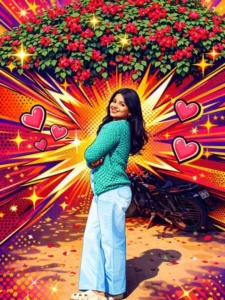
Transform the image into a high-end professional pop-art vector illustration.
Use clean vector shapes with accurate facial features, soft cartoon detailing, minimal halftone shading. Add comic bursts, dotted patterns, motion lines, energy effects, spark highlights using the photo's dominant colors.
Bold outlines, crisp edges, vibrant balanced colors, fully color-adaptive pop-art background and some cute pink hearts.
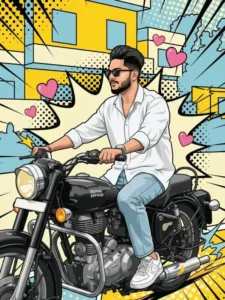
Transform the image into a high-end professional pop-art vector illustration. Use Clean vector shapes with accurate facial features, soft cartoon detailing, minimal halftone shading. Add comic bursts, dotted patterns, motion lines, energy effects, spark highlights using the photo's dominant colors. Bold outlines, crisp edges, vibrant balanced colors, fully color-adaptive pop-art background and some cute pink hearts!"
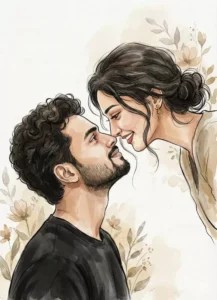
"Romantic watercolor-style digital illustration of a young couple in an intimate close-up. Woman with dark hair in a messy low bun, loose strands, small gold earrings, smiling warmly and leaning toward the man. Man with thick curly hair, trimmed beard, smiling up at her, wearing a black shirt. Faces very close, loving eye contact. Soft painterly brush strokes, ink outlines, warm muted beige and brown tones, minimal textured background with subtle floral elements,dream
What Styles And Types Of Photos Can You Create With Gemini?
Well, if we talk about the cartoon style, you can create 2D cartoon illustrations and 3D character designs. You can create anime style, Disney+ style, and even comic book style. I’ve already shared an article about comic book style, explaining how you can create such images. You can also create digital art. If you’ve seen digital paintings, you can create similar images. You’ll find an article about this on our website as well, along with the prompts. We’ve already shared them. Just explore them, and you’ll get an idea.
Why Should We Use Google Gemini
This explains why we use Google Gemini. The reason we use it is that it gives us excellent results with our photos. As you’ll see, it maintains the identity of our face perfectly; it doesn’t change our facial features. It recreates expressions and other natural details with great precision. It incorporates all these details into the newly generated photos. The colors are very smooth and don’t look edited. You can customize the hair according to your preferences. It completely avoids over-sharpening. If you don’t make any mistakes in your prompt, it will give you perfect results. If you’re writing something different in the prompt or adding something, you need to carefully check if it will be suitable for your photo. You can generate and test it to see if it’s working correctly.