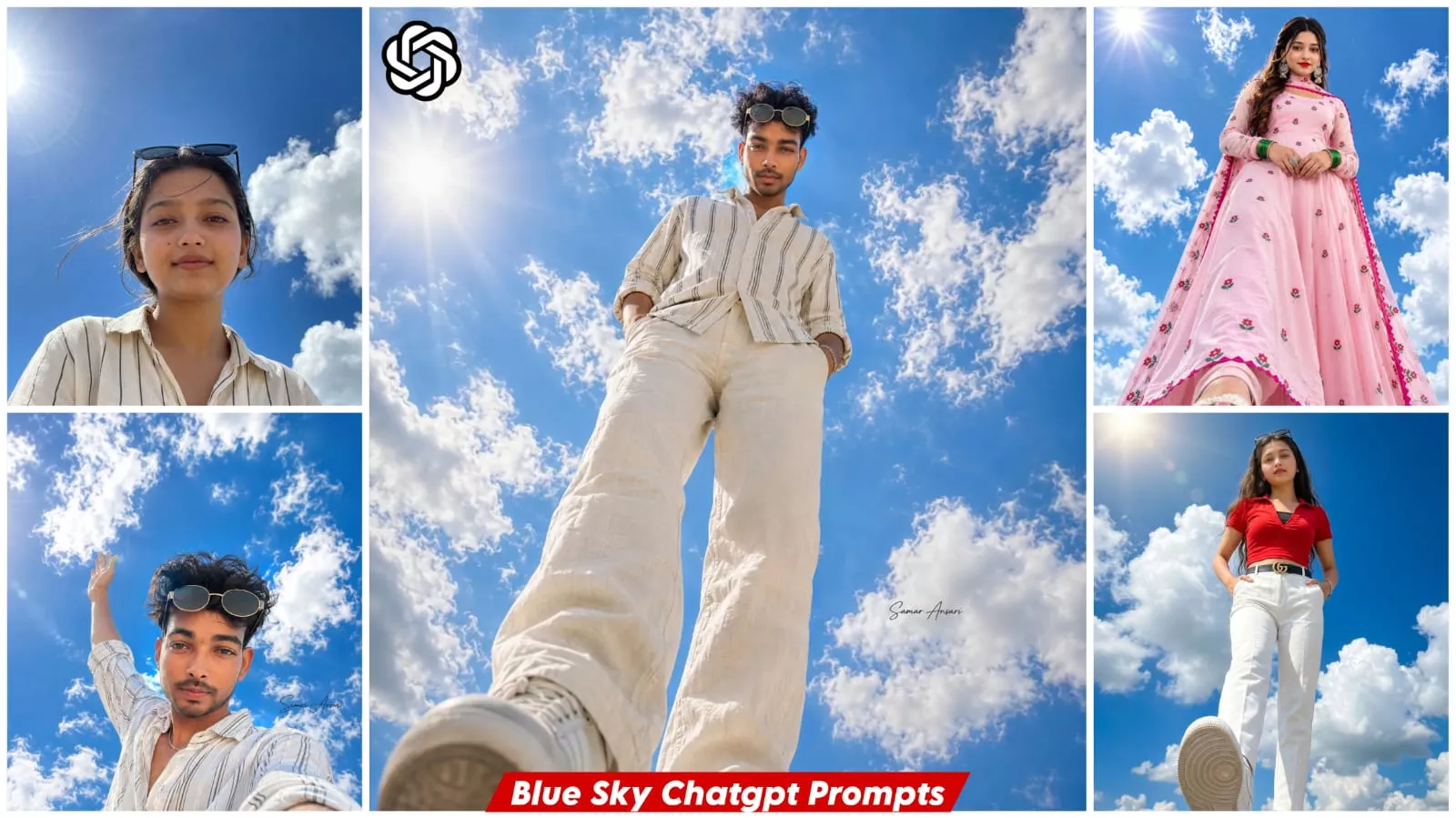
Blue Sky Ai Photo Editing Prompt – You might have noticed recently that low-angle photos featuring a blue sky are going viral on social media, with everyone—guys and girls alike—creating them. It looks as though the camera has been placed right on the ground, making you appear tall and imposing in the shot. Normally, capturing a photo like this—with that specific sky—can be difficult and labor-intensive. However, with the help of AI, creating such photos has become incredibly easy. Just follow the steps I outline, and you’ll see excellent results; simply follow along as I explain the process.
Why do low-angle photos look so captivating?
You see, in photography, the camera angle can completely transform the impact of an image. When a photo is taken from a low angle looking upwards, the subject appears more confident, stylish, and impressive. This perspective reveals the expansive blue sky, adding a sense of openness and depth to the picture. That is precisely why low-angle portraits set against the sky instantly grab attention on social media and easily go viral.
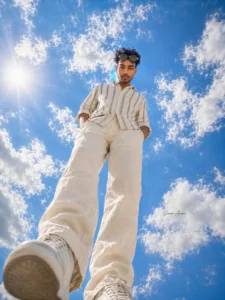
A slim-fit young man, Ultra-realistic full-body portrait of the same young man with the exact same face, skin tone, athletic slim-fit physique. Wearing the exact same loose cream-white linen shirt with thin black vertical stripes, sleeves rolled up, partially unbuttoned collar, matching light linen trousers, white sneakers, and a thin silver bracelet. creating an extreme low-angle ultra-wide perspective. The man is standing directly above the phone with one foot slightly forward and both hands casually in his pockets while looking down into the camera with a confident smile. Vast deep blue sky fills the background with soft white clouds, bright golden sunlight, subtle lens flare, gentle breeze moving the shirt, cinematic composition, natural outdoor lighting, ultra-realistic skin texture, HDR, DSLR quality, 24mm ultra-wide lens, premium lifestyle photography, sharp focus, realistic shadows, ultra detailed, 16K, size 3:4. Add the small
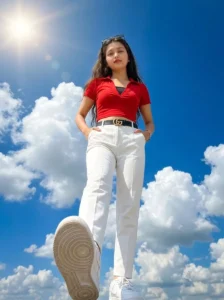
> Ultra-realistic full-body portrait of the SAME young South Asian woman captured from an extreme low-angle, ultra-wide (14mm lens) perspective, as if the camera is placed on the ground directly beneath her. She is standing confidently above the camera with one foot slightly forward, both hands casually tucked into her trouser pockets, looking directly into the lens with a calm, confident expression. Maintain 100% the same face and identity as the uploaded photo with no changes to facial features, skin tone, hairstyle, body proportions, or expression. She has long, naturally straight dark brown hair, fair-to-medium skin tone, and black sunglasses resting on top of her head exactly as in the reference image.

Keep the outfit exactly the same as the reference image: a fitted bright red short-sleeve crop top with a V-neck collar and subtle gathered detailing, a visible black inner camisole beneath the neckline, high-waisted white tailored trousers, a black leather belt with a gold double-G buckle, a delicate bracelet on her wrist, and clean white sneakers with realistic textured soles. Do not change, replace, recolor, or redesign the clothing or accessories.

The left shoe dominates the foreground because of the dramatic 14mm ultra-wide perspective, with highly detailed sole patterns visible. Bright midday sunlight creates crisp shadows, natural skin tones, and strong highlights. The background features a vibrant deep-blue sky filled with large fluffy white cumulus clouds and a glowing sun with a subtle cinematic lens flare in the upper-left corner. Hyper-realistic textures, cinematic HDR lighting, ultra-sharp focus, natural colors, high dynamic range, professional fashion photography, editorial magazine style, 8K resolution, DSLR quality, realistic fabric folds, atmospheric clarity, depth, Instagram-worthy composition, photorealistic, masterpiece, highly detailed, 3:4 portrait composition with a slightly zoomed-in framing while keeping the full body visible, 100% same face, same identity, no face alteration, no beauty filter, no gender distortion, ultra-realistic.
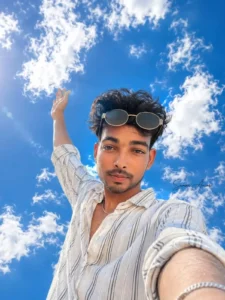
A slim-fit young man, Ultra-realistic low-angle selfie
portrait of the same young man with the exact same face, skin tone airstyle, beard, and smile. Wearing the exact same loose cream-whit inen shirt with thin black vertical stripes, sleeves rolled up, partially unbuttoned collar, and a thin silver bracelet. Standing beneath an ndless deep blue sky filled with soft white clouds, extending one ar high toward the sky as if touching the clouds. Bright midday sun creating natural lens flare and glowing highlights, cheerful smile, cinematic composition, vibrant colors, realistic cloud textures, HDR photography, crisp details, 24mm wide-angle smartphone selfie, premium travel photography style, hyper-realistic, ultra detailed,
16K, size 3:4.
Add the small stylish signature: Samar Ansari. Use my photo with attractive face 100%. Face same Or size 1,1
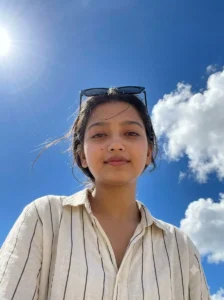
Ultra-realistic close-up portrait of the SAME young South Asian woman from the uploaded image, captured from a dramatic low-angle perspective using an 85mm DSLR portrait lens. Maintain 100% the same face, identity, facial features, skin tone, eye shape, nose, lips, hairstyle, and proportions as the uploaded photo. She is looking directly into the camera with a calm, confident expression and a soft natural smile. Her thick dark hair flows naturally in the breeze with a few loose strands framing her face. Black sunglasses rest naturally on top of her head. She is wearing a loose cream-white linen shirt with thin black vertical stripes, collar slightly unbuttoned, with only the upper chest and shoulders visible.

The background MUST be dominated by a vast vibrant deep-blue sky covering approximately 80–90% of the frame, filled with large fluffy white cumulus clouds. The horizon should be placed very low in the composition so that almost the entire background is open sky. A bright glowing midday sun appears in the upper-left corner with subtle cinematic lens flare, creating beautiful rim lighting around her hair and realistic catchlights in her eyes. No buildings, mountains, trees, balconies, roads, or distracting objects should be visible in the background—only the expansive blue sky and clouds. Strong background separation with creamy natural bokeh while keeping the sky clearly recognizable.

Hyper-realistic skin texture with visible pores, detailed eyelashes, natural lips, HDR lighting, ultra-sharp focus on the eyes, shallow depth of field, professional fashion photography, editorial magazine style, DSLR quality, 8K resolution, photorealistic, masterpiece, highly detailed, natural colors, atmospheric clarity, cinematic composition, 3:4 portrait composition, close-up head-and-shoulders framing, ultra-realistic, 100% same face, same identity, no face alteration, no beauty filter, no gender distortion.
How does this transform the image?
AI goes beyond merely changing the background; it alters numerous elements to completely transform the visual feel of your photo. For instance, it enhances the scene by introducing a brilliant blue sky with soft, wispy white clouds. It simulates natural sunlight coming from behind you, creating soft lighting effects and ensuring your skin tone looks completely natural. By incorporating these elements, it makes your photo look truly professional and captivating.
Why is this trend going so viral on Instagram?
You see, nowadays, simple yet premium-looking photos tend to go viral the most on social media. With this trend, you get a clean, bright, and eye-catching image featuring a blue sky background and a low-angle perspective. This setup makes viewers pause and look at your photo for a few seconds, thereby boosting its reach and engagement. You will also notice that even many new creators—those just starting out with editing—can easily pull off this kind of viral edit.
How To Use Blue Sky Ai Photo Editing Prompt
To create this image, first copy one of the prompts provided here; I have listed prompts in various styles, and they are currently trending. Select the style you prefer and click the “Copy Prompt” button. Next, open ChatGPT and paste the prompt. Then, click the plus (+) icon to upload a photo—you can use any photo as a reference. Finally, hit generate, and your image will be ready.