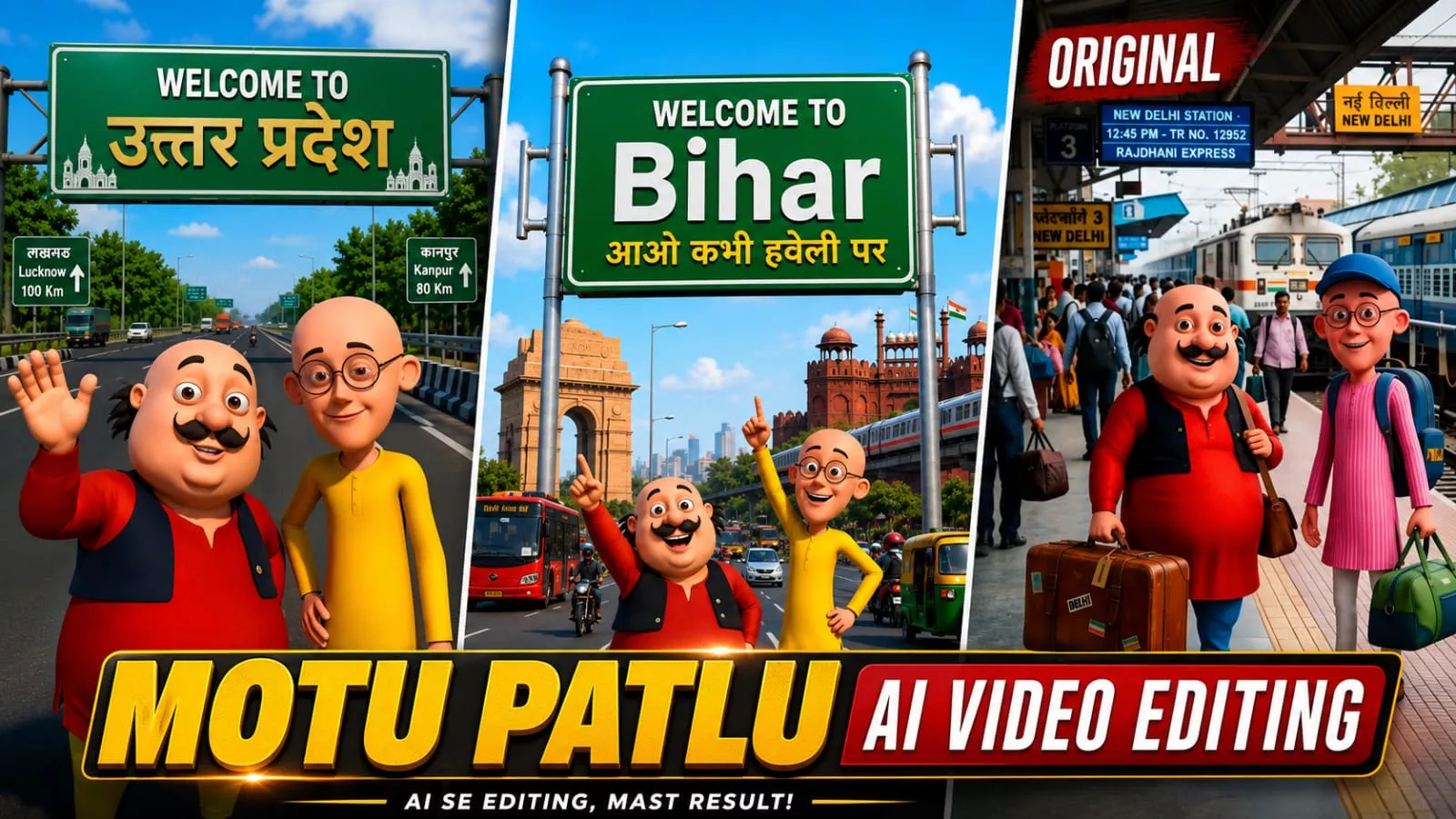
Motu Patlu Ai Video Editing Prompt – You may have noticed that “Motu Patlu” style videos are currently going viral on social media. People are using them to promote their shops, businesses, or products by incorporating their own names into the videos. I am here to tell you that you, too, can create videos using this trend. If you want to make a “Motu Patlu” video—one that features the characters, mentions your name, showcases your product, and even highlights your city—then this article will explain the entire process in detail. If you are interested in learning this type of video editing, you can create your own by following these steps.
Details Of Motu Patlu Ai Video Editing Prompt
Let me explain how this type of editing works. The entire process relies on AI. Nowadays, AI is widely used to create promotional content—for instance, featuring characters like Motu and Patlu. However, the voices used aren’t the official ones associated with the characters; instead, the AI generates the speech. The characters speak whatever dialogue you specify in your prompt—you can make them say anything you want simply by typing the text. Based on that input, your video or image is generated. I will explain this in greater detail later in the article, giving you a great opportunity to learn more about it.
The Process Of This Editing?
I have divided this process into two stages. First, we will learn how to create the image, and then we will learn how to convert that image into a video. During the image creation phase, you will be shown how to add the name of your specific location. Subsequently, regarding the video prompt, it will be explained how to incorporate your details. Everything will be explained thoroughly; if you want to create a perfect video, simply follow these steps, and you will achieve excellent results.
How To Create Image First?
First, we will learn how to create the image, as we will subsequently convert it into a video. I have provided an image prompt here; the first step is to copy it. Then, open ChatGPT and paste the prompt. You won’t need any reference photos because all the necessary details are already included in the prompt—specifically, details regarding the location. You should customize this part to suit your preference—for instance, by specifying the location or the name you want displayed on the board behind you. After making these adjustments, generate the image. The Motu Patlu characters will appear, along with the board displaying your chosen name in the background; simply save the resulting image.
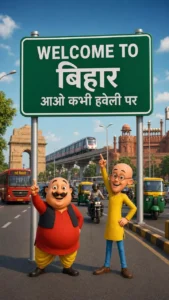
Image Prompt –
Create a high-quality 3D cartoon-style scene inspired by classic Indian animation. Two funny cartoon friends stand in the middle of a wide modern Indian city road, smiling and pointing upward. The left character is a chubby man with a big black moustache, wearing a red kurta, yellow pajama, black waistcoat, and black shoes. The right character is a slim bald man with round glasses, wearing a yellow kurta, blue pants, and brown shoes, raising one finger upward.Behind them is a large green highway signboard supported by two silver poles. The signboard has a white border and bold white text exactly as follows: WELCOME TO Biharआओ कभी हवेली पर The text must be perfectly centered, sharp, correctly spelled, and use realistic Indian highway sign typography.Background: A busy Indian city with India Gate on the left, Red Fort on the right, a metro train on an elevated track, red city buses, auto-rickshaws, motorcycles, cars, streetlights, trees, and a bright blue sky with soft white clouds.Camera angle: Eye-level, wide-angle, centered composition.Lighting: Bright natural daylight with soft realistic shadows.Style: Ultra-detailed Pixar-quality 3D cartoon render, vibrant colors, smooth textures, cinematic lighting, depth of field, Ultra HD, 8K, highly detailed, professional animation quality.Vertical composition (9:16), realistic road markings, clean perspective, sharp focus, vibrant colors.
Video Prompt –
Animate the existing image only. Keep the characters, background, camera angle, and composition unchanged. Natural facial expressions, realistic eye blinking, subtle body movement, accurate lip-sync, and hand gestures.

Motu (speaking in Hindi): "अरे पटलू, देखो! हम बिहार पहुँच गए!"

Patlu (speaking in Hindi): "हाँ मोटू, चलो सबसे पहले लिट्टी-चोखा खाते हैं!"

Motu (laughing): "वाह! आज तो बहुत मज़ा आने वाला है!"

Both characters smile, point toward the Bihar sign, laugh naturally, and maintain perfect Hindi lip-sync. Smooth animation, cinematic quality, 24 fps, 8 seconds.
How To Generate Ai Video?
To create the video, we are first provided with a video prompt. You need to copy this prompt, search for it on Google, and open the corresponding website. Once there, sign up and look for the “New Project” option; click on it. Next, click the plus (+) icon to upload the photo you generated earlier using ChatGPT. Then, paste the prompt—which contains separate dialogues for both Motu and Patlu. You need to pay attention to this part: modify the dialogues to reflect exactly what you want them to say, write that text in, and hit “Generate.” Finally, you will see your video perfectly created, featuring Motu and Patlu delivering those dialogues.
Conclusion
You can easily do this Instagram trending edit. I’ve explained all the editing steps. I’ve explained everything. Just follow along and create.
![Kedarnath Ai Photo Generator [2024]](https://editingprompt.com/wp-content/uploads/2024/05/Kedarnath-Ai-Photo-Generator-2024.jpg.webp)