Scrapbook Style Ai Photo Editing Prompt – New trends on social media go viral at an incredibly rapid pace. Among these, you have likely been seeing a great many photos featuring a distinctive “scrapbook” style. People typically edit these images—as they cannot simply be captured with a standard click—and creating such edited photos would ordinarily require a significant amount of effort. However, I am going to share a method with you that allows you to generate various unique images of this style using just a single photograph. (In some instances, you may need to upload multiple photos.) In this article, I will demonstrate just how easy it is for you to create your own photos in this scrapbook style, and I will also explain how creating such images can help you go viral. I will guide you through the entire process step-by-step, ensuring that you encounter absolutely no difficulties along the way.
Details Of Scrapbook Style Ai Photo Editing Prompt
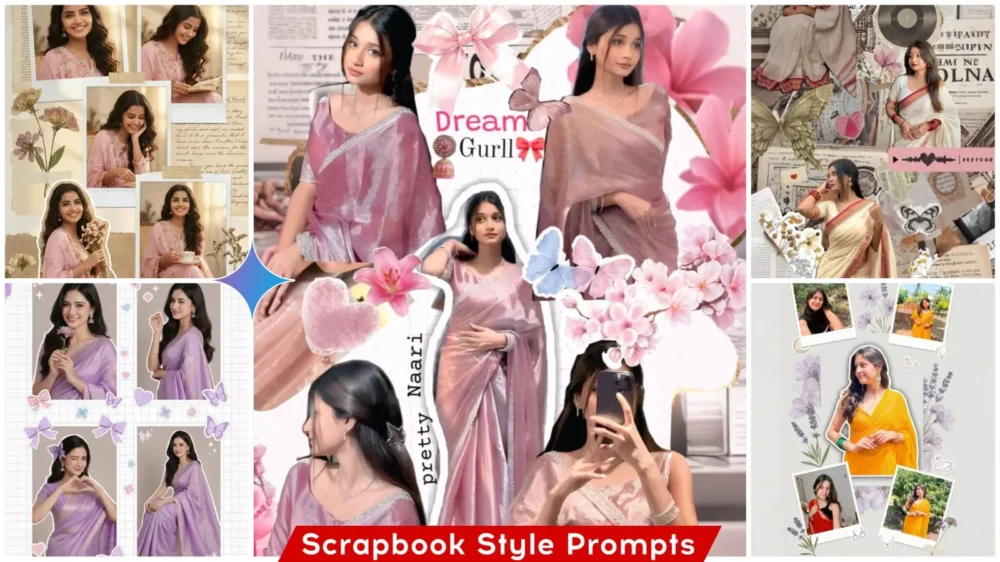
First, let’s understand what exactly this “scrapbook style”—which I’ve been describing—actually entails. It is a style characterized by the arrangement of various elements—such as paper tape, stickers, and handwritten notes—placed around the edges in a distinct and eclectic manner. In other words, it creates a visual aesthetic that looks truly unique. You will also often find photographs accompanied by text rendered in a vintage-style handwriting. Frequently, within a single frame or scene, you may even see an arrangement of two or more photographs at once—much like the numerous examples I have displayed here. Furthermore, the background typically features a textured finish, lending the overall composition a highly aesthetic and artistic feel. To put it simply: imagine how you might paste various items into your personal diary—perhaps sticking down mementos or adding photo cutouts. The images featured here are designed to capture precisely that kind of aesthetic—where multiple photographs are arranged together upon a single sheet, creating a cohesive and charming visual collage.
What You Need To Get Started With This Type Of Editing?
Have you wondered what Gemini is and what you need to get started with this type of editing? Gemini is a powerful AI tool that allows you to generate high-quality images simply by providing a text-based description. However, to achieve this, you must provide reference images; in return, it generates truly creative visuals for you. You have complete control over every aspect of the output through your prompts, making the process particularly easy—especially for business purposes. To utilize this tool effectively, there are a few specific requirements you need to keep in mind—specifically regarding the reference photos you intend to use. You must carefully observe the composition of the image you wish to create to determine how many reference photos are required. For instance, if the desired output features a single individual, you should upload a single photo of that person as your reference. Conversely, if the image you are aiming to generate depicts multiple people, you will need to upload several reference photos alongside your text prompt.
What Is Prompt?
What exactly is a “prompt”? A prompt is an instruction that guides the AI, ensuring that the image it generates is created precisely according to your specifications. The more detailed your prompt is, the higher the quality of the resulting image you receive. For instance, if we wanted to generate a high-quality image, I could write something like: “Create a scrapbook-style image with an authentic vintage background.” If I were to write that, the resulting image would be generated accordingly; however, if we required something more specific—something that needed to be explained in greater detail—you can refer to our prompts. As you will see, we have meticulously explained every single requirement in comprehensive detail.
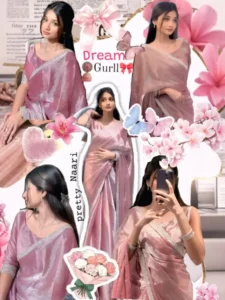
Dreamy scrapbook collage aesthetic of a girl in a shiny pastel pink saree, multiple angles and poses. Added stickers: bows, flowers, hearts, butterflies. White grid background, cut-out effect, cute decorative elements. Soft lighting, smooth skin, feminine aesthetic, Pinterest-style moodboard, ultra high quality.
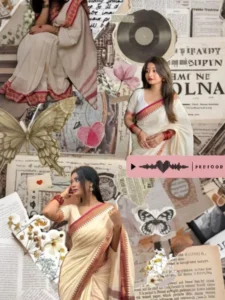
Vintage Scrapbook Collage
Vintage scrapbook style photo collage, Indian girl in saree and modern dress, floral elements, paper texture background, handwritten notes aesthetic, soft pastel tones, layered composition, artistic cutouts, dreamy cinematic feel, aesthetic Instagram collage, ultra HD quality
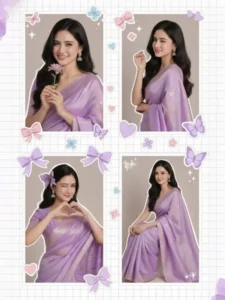
Dreamy scrapbook collage aesthetic of a girl in a shiny pastel purple saree, multiple angles and poses. Added stickers: bows, flowers, hearts, butterflies. White grid background, cut-out effect, cute decorative elements. Soft lighting, smooth skin, feminine aesthetic, Pinterest-style moodboard, ultra high quality.
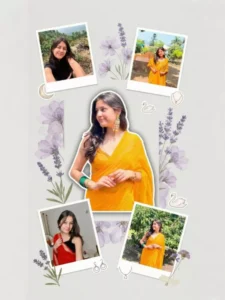
Create a soft aesthetic scrapbook-style collage using multiple images of the same person.
Background: plain light grey or off-white minimal background.
Center: one large main subject in full color, slightly tilted angle, clean cutout with soft
shadow.
Around the main subject, place 3–4 smaller photos of the same person in different poses,
some slightly rotated (random scrapbook placement).
Add large soft purple floral elements (transparent layered flowers) behind and around the
subject.
Include small aesthetic stickers like moon, swan, minimal jewelry icons.
Add soft botanical elements like lavender leaves or small flowers.
Keep everything clean, soft, and dreamy aesthetic.
Lighting: natural soft lighting, realistic skin tones.
High resolution, ultra realistic, Pinterest scrapbook style, Instagram aesthetic, portrait
orientation (4:5 or 9:16).
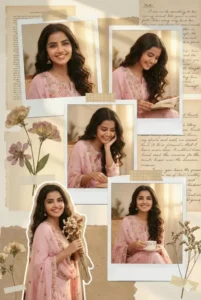
Aesthetic collage of a beautiful girl wearing a pastel pink embroidered suit, multiple poses in one frame, scrapbook moodboard style. Flowers, books, handwritten notes, Polaroid frames, vintage textures, soft sunlight. Natural makeup, long soft hair, smiling expressions. High-resolution portrait, warm dreamy tones, Pinterest-style aesthetic collage, ultra HD.
100% keep my original face
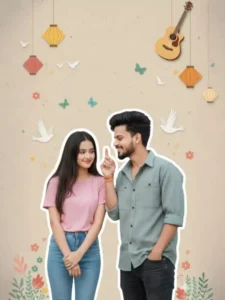
PROMPT ,Romantic vertical poster-style portrait of a young South Indian couple with white sticker-cutout borders, soft beige scrapbook background with lanterns, birds, butterflies, flowers and hanging guitar. Girl on left shy with hands clasped at waist, head tilted down looking up with smile, pink shirt and jeans. Boy on right leaning toward her, smiling warmly, right hand raised teasingly near her face, mint-grey shirt and jeans. Faces must exactly match reference identities.
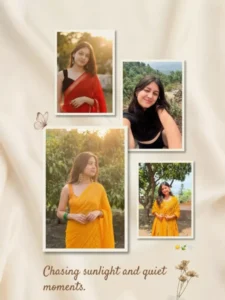
Create a soft aesthetic collage using multiple photos of the same person.
Background: warm beige / cream minimal background with smooth texture.
Place 3–4 images of the same person in a clean collage layout (slightly spaced, not
overlapping too much).
All images should have warm golden hour lighting, natural sunlight, outdoor greenery
background.
Use soft shadows under each photo to create depth.
Add minimal aesthetic elements like a butterfly, flower, and small emojis (subtle placement).
Include one larger central photo and smaller supporting images around it.
Add a soft elegant text quote at the bottom in a minimal serif or handwritten font.
Keep colors warm, soft, and slightly faded (vintage tone).
High resolution, ultra realistic, Pinterest aesthetic, clean minimal design, portrait orientation
(4:5 or 9:16).
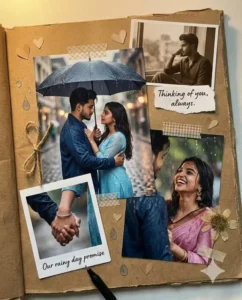
Create an ultra-realistic cinematic romantic scrapbook collage featuring the uploaded young Indian man.Use the
exactuploadedfacewith100%facialaccuracy. do NOT change facial structure, jawline, eyes, nose, lips, beard shape, hairstyleor skin tone. Maintain natural male skin texture, real beard density, natural hair volumeNo smoothing, no beauty filterno Alfacemodification, nosymmetrycorr ection.Thecollageincludes multiple romantic couplemomentsarranged in a layered scrapbookRainy emotional love.
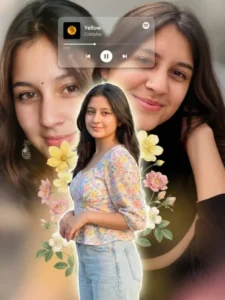
Create a premium aesthetic portrait collage using multiple images of the same person.
Center: one main subject in full color, sharp focus, clean cutout, slightly glowing edges,
standing pose.
Background: large blurred duplicate portraits of the same person (zoomed-in face and soft
expressions), creating depth.
Add soft floral elements (yellow and pastel flowers, leaves) around the subject, layered
naturally.
Include a semi-transparent Spotify-style music player card at the top (song title and artist
visible, soft blur effect).
Lighting: soft natural lighting with warm tones, realistic skin tones.
Add subtle depth of field and smooth blending between foreground and background.
Keep everything clean, premium, and balanced (not overcrowded).
High resolution, ultra realistic, Instagram aesthetic, poster style, portrait orientation (4:5 or
9:16).
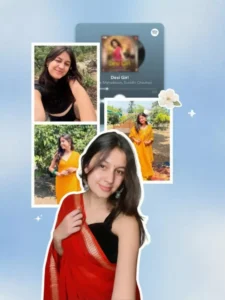
Create a modern aesthetic collage using multiple photos of the same person.
Background: soft blue gradient or textured background with minimal design.
Center: one large main subject in full color, clean cutout with white outline stroke, slightly
overlapping the layout.
Around the main subject, place 3–4 smaller images of the same person in different poses
(smiling, close-up, outfit pose), arranged in a neat grid collage style.
Add a blurred Spotify-style music player UI card in the background (song title and artist
visible but slightly soft focus).
Include subtle decorative elements like a soft flower sticker or minimal aesthetic graphics.
Maintain consistent identity across all images, realistic skin tones, sharp focus on main
subject.
Lighting: natural soft lighting, clean and bright look.
High resolution, ultra realistic, Pinterest aesthetic, Instagram collage style, portrait
orientation (4:5 or 9:16).
How To Create Image With Scrapbook Style Ai Photo Editing Prompt
To generate photos using these prompts, the first step is to select a specific style—specifically, the style in which you wish to create your image. Once you have decided on the style, you must copy one of the various prompts provided. Next, you will find a link to Google Gemini provided below. If you are using the dedicated application, navigate directly to it; the process is exactly the same whether you use the browser version or the app. Upon reaching the interface, begin by pasting the prompt. At this stage, you will need to recall which specific style of prompt you copied: if you selected a prompt designed for a single image, you will need to upload just one reference photo. Conversely, if the style you chose is designed to display multiple images of yourself, you will need to upload multiple photos; you have the option to upload images in different styles or simply upload the same photo multiple times. Finally, click “Generate” and wait just a few seconds. The tool will then deliver your generated photo, presenting you with a professional-quality result.
Check Out These Pro Tips For The Best Results.
If you consistently desire high-quality outcomes, you must always incorporate specific details into your prompts. For instance, even if the prompt instructions don’t explicitly state it, ensure you specify that your face—the subject of the image—remains 100% intact and unaltered. Additionally, incorporate details regarding lighting and texture, and provide specific descriptions for key features; however, avoid cluttering the prompt with too many elements. The goal is to keep everything precise and distinct. You should experiment with various prompts, as AI is not yet advanced enough to guarantee a perfect result on your very first attempt.