Pre Wedding Ai photo Editing Prompts – In today’s times, pre-wedding photoshoots have become a popular trend even before the actual wedding takes place. Every couple desires their pre-wedding photos to look absolutely cinematic, realistic, and romantic. However, since not everyone has the budget for an expensive professional photoshoot, we have brought you a solution that allows you to create such stunning pre-wedding photos right from the comfort of your own home. If you are a couple, this article is specifically for you; it is not intended for single individuals. Those who are about to get married and wish to have a pre-wedding shoot can now do so with absolute ease. Simply keep two of your regular photos ready, and Google will take care of the rest. In this article, we will learn how to utilize Gemini, how to craft the best prompts, and how to generate truly realistic images. We will also share various tips and tricks with you to ensure that you encounter no difficulties whatsoever in creating your desired photos.
Details Of Pre Wedding Ai photo Editing Prompts
You might wonder why people are opting for this style of AI-driven pre-wedding editing. While there are numerous reasons for its popularity, let me share what I consider to be the primary one. First and foremost, it is a cost-effective solution; you don’t need to spend thousands of rupees. You can create professional-quality images—either completely for free or at a very minimal cost—using AI, without ever having to leave your home. If you are creative, you can virtually transport yourself to diverse settings—such as beaches, mountains, or gardens—and generate stunning photos set against these backdrops without ever physically visiting them. It is also a massive time-saver. If you were to conduct a traditional photoshoot across various physical locations, it would consume a significant amount of time; however, AI can generate these images for you in just a matter of minutes. Finally, it serves as highly unique content for social media; you will notice that people on these platforms frequently upload and share such distinctive, AI-generated photos.
What Is The Essential Requirement For This Ai Editing?
Before you begin the editing process, make sure you have this specific item ready, as it will ensure your final edit turns out absolutely perfect. First and foremost, prepare a clear photograph of a couple. You can use separate individual photos of both partners, or you can use a single photo featuring both of you together; however, if using a combined photo, ensure that both faces are positioned right in the center of the frame. Their faces should be facing directly forward and be clearly visible. The photograph must feature proper lighting and a simple background. For instance, avoid using photos taken in a crowded setting—specifically those containing many different faces—as the AI will struggle to accurately detect the subjects in such images. Additionally, you will need access to Google Gemini; I will guide you through the process of how to access and utilize it to create your edit.
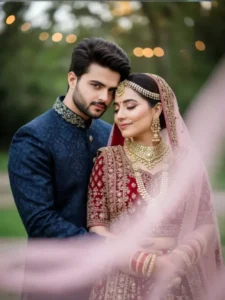
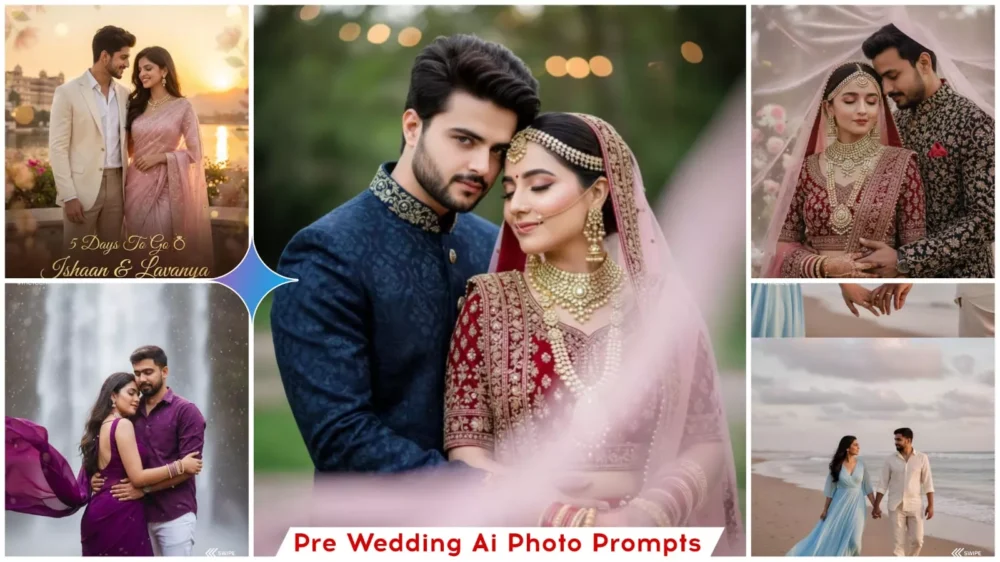
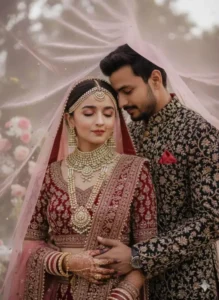
100% face no change, create Close-up, romantic wedding portrait. South Asian couple. Bride in deep red/maroon traditional bridal wear, heavy gold jewelry, henna on hands, eyes closed with serene expression. Groom in dark suit/sherwani, head leaning towards bride's, arm around her. Pink sheer dupatta/veil softly draped over their heads/foreground. Soft, diffused outdoor lighting, blurred natural background. Intimate, emotional, cultural wedding photography.
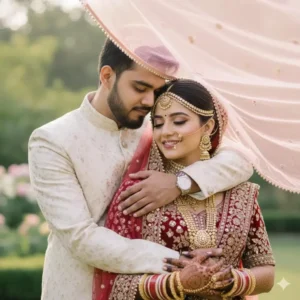
100% (reference face),, create Close-up, romantic wedding portrait. South Asian couple. Bride in deep red/maroon traditional bridal wear, heavy gold jewelry, henna on hands, eyes closed with serene expression. Groom in dark suit/sherwani, head leaning towards bride's, arm around her. Pink sheer dupatta/veil softly draped over their heads/foreground. Soft, diffused outdoor lighting, blurred natural background. Intimate, emotional, cultural wedding photography.
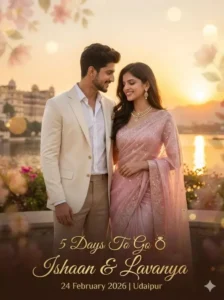
Create a stylish pre-wedding countdown poster using the exact same faces from the uploaded images (100% face match, no facial changes).
Pose: Couple standing close together, soft smile, natural chemistry.
Outfits:
Groom: Cream blazer, white shirt, beige trousers (modern royal look).
Bride: Pastel pink designer saree with soft shimmer and elegant jewelry.
Theme: Soft sunset golden background with subtle floral overlays.
Text (center aligned, premium font):
“5 Days To Go 💍”
“Ishaan & Lavanya”
“24 February 2026 | Udaipur”
Luxury, romantic, Instagram-ready, high resolution.
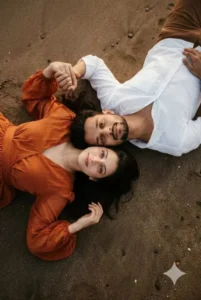
Pose: More specifically, it's a variation of a head-to-head or side-by-side pose, often used in engagement or romantic shoots. Here are a few ways photographers might describe this pose: Lying on the sand, heads together: This highlights the ground they're on and their physical closeness. Intimate Overhead Lie-Down: This refers to the closeness and the likely camera angle, which seems to be taken from above. Horizontal Head-to-Head: A simple description focusing on the orientation..The “Cuddle-Up” Lie Down: A more casual name for the feeling of the pose. The key elements are: Both individuals are lying down (supine or on their backs/sides) with their heads close together. They are facing the camera, which is positioned overhead. The woman is holding the man’s hand, adding a sweet, romantic connection to the composition. Outfits & Accessories: Woman: A flowing, earth-toned, burnt orange or sienna colored dress, long billowy sleeves, and a defined waistline. She is wearing a simple ring on her finger. Man: A simple, crisp white collared full sleeve shirt with folded sleeves unbuttoned at the top, brown pant Color Grading & Style: Natural, soft, and warm light. The image has a matte, slightly desaturated, film-like aesthetic. Colors are warm with a golden-brown tint. Highlights are soft and rolled off, and shadows are gentle (not deep black). High-quality professional documentary-style wedding or engagement photography. Shot with a shallow depth of field, focused on the couple’s faces. Camera: Overhead wide shot, natural light. (keep our face 100% accurate with every face details which i uploaded) ultra realistic, 8k, ultraclear face
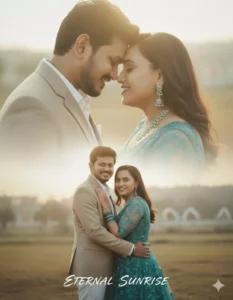
Create a soft, romantic couple poster of couple give in reference image
Keep face the same as 100% in my reference photo. Man is wearing Beige Suit and White Pants, Women wearing Teal Embroidered Net One Piece Gown with Matching Accessories, both man and women are wearing mentioned outfits in both the scenes, The design should include two blended scenes:
1. A close-up shot of both faces, smiling with eyes closed, touching foreheads gently. 2.  A full-body or mid-body shot where we are standing close, with my partner hugging me from behind while we both smile naturally.
Use warm sunlight, soft-focus background, and a dreamy cinematic color tone. The poster should have a smooth double-exposure, do not change face
A newly married couple sitting together Hindu couple on a decorated wedding stage at night, smiling happily. The groom is wearing an elegant sherwani with a matching dupatta, turban, and nagra shoes. The bride is wearing a beautiful lehenga with heavy makeup, matching jewelry, and nagra shoes. The surroundings are filled with flowers and bright lights, creating a festive atmosphere. Ultra-realistic, 8K, HD. 100% same face. Same face as uploaded
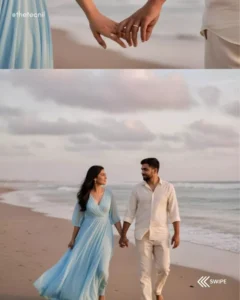
A soft, romantic wedding portrait showcasing a young couple on a tranquil beach. In the first shot, they are strolling towards the camera, hand-in-hand, the woman in a flowing, light blue dress, and the man in cream-colored linen pants and a matching shirt. Their faces are turned towards each other, sharing a gentle, loving gaze. The scene unfolds on a wide, sandy beach under a vast, cloudy sky. Gentle waves lap at the shore, creating a soft, diffused background behind the couple. Above this is a close-up shot of their hands about to touch, as if creating a bond between the pair, Keep both face same 100% same as in the reference image.
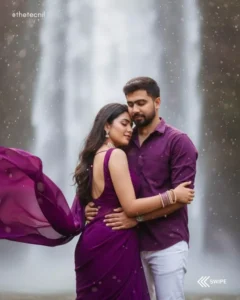
A romantic pre-wedding photoshoot at a beautiful waterfall. The girl is wearing a deep purple chiffon saree with a sleeveless, backless purple blouse. She is adorned with elegant pearl jewelry, including pearl bangles on her hands, close eyes. The saree's pallu flows dramatically in the wind, adding movement to the scene. Her long, lightly curled hair is open and cascading naturally. Behind her, the boy stands close, close eyes, wearing a purple shirt with white jeans. He gently holds her from the back as she rests her head tenderly against his chest. The waterfall creates a dreamy, romantic backdrop with misty droplets in the air, enhancing the magical atmosphere, Keep both face same 100% same as in the reference image.
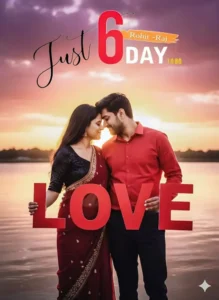
"A romantic pre-wedding style photoshoot of a couple standing outdoors near a lake during sunset. Soft warm sunlight behind the couple creating a glowing halo effect. The man and woman are standing close, touching foreheads lovingly. They are holding large red letters forming the word 'LOVE'. The man is wearing a red shirt and dark pants, while the woman is wearing a maroon saree with a shiny black blouse. Dramatic cloudy sky in the background, soft cinematic lighting, vibrant colors,
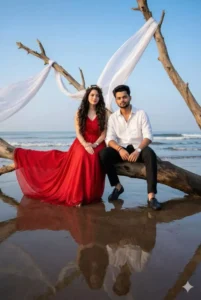
Girl Outfit: She is wearing long red pre-wedding gown, long straight hair with princess curl on ends only hairstyle with huge volume hairs and tiny flower crown on hair. She is wearing silver heart shaped pendant. some silver bracelets on hand, silver watch in one hand. Boys Outfit: He is wearing black beach pant, white linen shirt with sleeves folded, black and brown threaded bracelet accessories in one hand and on another hand white stainless steel round watch, black loafer location: on Beach with dark brown sand. calm atmosphere, waves, Pose: vintage dark sand, early morning, blue sky, both are sitting on a huge wooden tree dried with trunk in romantic pose looking at the camera, and some dried tree tucked in on sand near us and white fabrics is flowing in windy on that tree. reflection of us seen, Ultra realistic model shoot, 8k quality, capture from low angle. (keep our face 100% accurate with every face details which i uploaded) ultra realistic, 8k, ultraclear face.
How To Create Image Using Google Gemini
Let’s understand how to create those Gemini-style photos—it’s actually quite simple, and you’ll have fun following these steps. First, open Google Gemini; I’ve provided a direct link for this. You can also install the application directly from the Play Store. Once there, you need to enter a suitable prompt. However, you don’t necessarily have to write a prompt from scratch; I’ve already provided a selection of prompts here for you. Simply copy the one you like best. Next, click on the “plus” icon to upload your couple photo, or upload separate photos of both individuals. Then, just click the “Generate” button. Wait a few seconds, and it will create a professional-quality photo for you.
Some Useful Style For Pre Wedding Photoshoot
Here are some styles that will prove extremely useful for your pre-wedding photo editing—or even if you decide to go for a professional photoshoot in the future, these concepts will work wonders. First and foremost, you absolutely must give a try to the “Garden Love” theme and style featured here. Within this framework, you can create various types of images: romantic beach scenes, regal shots set against royal backdrops, mountain-themed love stories, and romantic “City Nights” looks. Additionally, I have included a distinct category for rain-themed photographs. I have presented the trending couple-style concepts in a separate article—which you are welcome to explore independently—but this specific article has been curated exclusively for pre-wedding purposes.
Always Keep Some Points In Mind
When editing, always keep the following points in mind: prioritize maintaining the original quality of your photo. Using low-quality images yields very poor results; therefore, you should always utilize high-quality photographs and ensure that the subject’s face remains clear. If the face is distinct, you will achieve better results. Avoid “over-prompting”—providing excessive details can also negatively impact the final output.