Happy Holi Ai Photo Editing Prompts – Nowadays, people post their beautiful photos on it. Like unique cinematic type or festival related photos, a lot of people like them and with the help of prompt, we can create our photos using Google Gemini. Now in this article, we will learn about Holi photos. What is Google Gemini, what is Holi photo editing. How can you write the right prompt. After that, how can you create a photo of yours. I will share all the details with you in this article. If you want to generate a professional type Holi photo, then you can read this article.
What Is Google Gemini ?
Google has an advanced AI tool that lets you generate your own text images, convert text to video, and showcase a lot of creativity. It was originally called Google Board, but later changed to Gemini. What can you do with it? You can create an image from it. You can also prepare your Chrome for photo editing here. You can use the best captions for social media. You can also find detailed AI editing instructions. If you want to create a photo or video, just tell it about the elements you want. It will guide you thoroughly on where to cut and how to apply effects. We’re currently talking about photo editing. If you want to create a professional Holi image like this, you can easily do it with Google Gemini.
What Does Holi AI Editing Mean?
We’ll convert our normal photos into Holi photos, using an AI tool. We won’t be doing anything custom. We won’t be applying color to our faces, nor will anything physical happen. However, you’ll definitely see all of these elements in your photos. For example, you’ll see flying gulal (gulaal). You’ll see a blast of color from behind. You might even see a water gun (pichkari). You might also see a photo of Lord Krishna receiving blessings, and you’ll also see many other realistic close-up portraits. You can easily create all these photos using prompts. Special prompts are shared for everyone. The prompts are tailored to the type of photo, so we’ll create them using those prompts.
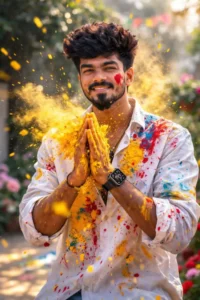
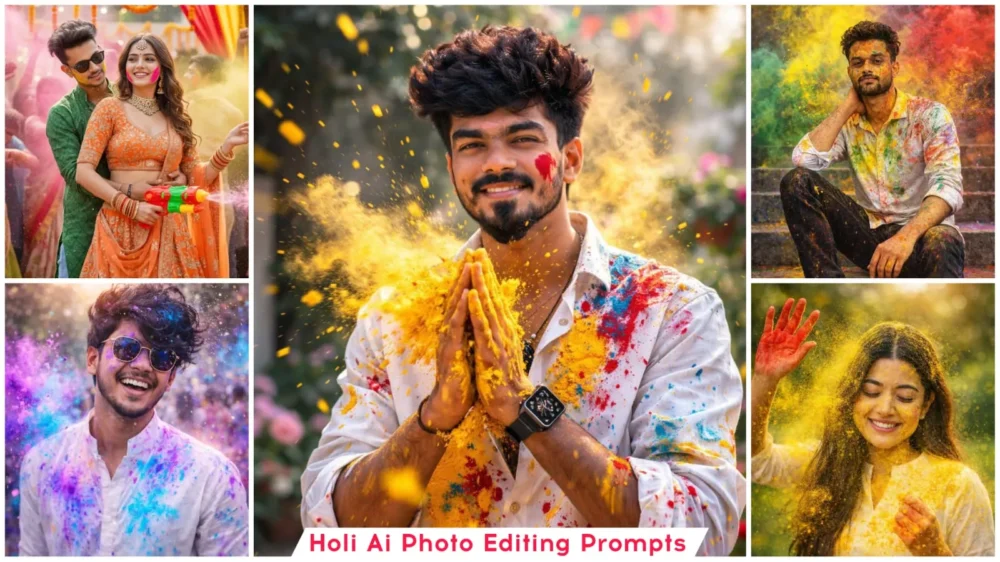
Ultra-realistic Holi festival portrait using my uploaded photo as the face reference, joyful young man smiling naturally, hands pressed together in front of chest covered in bright yellow Holi powder, vibrant yellow color powder exploding and flying across the frame, white button-up shirt splashed with multicolor paint stains (yellow, red, blue), red powder streak on one cheek, playful festive expression, dynamic powder particles frozen mid-air, outdoor garden background softly blurred with green foliage, bright natural daylight, warm tones, cinematic lighting, shallow depth of field, sharp focus on face, ultra-detailed skin texture, high shutter speed capture, 85mm lens, f/1.8, professional DSLR photography, vibrant colors, high contrast, 8K resolution, realistic fabric texture, energetic Holi celebration atmosphere, editorial photography style
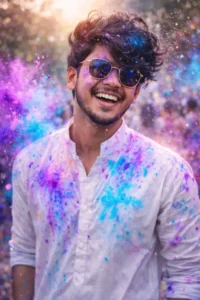
Ultra-realistic 8K cinematic Holi portrait of a young Indian man (early 20s, chiseled features, intense eyes), mid-action squirting pink water from a brass pichkari towards camera with triumphant grin, face and curly wet hair splashed in turquoise and orange gulal, wearing fitted black t-shirt under open white vest drenched in colors, golden hour backlit with water droplets sparkling like diamonds, blurred revelers in bokeh background. Canon EOS R5 50mm f/1.2, shallow DoF, volumetric
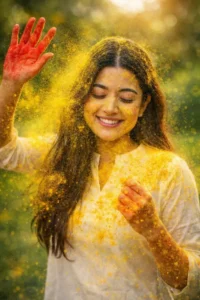
Ultra-realistic Holi festival portrait using my uploaded photo as the face reference, keep my exact facial features and natural smile unchanged, candid joyful expression with eyes gently closed, head slightly tilted down, long straight hair falling naturally over shoulders, wearing a simple white traditional kurti, outdoor park setting with lush green blurred background and soft natural daylight, vibrant yellow gulal powder exploding across the frame and covering face, hair, and dress,
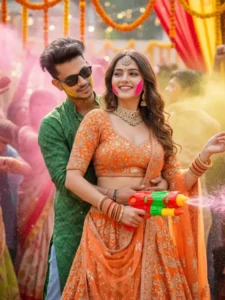
A hyper-realistic, ultra-cinematic festive Indian celebration scene in 8K resolution, vertical composition. In the foreground, a beautiful young Indian woman wearing a traditional orange embroidered lehenga choli with heavy detailing, deep neckline blouse, matching dupatta, and elegant jewelry including necklace, earrings, bangles, and waist chain. Her long wavy brown hair flows naturally, soft makeup with glowing skin, smiling confidently while dancing. There should be some color on her cheek.
Behind her, a stylish young Indian man wearing a green printed kurta over a casual shirt, light blue jeans, and black sunglasses. He has stylish messy hairstyle, holding colorful Holi powder (gulal) in his hand, leaning slightly toward her with a playful, romantic expression.
Background filled with joyful people celebrating Holi, throwing vibrant pink, yellow, and orange color powder into the air. Decorative string lights, marigold garlands, and festive drapes create a warm golden glow. Cinematic shallow depth of field, soft bokeh lights, dynamic motion, floating color particles, ultra-detailed fabric textures, natural skin tones, realistic lighting, joyful Bollywood festival vibe.
Shot on a professional DSLR, 85mm lens, f/1.8, high dynamic range, ultra-sharp focus, cinematic color grading, photorealistic, no cartoon, no illustration. Exactly same facial features of both male and female."
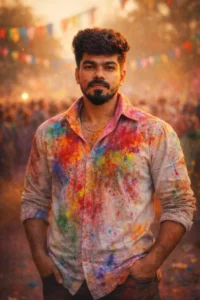
Ultra-realistic cinematic DSLR portrait of a young Indian male (exact face match from reference).
Subject standing confidently, both hands casually in pockets.
Relaxed royal posture, calm dominant expression.
White shirt richly splashed with Holi colors, elegant yet powerful look.
Soft crowd blur behind, colorful flags and powder in air.
Golden hour lighting with cinematic color grading.
DSLR, 85mm lens, f/1.8, shallow DOF, ultra-realistic, full HD professional photography
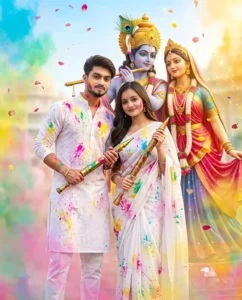
Full-body Indian couple in portrait orientation (1080x1350), boy smart & handsome (exact face & hairstyle), girl beautiful (exact face, long open hair, black kajal, pink lipstick), both facing camera with soft gentle smiles (no teeth showing), playful Holi pose - girl slightly in front, boy leaning from side with playful tilt, each holding high-quality Holi pichkari, faces and white Chikankari outfits splashed with vibrant Holi colors. Outfits: elegant, traditional, matching. Background: vibrant Radha-Krishna murti at Prem Mandir, Vrindavan, Krishna bluish-indigo with golden mukut & peacock feather, Radha in flowing red-pink-yellow drapery, flower garlands. Holi powders (pink, yellow, green, blue) floating, petals drifting, subtle colorful mist, bright daylight, warm golden highlights, cinematic HDR lighting, selective focus on couple & murti, soft blurred background, divine aura, gentle sparkles. Ultra-realistic, cinematic full-body photo, reel-style, vibrant yet serene devotional Holi scene.
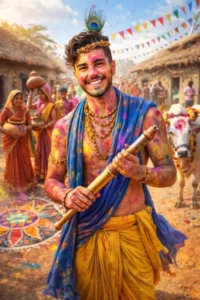
Ganrate A young village man 22s old dressed like Lord Krishna standing in a colorful desi village during Holi, wearing yellow dhoti, blue shawl, peacock feather on head, holding a traditional pichkari, face joyfully covered with gulal colors, mud houses and rangoli designs around, villagers in traditional clothes celebrating Holi, women carrying pots, children throwing colors, cows decorated with flowers nearby, rural India atmosphere, bright sunlight, festive flags.
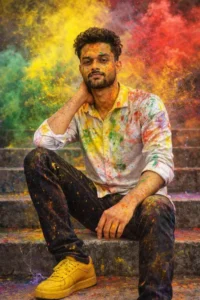
Uploaded person sitting on outdoor concrete steps during a Holi festival celebration. covered in vibrant splashes of yellow, green, and red powder across his face, hair, clothes, and arms. He wears a white full-shirt, slim-fit black jeans, and bright yellow sneakers His pose is relaxed and confident, one hand resting on his neck and the other on his knee. Colorful powder bursts dramatically in the air around him, forming a dynamic cloud of yellow, green, red in the background.
How To Create Image With Happy Holi Ai Photo Editing Prompts
Now, if we talk about creating a photo, you can create one like this quite easily. I’ve explained the different styles here, which is absolutely correct. What you can do is copy the style you like from the various prompts provided. Then, go to the Google Gemini website, the link to which I’ve added below. You can go there directly by clicking on it. Once there, first paste the prompt and select the Create Image option. Then, go to the Plus option and select a photo. You need to upload a selfie to the photo. There’s nothing more to do. Then, select the Pro model. This provides excellent results. You should know that it’s the best model so far. Select it and click Generate. Your photo will be ready, just the way you want it.
Advanced Editing Techniques For The Best Prompts.
If you want to create a good product, you should definitely apply this technique. You should always add depth fields to your photos, such as blurring the background and keeping the subject clear. This will ensure that your subject is properly visible in your photo. Now, you can keep the lighting here cinematic. You can use soft light, golden light, or rim light. You need to specify the lighting you want. You will get that lighting in your photo. You will also need to add a camera lens here. If you’ve ever used a camera, you’ll know about lenses. You can add a 50mm, 85mm, or wide-angle lens accordingly, or you can simply tell the AI to provide the best camera angle you think will produce professional results. It will provide the best results for you. Don’t rely entirely on your AI. You have to tell him how the lighting is, what the background is, there are some things that he can understand and there are some things that you have to tell him about.