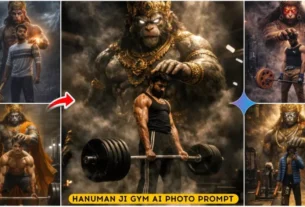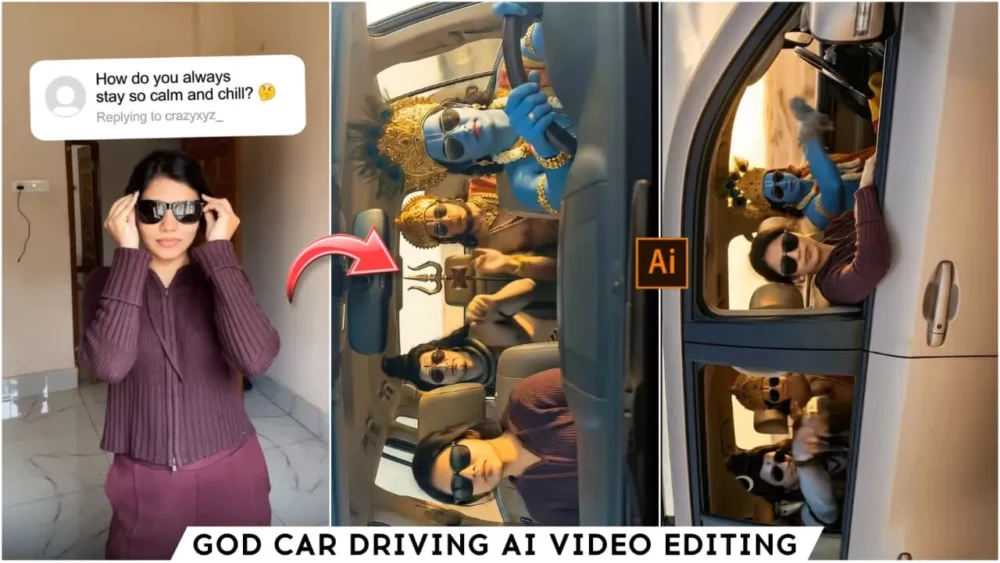
God Car Driving Ai Photo & Video Editing – You’ve probably seen some edits on Instagram recently where people are shown driving God’s vehicle. These kinds of photos and videos are going viral, and people are creating them in all sorts of different styles. In this article, you’ll learn how to create these kinds of photos. We’ll also explain how to convert these photos into videos. You’re going to love this article! You should definitely try this out. Now is the perfect time to use this technique, because this type of editing is very popular and trending right now. People really love it. Just follow all the steps I’ll explain..
Details Of God Car Driving Ai Photo & Video Editing
As we told you, you’ll find these kinds of edits here. Both photos and videos are going viral, so let me explain what kind of editing is involved. The edit will look something like this: you’re driving a car, and a deity is sitting next to you, happily enjoying the ride. There are other variations as well, where the deity is driving the car. Since these are videos, you can’t create them easily. I’ll show you how you can create these viral photos and videos. The photos are also going very viral, and it’s important to create them because if there’s a trend, you need to follow it, especially if you want to stay relevant on Instagram and go viral. You should definitely try creating these kinds of things.
How To Create Image
First, we’ll teach you how to create photos because only by creating photos can you convert them into videos, and you can also post the photos you create. I’ve shared several different prompts for different styles. You can create different photos using these styles. If you want to add a specific deity to the image, you can include their name in the prompt. Once you write it, your photo will be ready with the deity included. Here’s what you need to do: First, copy the prompt. Below, you’ll find a button that says “Create Image.” Click on it. After clicking, you’ll go to the Google Gemini website. This website is designed to generate your photos. First, you need to paste the prompt there. Then, go to the plus option and upload a selfie of yourself. This photo is needed for reference because if you upload your selfie there, the generated photo will include your image. After uploading, click “Generate.” In just a few seconds, your photo will be ready.
Images Prompts:-

Use the uploaded photo as the PRIMARY and ONLY face reference for the front passenger seat person.
The person in the front passenger seat must be exactly the same person from the uploaded image, with 100% identical face, skin tone, facial structure, beard/hair, and identity.
Do not create a new face. Do not modify the identity.
Scene: A modern luxury SUV driving on a desert highway during golden hour.
Front seats:
– Driver: Lord Hanuman, muscular body, monkey face, golden crown, divine ornaments, wearing black sunglasses, hands on steering wheel.
– Front passenger: The person from the uploaded photo, wearing black sunglasses and seatbelt, cinematic lighting on face.
Back seat:
– Lord Shiva with ash-covered blue skin, rudraksha mala, long tied hair, calm expression, sunglasses.
– Lord Rama with blue skin, golden crown, royal divine look, sunglasses.
– Lord Ganesha with elephant head, traditional ornaments, peaceful expression.

Ultra-realistic cinematic photograph, hyper-detailed, realistic skin texture, shallow depth of field, dramatic lighting, movie poster style, modern + ancient fusion, 8K quality, sharp focus.
exact face match, identity lock, reference image priority, no face variation, no face morphing, photorealistic face preservation
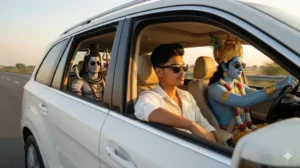
Ultra-realistic cinematic interior shot of a luxury SUV car driving on an open road during golden

hour.

Camera angle is wide and slightly tilted from the dashboard, capturing all passengers clearly.

Driver seat: Lord Shiva, blue skin, calm divine expression, wearing sunglasses, hands confidently on the steering wheel, trident (trishul) visible behind the seat, subtle divine glow.

Front passenger seat: A young Indian boy (modern look) wearing sunglasses, stylish casual outfit, confident and relaxed expression (replacing the girl with a boy).

Back seat:- Lord Krishna with blue skin, peacock feather crown, wearing sunglasses, relaxed modern-divine vibe
How To Create A Video?
There are different platforms for creating videos, but I’ll tell you about the free ones that will work well for you. Your video will be created perfectly. For this, you can use Google Flour. This website gives you a lot of free credits. You can use them to generate your video. You will find a “Create Video” option below. Click on it, and then you will go to the Google Play website. Sign up with your email there, and then go to the “New Project” option. There you will find a “Text to Video” option. Change it to “Frame to Video.” This will allow you to upload your selfies and generated images by clicking on the plus icon. Then, you need to paste the video prompt that we have provided in the article. You will find the video prompt separately. Paste it there and then generate the video. It will take a few seconds, and your amazing video will be ready.
Video Prompts:-
Generate a hyper-realistic cinematic video using the uploaded reference image only. CRITICAL FACE IDENTITY LOCK: Facial structure must remain 100% identical to the reference image No face reshaping, no beautification Geometry, proportions, and features must stay fixed MICRO EXPRESSION (VERY SUBTLE): Add a barely noticeable micro-smile Smile intensity 2–3% only No teeth visible Lips remain closed No lip corner stretch Expression should feel like inner happiness, not an obvious smile Face should still look almost neutral ENJOYMENT THROUGH BODY LANGUAGE: Gentle rhythmic head-nod (pitch rotation ±6–8 degrees) Soft shoulder bounce synced to beat Slight upper torso sway Rap / DJ remix enjoyment vibe Characters & Seating (unchanged): Driver: Lord Shiva Front passenger: uploaded human Back middle: Hanuman Ji Back right: Vishnu Ji All four characters share the same micro-smile + rhythmic movement, enjoying the music calmly. Camera: Front dashboard view Slow cinematic push-in toward windshield Single continuous shot Lighting & Mood: Warm golden sunset light Cinematic reflections Negative Prompt: Strong smile, teeth showing, expression change, laughing, talking, lip movement, face deformation, identity loss. Duration: 6–8 seconds Aspect ratio: 9:16 Style: Ultra-realistic cinematic
Conclusion
This is how you can create this viral video of the deity. I’ve shared all the details with you. I’ve also explained the option for creating photos and videos. Now it’s up to you how much creativity you use in the editing process, because it’s all about using your imagination. Unless you create something unique and creative, your video won’t go viral. You can create a video like this, but it might not go viral. That’s why I say, if you learn to create any video using this method, use it as a reference. Get inspired by it and add something new to it.