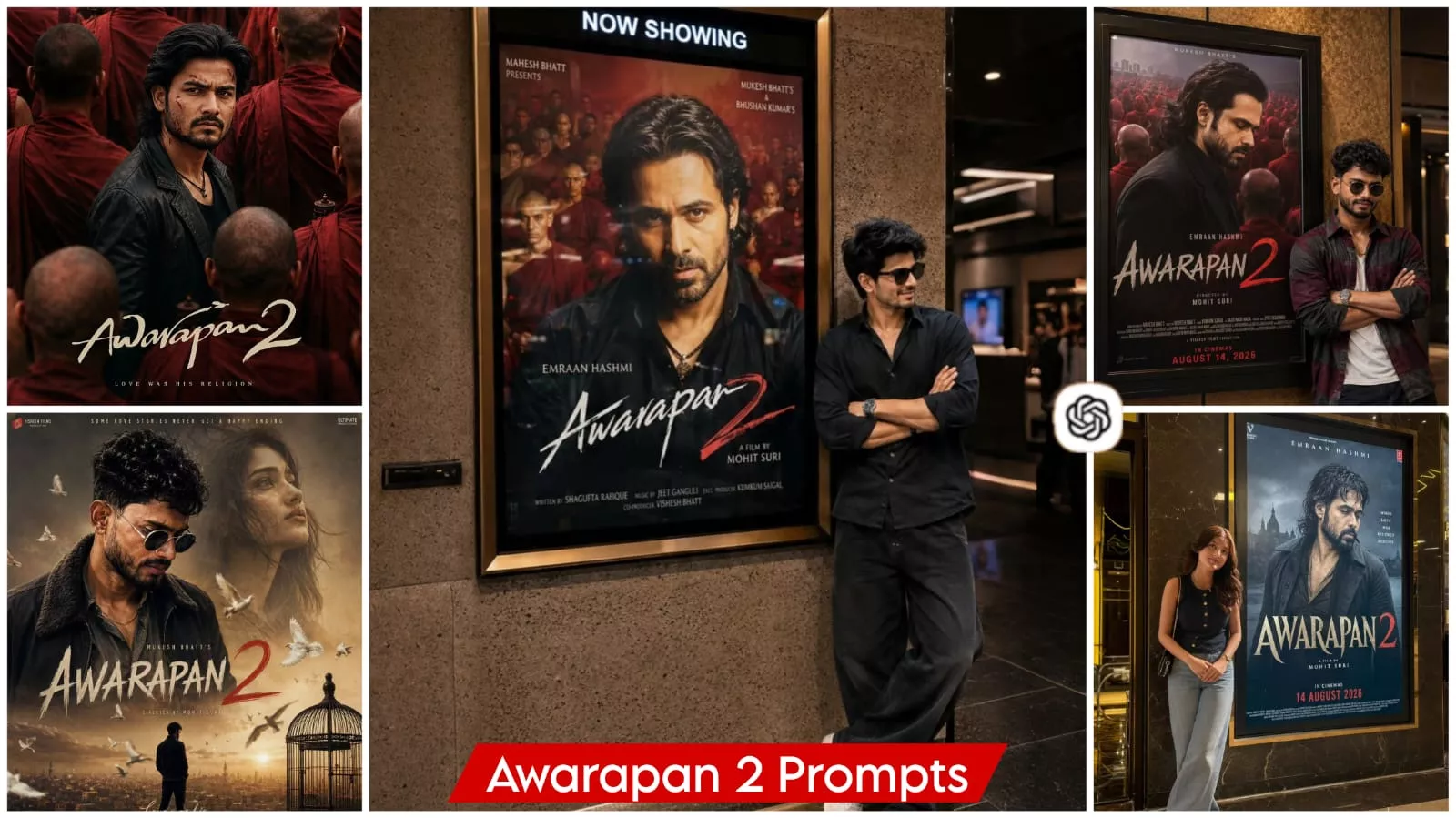
Awarapan 2 Movie Ai Photo Editing Prompt – Certain movies instantly come to mind—their songs, characters, and overall visual vibe stay with us. One such movie is Awarapan, and with a sequel on the horizon, people are going wild for it; they are editing videos to its songs, creating photos inspired by the film, and making creative posts. Let me tell you, achieving this kind of editing is actually quite simple today. If you follow the right method, you can get excellent results. In this article, I will explain two ways to do this: one involves photo editing, and the other uses a template. This editing process relies on a specific code that you can use to create your own edits.
Process OF This Viral Editing
So, what kind of editing are we talking about here? Well, I’m going to discuss two different methods. The first involves editing a photo: your standard photo will be transformed into a specific style—like a movie poster or a scene from a film—capturing a memorable moment that resonates with people. The second option involves video editing, where we’ll use a video clip and apply a “flashback” effect; this style is very popular and widely used. Let’s get started—I’ll show you how to create the photo first, and then the video.
How To Create Image With Awarapan 2 Movie Ai Photo Editing Prompt?
When it comes to the images, you will find various prompts available here. You can use these prompts for your editing; simply copy the style that appeals to you. Next, open ChatGPT, as this model generates the best editing results for us. We will paste the prompt there and then click the plus (+) icon to upload a reference photo. The reference photo should clearly show your face, as your face is what establishes your identity. Finally, hit ‘generate,’ and it will create a perfect image for you—the result will be truly impressive. Awarapan 2 Movie Ai Photo Editing Prompt.
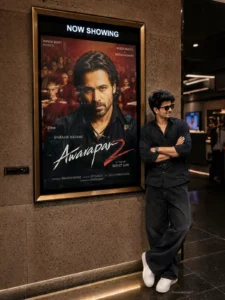
Use uploaded photo as STRICT IDENTITY REFERENCE. Keep face, hairstyle, expression, skin tone, outfit, hijab/hair, body proportions and overall appearance 100% identical. No beautification, no face editing, no AI face replacement, no age modification.
EXACT SCENE RECREATION
Ultra-realistic luxury cinema lobby photograph. Subject standing naturally beside a giant illuminated Awarapan 2 movie poster display mounted on a premium marble wall. Original Awarapan 2 poster featuring Emraan Hashmi remains completely unchanged.
Luxury PVR/IMAX cinema environment, warm golden ambient lighting, polished marble floor reflections, realistic glass surfaces, premium theater atmosphere.
SUBJECT POSITION
The uploaded person standing beside the movie poster, naturally posing for a photo.
If male: confident casual pose.
If female: elegant natural pose.
Same clothing as uploaded photo.
Same face and identity preserved exactly.
Looking toward camera.
Realistic shadows and reflections.
POSTER LOCK (DO NOT CHANGE)
Keep the original Awarapan 2 poster exactly unchanged:
Emraan Hashmi remains inside poster.
Same title: AWARAPAN 2
Same typography.
Same colors.
Same background.
Same release text.
Same poster design.
Same frame size and placement.
CINEMA ENVIRONMENT
Luxury multiplex lobby, marble wall, realistic reflections, premium movie-promotion display, DSLR photography look, cinematic depth of field, natural perspective, authentic theater lighting.
IMPORTANT
Only replace the audience standing beside the poster.
Do not modify:
Awarapan 2 poster
Emraan Hashmi
Movie title
Release date 14 August 2026
Cinema frame
Wall texture
Camera angle
Overall composition
 bottom-right corner.
QUALITY
Ultra-realistic DSLR photograph, 8K Ultra HD, HDR, cinematic lighting, professional movie-premiere photography, hyper-detailed, viral Instagram-quality image.
ASPECT RATIO
4:5 Vertical.
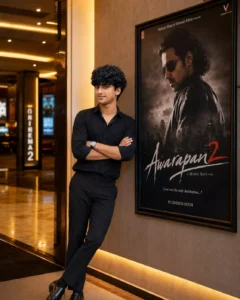
Use my uploaded photo as the exact facial reference and preserve my face, hairstyle, skin tone, facial structure, and natural identity with maximum accuracy. Create a photorealistic full-body portrait of me standing confidently inside a premium cinema lobby beside a large framed Awarapan 2 movie poster. Dress me in a stylish all-black outfit featuring a fitted black shirt with rolled sleeves and black trousers. Pose casually with arms crossed, body slightly leaning toward the wall, and look directly at the camera with a calm expression. Add warm cinematic ceiling lights, textured walls, realistic shadows, shallow depth of field, DSLR photography, detailed skin texture, HDR, ultra-sharp 8K, vertical 4:5.
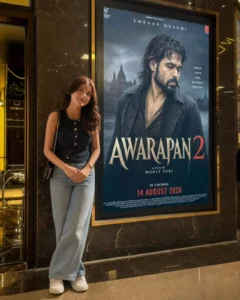
Use the uploaded photo as a STRICT IDENTITY REFERENCE. Keep the face, hairstyle, expression, skin tone, outfit, hijab/hair, body proportions, and overall appearance 100% identical. No beautification, face editing, Al face replacement, or age modification. Recreate an ultra-realistic luxury cinema lobby with the person naturally standing beside the giant illuminated original Awarapan 2 poster featuring Emraan Hashmi. Keep the poster completely unchanged, including title, typography, colors, background, release text, frame, and placement. Use premium marble walls, polished floors, realistic reflections, warm golden lighting, glass surfaces, and cinematic depth of field. Preserve camera angle and composition. Add realistic shadows and DSLR photography quality. 8K HDR, 4:5 vertical.
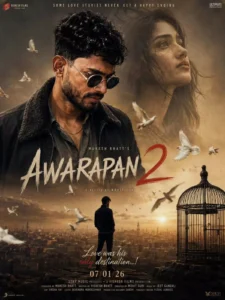
A cinematic movie poster for a dramatic film titled "Awarapan 2." In the foreground, a rugged, intense man with dark hair and a beard stands prominently, wearing a dark jacket with a fur-lined collar over a gray shirt. In the background, there is a large, ethereal, and slightly translucent portrait of a woman looking upward with a melancholic expression. In the center-bottom, a lone man stands in a landscape overlooking MUKESH BHATT'S a sprawling, dusty city at sunset. A large birdcage is placed near him, and a swarm of pigeons is flying throughout the AWARAPAN scene, adding a sense of movement, posters include a tagline "Love was his only destination...!", all set against a nostalgic, sun-drenched, and emotive atmosphere., Several white pigeons are flying across the scene, creating a sense of motion and contrast against a warm, and cinematic atmosphere 32k ultra hd enhance make the espect
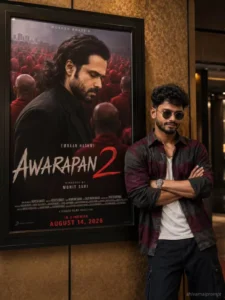
AWARAPAN 2 CINEMA HALL MASTER PROMPT (Audience Version)ChatGPT Prompt GuideUse uploaded photo as STRICT IDENTITY REFERENCE. Replace only the person standing beside the poster with the uploaded person. Keep face, hairstyle, beard, expression, skin tone and body proportions 100% identical. No face swap effects, no beautification, no Al face changes. IMPORTANT LOCKKeep the original Awarapan 2 movie poster featuring Emraan Hashmi i ex exactly unchanged inside the cinema frame. Do not modily the poster, actor, title, monks crowd, colors, typography, credits, lighting, or poster design.SCENEUltra-realistic cinema hall 2026 photograph. Large illuminated cinema poster frame mounted on a textured wall. Original Awarapan 2 poster visible inside the frame exactly as in the reference image. Google Gemini Tutorial The uploaded person is standing beside the poster, leaning naturally against the wall with folded arms and a confident smile. Realistic casual black outfit. Natural body posture. Looking toward camera
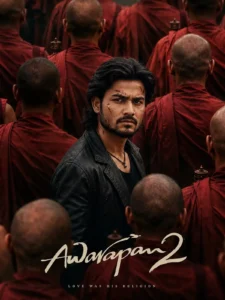
Use the uploaded reference image ONLY as the identity/face reference for the central male character. Preserve the person's facial identity, facial proportions, skin tone, eyes, nose, lips, jawline and overall recognizable appearance. Do not copy any existing poster or movie image.

Create a vertical 9:16, ultra-realistic, high-end Bollywood crime-drama movie poster with a dark, intense, mysterious and emotionally powerful atmosphere.

CENTRAL CHARACTER

Place the reference person as the main character in the exact visual position of a cinematic hero standing in the middle of a dense crowd.

He is shown from approximately the waist/chest up, slightly turned sideways while his head turns toward the camera. His shoulders and body are angled slightly away from the viewer, but his face looks directly toward the camera..

Give him a very serious, angry and emotionally exhausted expression:

deeply furrowed eyebrows

intense, piercing eyes slightly narrowed eyes

tight lips

strong, serious jaw

subtle expression of pain, anger and determination.

no smile

natural realistic facial tension

HAIR & BEARD

Transform the person's hairstyle into medium-long, thick, naturally messy dark black hair, swept backward with loose strands around the sides and slightly longer hair at the back.

Add a full, naturally grown dark beard and moustache, masculine and slightly rugged rather than perfectly groomed.

The beard should look realistic and naturally connected to the person's original facial structure.

FACE MARKS/WOUNDS

Add several small, realistic superficial scratches and dried-blood marks on the face, especially:

or two thin scratches near the forehead/temple

a small scratch on the cheek

a few subtle dried-red marks around the beard/cheek area

Keep the marks cinematic and realistic, not gory or exaggerated. The person's face must remain clearly recognizable.

OUTFIT

Dress the character in:

jacket black slightly worn leather jack simple black/dark crew-neck shirt underneath

subtle black necklace with a small pendant

The jacket should have realistic leather texture, natural folds and slightly rugged detailing.

BACKGROUND

Surround the central character with a large crowd of bald Buddhist-style monks wearing

Most monks should be facing away from the camera, creating a crowded wall of red robes around the central character.

deep red/maroon robes.

Some monks should be:

close to the camera and partially blurred

positioned in the foreground

positioned behind the character

partially blocking the lower and side portions of the frame

The central character must remain the clear visual focus.

Add a few subtle traditional metallic prayer/ritual objects among the crowd.

COMPOSITION

Use a highly cinematic composition:

central character positioned slightly below the vertical center

crowd surrounding him from every direction foreground monks larger and slightly out of focus

background monks progressively softer and more atmospheric

central character sharply focused

strong depth of field

natural perspective

realistic crowd density

no empty background

The image should feel like a frame from a big-budget Indian crime/thriller film.

LIGHTING & COLOR

Use dark cinematic lighting with warm muted tones.

Dominant colors:

deep maroon/red robes

black clothing dark brown shadows

warm skin tones

subtle golden highlights

Use soft directional cinematic light on the central character's face, creating dimensional facial shadows while keeping his eyes clearly visible.

cinematic color grade.

Add subtle film grain, atmospheric haze, realistic shadows and a slightly desaturated

CAMERA/QUALITY

Professional cinema-camera photography look.

vertical 9:16 composition

realistic 50mm cinematins.

shallow depth of field

sharp fasialporés realistic hair strands

realistic beard texture

realistic leather texture

TEXT

natural skin texture

contr cinematic contrast

subtle film grain ultra-detailed

photorealistic

premium theatrical movie-poster quality

4K/8K-level detail

At the bottom of the poster, add elegant handwritten cinematic title typography:

"Awarapan 2"

Use large cream/off-white brush-script lettering with a sophisticated Bollywood

movie-poster aesthetic.

Under the title, add a small elegant tagline:

"LOVE WAS HIS RELIGION"

Keep the typography integrated naturally into the composition without covering the

character's face.

IMPORTANT IDENTITY RULE

The uploaded reference photo is the only identity reference. Keep the person's face recognizable and consistent. Do not replace the face with another person. Do not make the character look like a celebrity. Do not alter the fundamental facial structure.

NEGATIVE PROMPT

Avoid cartoon/anime appearance, artificial Al skin, plastic skin, excessive beauty retouching. distorted face, different person, extra limbs, deformed hands, duplicate character, oversized head, unnatural beard, fake-looking hair, excessive blood, gore, exaggerated wounds, smiling expression, bright cheerful colors, modern casual background, empty background, low resolution, blur on the main face, bad typography, misspelled title, watermark, logo, excessive sharpening, oversaturated colors.
VN Code –

How To Create The Viral Video ?
Now, let me tell you about another editing method—one that involves using a code. You’re going to love this approach because it’s incredibly simple: all you have to do is scan a code using an app called VN Editor. This app makes editing very easy. Here’s how to go about it: first, open the app. If you look at the top right-hand side, you’ll see a scanner-like icon; tap on it to scan the QR code. Select the code from there, and you’ll get access to the project file. Select and download it, then tap on it to open it. Once you do that, simply add your own clips, and your final video will be ready.
Conclusion
You can create Instagram trending edits in two ways. I’ve explained the editing steps for both. You can follow these steps to create them. If you find the results impressive, please create them and let us know what you understood, what you didn’t, and any other issues. If you’re having any problems, please let us know. We’ll explain things to you in more detail and encourage you to create even better edits.