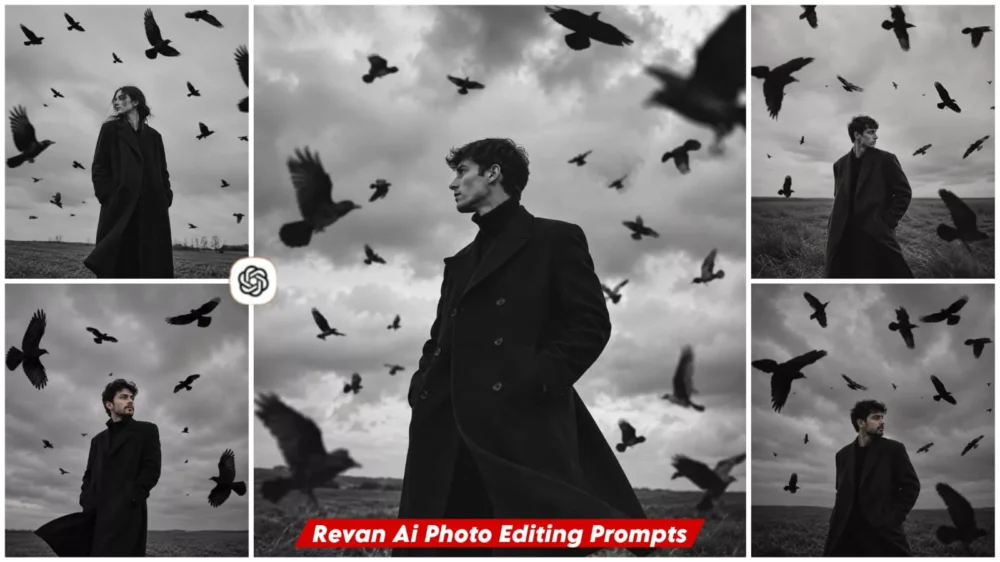
Aesthetic Raven Ai Photo Editing Prompt – Some such pictures on Instagram which people do not like immediately after seeing them. First they look at them carefully for a few seconds. Then again at the end they comment, brother how did you do it because such photos can only be actually created. You may have to work very hard to click such photos, so today we will learn in this article. How can we do such black and white aesthetic type raven editing and how will it be edited. What kind of look will you get in it. You will get all those details in this article and I will tell you the steps. Just follow them correctly and create it.
Details Of Aesthetic Raven Ai Photo Editing Prompt
So, what exactly is this editing style? Let me explain. Imagine yourself standing in a black suit, set against a highly aesthetic background. It isn’t a standard black-and-white look; instead, the sky behind you is filled with swirling dust and flying debris, creating a truly unique visual. When elements like debris are shown in motion, it adds a sense of motion blur to the photo. The result is so captivating that it becomes impossible to look away—and that is the true essence of this style: it avoids flashy glitz in favor of creating a mysterious, atmospheric vibe.
Why Has This Trend Suddenly Become So Popular?
Look? Until a few years ago, people wanted to be seen in bright and colorful pictures on social media, but now the audience is gradually turning to aesthetic photos in which people are showing their pictures. You can see them as having emotions and hidden secrets. People are working more on such things that when a crow is shown flying in such a photo, it seems like a very unique step. People want to understand what is the story behind it. Why are such people taking this photo? There must be something that is causing this photo to be taken, and this curiosity makes such photos memorable.
Difference Between A Basic Prompt And Pro Prompt?
Let me explain the difference between a basic prompt and a pro prompt. Suppose you want to create an image featuring a crow. With a basic prompt, you might simply say, “Create a photo of me with a crow, wearing a black jacket.” The result would likely be something generic that you wouldn’t really like. However, if you want to create a unique image, you would use a pro prompt: “Create a cinematic portrait of me in dark black-and-white tones, standing in a desolate forest or a similar setting, with a flock of crows flying in the background.” You would then specify the background details, describe the environment, and add lighting preferences—such as cinematic lighting or any other specific style. With this level of detail, your photo will turn out perfectly.
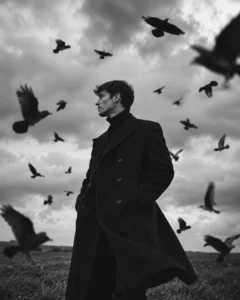
Keep my exact facial features and identity unchanged. Standing alone in a massive empty field. Wearing a long black wool trench coat. Hundreds of crows circling around me. Strong wind. Dark storm clouds. Black and white cinematic photography. Powerful mysterious energy. Looking toward the horizon. Fashion magazine quality. Ultra realistic.
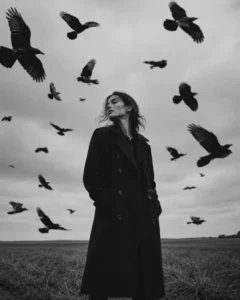
Keep my exact facial features and identity unchanged. Standing in a windswept field. Long elegant black trench coat.Messy windblown hair. Flock of crows surrounding me. Overcast sky. Black and white photography. Dark romantic gothic mood. Looking to the side. Cinematic realism. Photorealistic.
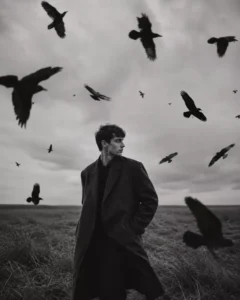
Keep my exact facial features and identity unchanged. Standing alone in a massive empty field.Wearing a long black wool trench coat. Hundreds of crows circling around me. Strong wind.Dark storm clouds. Black and white cinematic photography. Powerful mysterious energy.Looking toward the horizon. Fashion magazine quality. Ultra realistic.
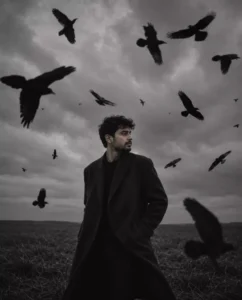
Keep my exact facial features and identity unchanged. Standing motionless in a dead grass field.Large black coat. Wind blowing through hair. Crows flying past camera lens. Heavy clouds overhead. Black and white film photography. Melancholic mood. Cinematic depth.Photorealistic.
How To Generate Image Like This?
We have already provided the prompts for creating these photos. Here is what you need to do: simply copy one of the prompt styles—there is a ‘copy’ button available for this purpose. Once you have copied the stylish prompt, paste it into the designated area. Then, click on the ‘plus’ option to upload a good photo of yourself; a selfie works best for achieving the best results. It will generate the final image for you in just a few seconds.
Conclusion
I have explained in detail how you can create these professional-looking photos through editing, and I hope you achieve great results. If you like what I’ve shown here, let us know, and we’ll bring you even more amazing edits.