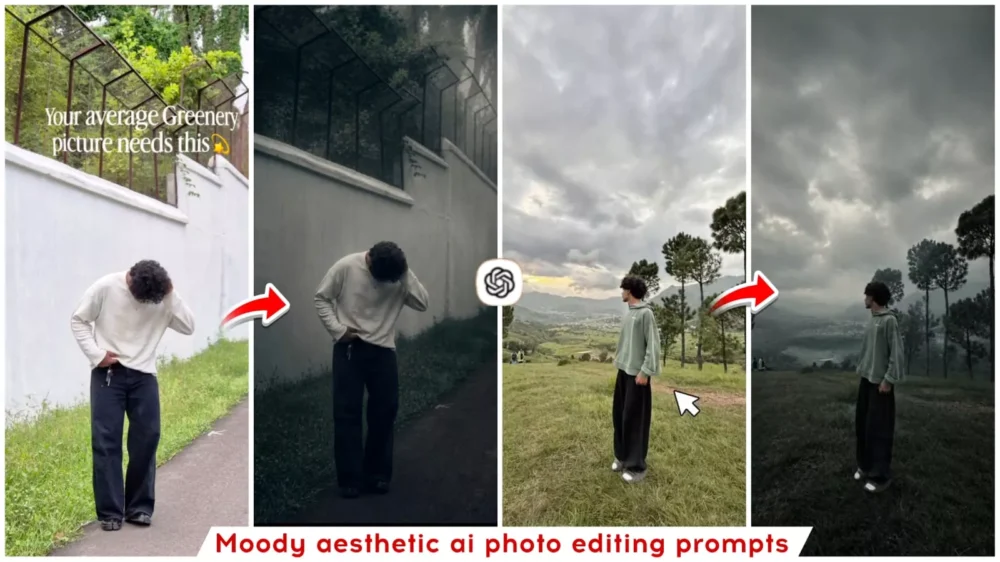
Moody Aesthetic Ai photo Editing Prompt – Some photos appeal to you because of the way they were shot, while others stand out due to their editing. There are certain images that instantly capture your attention and invite you to admire them closely; when you really look at them, you find yourself loving them. This reflects a unique photographic perspective, often enhanced by excellent color grading. In this article, I will show you how to easily create photos with that popular, aesthetic color style—the kind that often goes viral. You will learn the entire process step-by-step, and by following these instructions carefully, you can achieve this viral-worthy editing look yourself.
Details Of Moody Aesthetic Ai photo Editing Prompt
First, let’s understand how this photo effect works. When you use a standard photo, this tool converts it into a dark, cinematic style—giving it a forest-like aesthetic set against a dark background that makes the entire image appear moody and atmospheric. It alters the color combination to elevate your photo to the next level, so you are almost certain to love it. If you’d like to give it a try, I’ve provided the reference in the article.
What Is The Difference Between An Ordinary Photo And A Cinematic Photo?
Let me explain. Many people mistakenly believe that a “cinematic” photo simply means a dark photo, but the reality is quite different. People often think that by merely lowering the brightness or tweaking the lighting and colors, a photo becomes cinematic. However, creating a cinematic photo requires a precise, balanced adjustment of colors and a focus on the visual composition. Most importantly, you need to capture an emotional atmosphere. That is why, while a standard photo looks ordinary, a cinematic edit makes it appear truly unique.
Update :- I’m updating the editing section to add some new trends to this article so you can create more editing. It’s going viral right now. I wanted to share it here, so you can use it to create.
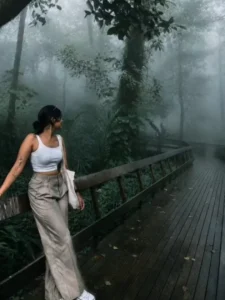
Transform this image into a breathtaking ultra-realistic foggy forest masterpiece. Add dense natural white fog covering the entire environment, creating a mysterious and cinematic atmosphere. Apply rich forest-inspired color grading with deep emerald green, dark teal, moss green, and earthy brown tones. Enhance the trees, foliage, and background elements to resemble a lush enchanted forest hidden in the mist. Introduce soft volumetric light rays subtly penetrating through the fog, creating depth and realism.
Increase overall image quality to ultra-high-definition 4K resolution with razor-sharp details, HDR enhancement, realistic textures, balanced contrast, and natural color harmony. Improve shadows, highlights, and dynamic range while maintaining a realistic appearance. Add a moody woodland aesthetic, dreamy fog layers, atmospheric perspective, and professional cinematic photography grading. The final result should look like a premium DSLR forest photograph captured during a cold misty morning, with ultra-realistic details, immersive depth, soft natural lighting, and stunning visual quality.
Style: Cinematic Forest Photography, Moody Nature, Dense Fog Weather, Volumetric Lighting, HDR, Ultra Realistic, Professional Color Grading, 4K Quality, DSLR Shot, Atmospheric Depth, Photorealistic.
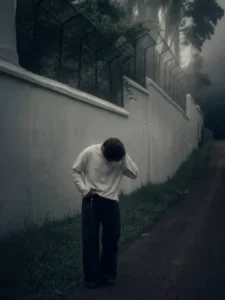
Cinematic moody forest color grading, muted colors, soft matte finish, deep shadows, low saturation, foggy atmosphere, cool green and grey tones, faded blacks, high contrast subject, subtle film grain, dreamy depth, soft natural light, desaturated red hoodie, teal and olive color palette, professional reel look, aesthetic Instagram cinematic edit, ultra realistic, sharp subject, background haze, 4K quality.
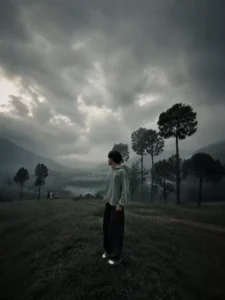
Cinematic moody forest color grading, dark green pine forest background, muted colors, soft matte finish, deep shadows, low saturation, foggy atmosphere, cool green and grey tones, faded blacks, high contrast subject, subtle film grain, dreamy depth, soft natural light, teal and olive color palette, professional reel look, aesthetic Instagram cinematic edit, ultra realistic, sharp subject, background haze, 4K quality.
IMPORTANT: Keep the exact same person, face, hairstyle, pose, body shape, and clothing unchanged. The subject must wear the same original outfit/dress as in the reference image. Do not change, replace, redesign, recolor, or generate a new outfit. Preserve all clothing details, fabric, patterns, logos, accessories, and fit exactly as they are. Only apply cinematic color grading and background atmosphere. No wardrobe changes, no costume changes, no fashion alterations.
Compare A Basic Prompt Vs A Cinematic Prompt
The biggest issue arises when someone wants to create a cinematic photo: instead of using the right prompt, they might simply write something like, “Make this photo cinematic.” A tool cannot effectively transform your photo based on such a brief instruction; it will only produce the best result possible within its own limitations. If you want a perfect photo, you need to provide detailed specifications. You should describe what your face looks like in the photo, the setting or atmosphere, the color palette (such as the level of darkness), and the type of lighting—whether it is natural, realistic, or something else. There are various other details you should include as well.
How To Use Moody Aesthetic Ai photo Editing Prompt
We have provided the prompt for creating this photo within the article; simply copy the one you like. Next, open ChatGPT, as we will be using it to create the image—just as the viral photos you see online are being made. First, paste the prompt into the chat box in ChatGPT. Then, upload your reference photo (which must feature your own face—do not use someone else’s) by clicking the plus (+) icon before hitting generate. Finally, generate the image, and it will create a fantastic photo for you.