Dark Cinematic Ai Photo Editing Prompts – In today’s times, you will observe that people no longer even visit photo studios, as they are now utilizing AI to create images that look even more professional than those produced in a traditional studio setting. You will notice backgrounds—such as the deep black backdrops often found in studios—replicated here with a similar dark aesthetic. Your face remains prominently highlighted, lending the image that distinct, professional studio look.
In this article, we will discuss precisely this type of editing—specifically, how you can effortlessly create these viral “dark portrait” style images. By following these steps, you are guaranteed to achieve excellent results, ensuring that your face integrates seamlessly without any visual mismatches. I will guide you through this process in a very simple manner, demonstrating how you can achieve this using just a single AI tool.
Details Of Dark Cinematic Ai Photo Editing Prompts
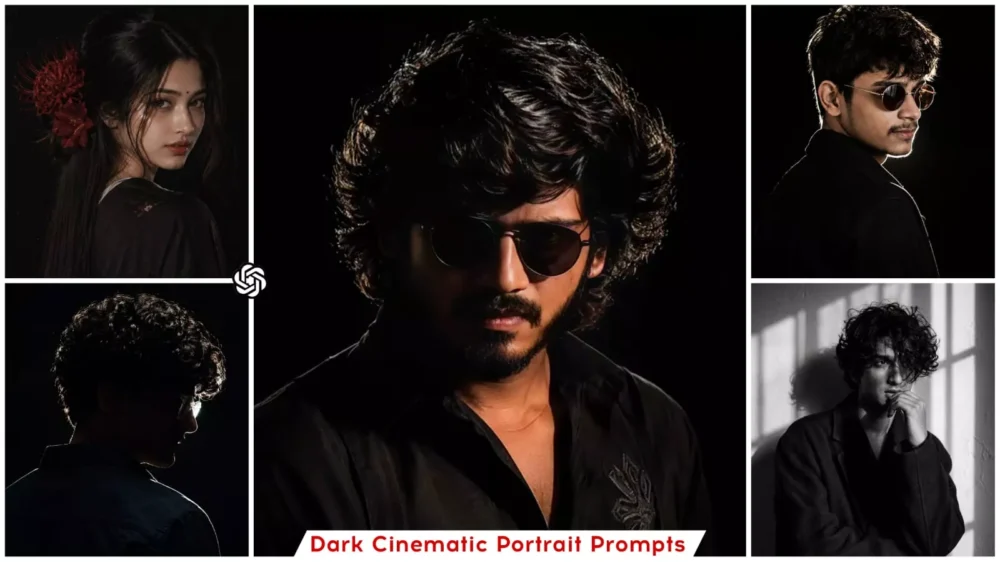
So, what exactly is this style? Well, it is a type of cinematic portrait editing in which your photograph retains an aesthetic quality. The background of the image is kept completely dark—specifically black—to ensure that the subject (our primary focal point) receives excellent lighting on their face. Consequently, the face appears much sharper. The skin tone takes on a distinctly cinematic look, and the overall image exudes a moody and dramatic vibe—creating a final result that looks exactly as if it were captured by a professional photographer.
Why Is This Trend Becoming So Popular?
Well, first and foremost, the photos generated by this trend possess a distinct “premium look.” This aesthetic quality makes them highly appealing to people, allowing you to use them as your Instagram DP, YouTube thumbnails, or as a profile picture on any other platform. Your photos take on a truly cinematic feel, creating a unique and distinctive image that stands out from your other photographs.
Furthermore, the AI technology embedded in this tool has made the editing process incredibly simple. Gone are the days when you needed an elaborate setup—requiring a professional studio, a DSLR camera, and precise lighting adjustments—to achieve such results. Now, you don’t have to do any of that; you simply need to specify the kind of lighting and background you desire, and the system automatically handles the rest.
What Are The Defining Characteristics Of This Edit?
The key identifying feature is that, first and foremost, you will notice a black background. Next, you will observe dramatic lighting, characterized by a strong light source illuminating one side of the face, while the other side remains shrouded in shadow. Furthermore, the edit features sharp contrast, creating a distinct and striking difference between the highlights and the shadows. The photograph evokes a mysterious and emotional mood, accompanied by cinematic color grading—specifically utilizing various color palettes, such as orange and teal, among others.
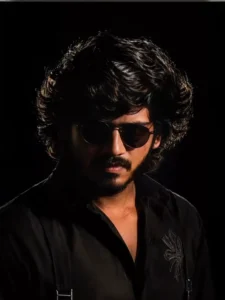
Ultra-realistic cinematic studio portrait of a young Indian man, front-facing pose with head slightly tilted down, eyes looking downward, serious and mysterious expression, black oversized curly textured hair with strong rim light highlights, wearing round black sunglasses and a black shirt, low-key lighting setup, dramatic side rim light outlining face and hair, deep shadows, dark black background, moody atmosphere, ultra detailed skin texture, sharp jawline, minimal light hitting the face, high contrast photography, editorial fashion portrait, volumetric lighting, DSLR quality, 85mm lens, shallow depth of field, ultra realistic, 8K, centered composition, Instagram aesthetic, cinematic color grading
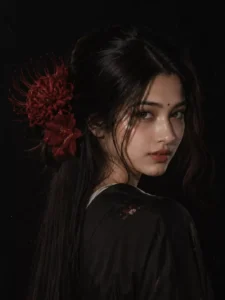
A girl in side profile pose, looking back at camera, long straight black hair, soft bangs, big red spider lily and red daylily flower on side of hair, wearing black kimono style outfit, dark black background, pale soft skin, neutral expression, no smile, moody aesthetic, japanese vibe, low key lighting, soft flash, high contrast, cinematic shadows, glossy lips, ultra realistic, 4k (And use flash film styles effect on instagram)
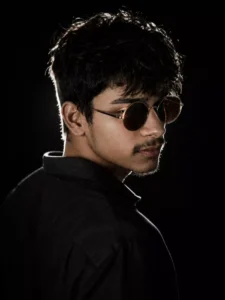
Create an Ultra-realistic cinematic dark poster dramatic over-the-shoulder pose of a young man (using the same face as uploaded image), camera positioned slightly behind the shoulder, 90-45 degree side profile facing right, strong rim light outlining the messy textured hair, nose and sharp jawline, deep black background, only the edges of the face glowing with white light, brown round sunglasses with silver rimmed reflecting and face tune and facial skin
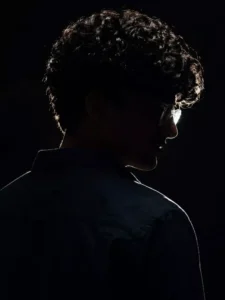
Create an Ultra-realistic cinematic dark poster, dramatic over-the-shoulder pose of a young man, camera positioned slightly behind the shoulder, 90-45 degree side profile facing right, strong rim light outlining the messy textured hair, nose and sharp jawline, deep black background, only the edges of the face glowing with white light, glasses reflecting a soft glow, mysterious shadowed face with almost no facial details visible, intense cinematic lighting
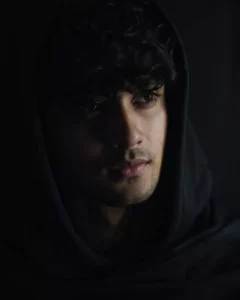
Ultra-realistic dark cinematic close-up portrait of a young man, wearing a black hooded cloak. One side of his face softly lit, the other in deep shadow. Messy hair, light beard, expressive eyes. Dark background, shallow depth of field, high contrast, dramatic cinematic mood.
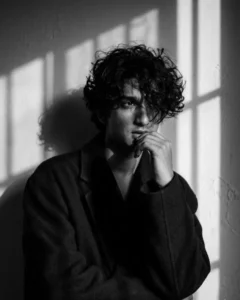
A black-and-white aesthetic portrait of a stylish me(use my image with accurate face 100%) standards on the in Wall dramatic lighting. He is wearing an oversized dark coat, with messy, voluminous hair partially covering his face. His pose is emotional and introspective, with one hand near his mouth and his head slightlytm turned to the side. Shadow from a window fall across the wall behind him, creating a moody and artistic atmosphere.
How To Create Image Using Chatgpt?
Now, when it comes to creating images of this kind, we can utilize a tool like ChatGPT. To generate them successfully, it is essential to have a well-crafted prompt; I have provided a detailed collection of excellent prompts in the accompanying article. You can choose whichever one appeals to you—there are prompts available in various styles. Simply copy the prompt you like, and then open ChatGPT.
Once there, the very first step is to locate the “Create Image” option. Click on the plus (+) icon to select it. Selecting this option ensures that your image will be generated successfully, without encountering any issues whatsoever. Next, click the plus (+) icon again to upload your reference photo. Finally, paste the prompt you had previously copied, hit “Generate,” and the tool will create and prepare your image for you.
Conclusion
You already know the reasons why this style is trending on Instagram. The fact is, the Instagram audience has a strong preference for high-contrast photos, cinematic visuals, and images with a premium aesthetic. With this specific editing style, the photos in your feed will stand out completely—they will quickly grab attention and fit perfectly into an aesthetic-focused page.