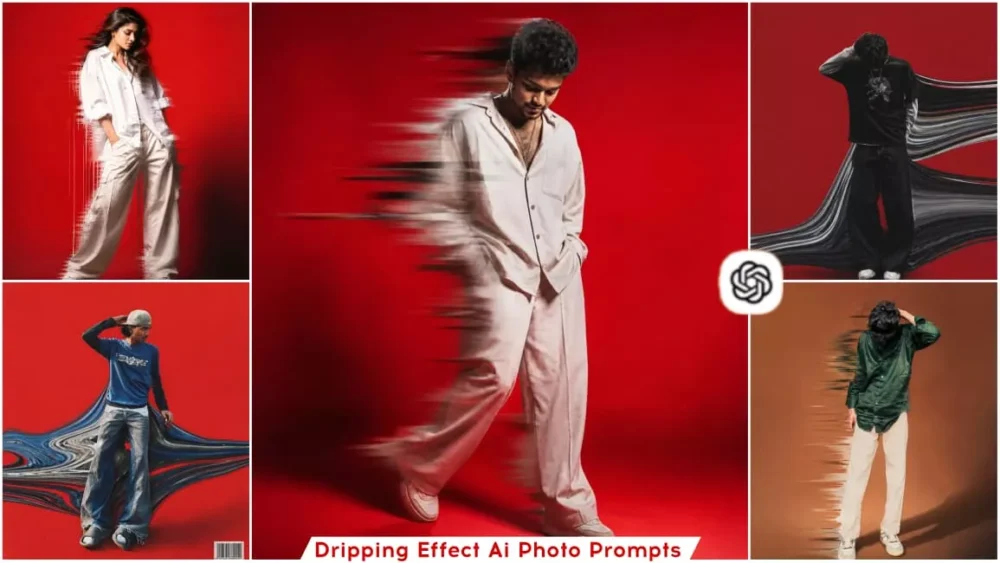
Dripping Effect Ai Photo Editing Prompts – On social media, unless you do something creative, people generally won’t ‘like’ your photos. Consequently, you often see various trends popping up—such as the Ghibli style, miniature effects, or other distinct artistic looks. People utilize these trends to generate unique images, and you, too, can effortlessly create these kinds of viral photos, as I will be outlining all the necessary steps in this article today. One such edit that is currently going viral is known as the “Dripping Effect.” In this style, the resulting image features elements appearing to drip or flow away from the subject’s body—resembling a liquid-like substance. While people may describe it in different ways based on their own interpretations, “Dripping Effect” is, in fact, its official name. If you wish to create this effect yourself, this article will provide a detailed, in-depth guide on the subject. We will cover how to apply this effect, why it has become so viral, and which tools—such as ChatGPT or others—are best suited for the task.
Details Of Dripping Effect Ai Photo Editing Prompts
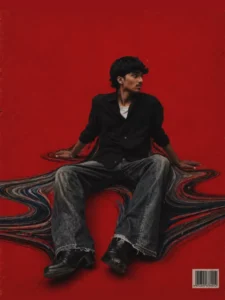
Now, let’s take a look at this “dripping effect”—what exactly is it, and what features can you expect to see? Let’s explore these details. Essentially, this technique involves creating a digitally manipulated version of your photograph. It features elements of digital distortion, a melting aesthetic, and RGB-style color effects. To put it in simple terms: the photograph appears as if it is melting or liquefying—specifically, the colors look fragmented or broken. It creates the illusion that the colors are dripping downward or flowing off to the side. The visual effect resembles screen distortion, and it can even be used to achieve a cyberpunk-style aesthetic—though, in this specific instance, I haven’t incorporated that particular look. I’ve simply applied the standard, straightforward dripping effect. You will notice digital wave-like patterns appearing around the subject’s face; this establishes a distinct artistic concept and gives the photograph a truly unique appearance.
Why This Currently Going Viral?
This particular style of photo editing is currently going viral because, with millions of people uploading photos to Instagram every minute, a specific challenge has emerged: only those images that grab attention at first glance manage to go viral. The effect featured here—the style in which these photos are being generated—does exactly that; it captures attention the very moment it is seen. When people come across such images, they offer a truly authentic and precise aesthetic, delivering a distinct cinematic look. Your photos are transformed into a dark, moody, and atmospheric style. Consequently, this compels viewers to pause their scrolling and take a closer look at the image. Furthermore, with the assistance of tools like ChatGPT, creating these photos has become remarkably simple; you can easily generate images like these by merely uploading a photo and providing a few basic instructions.
How Has ChatGPT Fueled The Trend Of Advanced Photo Editing?
As you may have observed, people often remark that the trend of photo editing is going viral at an astonishing pace—but it is crucial to understand the significant role ChatGPT plays in this phenomenon. Thanks to specific popular trends, AI-generated photos have begun to go viral on a massive scale. Consequently, people from all walks of life have gravitated toward this trend, enthusiastically creating similar images themselves. To cite a few examples of these popular trends, you have likely heard of the “Ghibli style.” You will also encounter “miniature-style” editing, as well as the distinct “Chibi style.” Similarly, the “Aesthetic Girl” style of editing has gained immense popularity. There are, in fact, so many such trends that if I were to start listing them all, the list would become incredibly long. These trends have provided social media creators with a fresh source of inspiration; creators have leveraged these ideas to produce their own unique images, resulting in their content going viral.
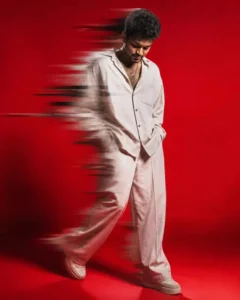
Create stylish young man standing in a dynamic pose, looking down, wearing oversized shirt and loose pants, minimal aesthetic fashion, solid bright red background, dramatic lighting, motion blur dripping effect  around the body, glitch smear effect, soft shadows, high contrast, cinematic look, ultra realistic,
4K, sharp details, editorial fashion photography style 4:5 ratio
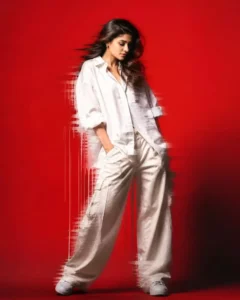
Create A stylish young women standing in a dynamic pose, looking down, wearing oversized shirt and loose pants, minimal aesthetic fashion, solid bright red background, dramatic lighting, motion blur dripping effect around the body, glitch smear effect, soft shadows, high contrast, cinematic look, ultra realistic,
4K, sharp details, editorial fashion photography style 9:16 ratio
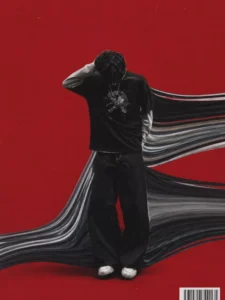
The background is a solid bold red with subtle grain and texture. From behind and beneath him, a smooth flowing glitch distortion stretches horizontally across the frame, forming wavy, ribbon-like streaks made from his clothing textures (denim blues, greys, muted tones). The distortion curves like liquid or melted fabric, wrapping around his legs and extending outward in a dynamic wave pattern.
Minimalist composition, subject centered, lots of negative space. Strong contrast between subject and red background. Cinematic lighting with soft shadows, editorial fashion photography style. Add subtle film grain, dust texture, and a printed poster aesthetic. Include a small barcode in the bottom corner for a graphic design touch. Ultra-realistic, high detail, 8K, sharp focus on subject, depth of field, modern streetwear vibe."
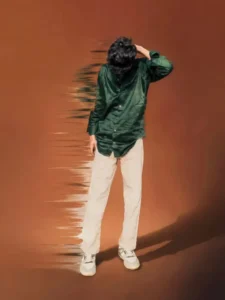
A stylish young man standing in a
dynamic pose, looking down,
wearing oversized shirt and loose pants, minimal aesthetic fashion, solid brighit brown background,
dramatic lighting, glitch smear etfect,
soft shadows, high contrast,
cinematic look, ultra realistic, 4K,
sharp details, editarial fashion
photography style
The background is a solid bold red with subtle grain and texture.From behind and beneath him, a smooth flowing glitch distortion
stretches horizontally across the frame
forming wavy, ribbon-like streaks made from
his clothing textures (denim blues, greys,
muted tones). The distortion curves like liquid
or melted fabric, wrapping around his legs and extending outward in a dynamic wave pattern.
Minimalist composition, subject centered, lots of negative space. Strong contrast between subject and red background. Cinematic
lighting with soft shadows, editorial fashion photography style. Add subtle film grain, dust texture, and a printed poster aesthetic.
Include a small barcode in the bottom corner for a graphic design touch. Ultra-realistic, high detail, 8K, sharp focus on subject, depth of field, modern streetwear vibe."
How To Create Dripping Effect Ai Photo Editing Prompts
To create photos like this, you must first learn how to use prompts effectively—a process I will guide you through in this article. Here is what you need to do: First, copy the specific prompt that we have shared with you in this article. Simply select and copy the one that appeals to you the most. Next, open ChatGPT. Accessing it is straightforward; you can either use the dedicated application or a web browser—either method allows you to proceed with ease. Once opened, your first step is to paste the copied prompt into the interface. Then, click on the “plus” icon to upload your reference photo. That’s it! Simply hit “Generate,” and the tool will instantly create a stunning image for you. The resulting photo will be generated in a style that precisely matches the prompt you selected. You can find prompts in various other styles—similar to the “dripping” effect you just created—available on our website.
Who Are The People Using This The Most?
You will find that it is predominantly used on Instagram profiles; people post it very frequently on the platform. Next come YouTubers who specialize in this type of editing—you will often see them showcasing such content. Some gamers are also utilizing it. As for artists—those who engage in creative work—while many of them create such visuals from scratch themselves, there are also some within this group who generate these types of photos using AI tools. Additionally, social media influencers with large followings are also readily posting these kinds of photos.