Trending Dual Pose Butterfly Effect AI Photo Editing Prompts – Friends, currently, AI-based photo editing is trending massively on social media. Nowadays, new styles of photo edits are going viral almost daily—edits that can be created with remarkable ease. People are utilizing this editing technique to make their own photos go viral. This trend is incredibly simple to replicate. In today’s article, I will teach you how to perform this “Double Exposure AI Photo Editing.” You have likely seen numerous examples of this double-exposure style across social media platforms, as it is currently one of the hottest trends. So, if you wish to try your hand at this editing—and create images of yourself in this unique style—simply follow along with this article. I will provide you with specific “image prompts” and guide you step-by-step on how to use them to generate these edits. Stay tuned to the article, as the entire process will be explained in complete detail.
Details Of Trending Dual Pose Butterfly Effect AI Photo Editing Prompts
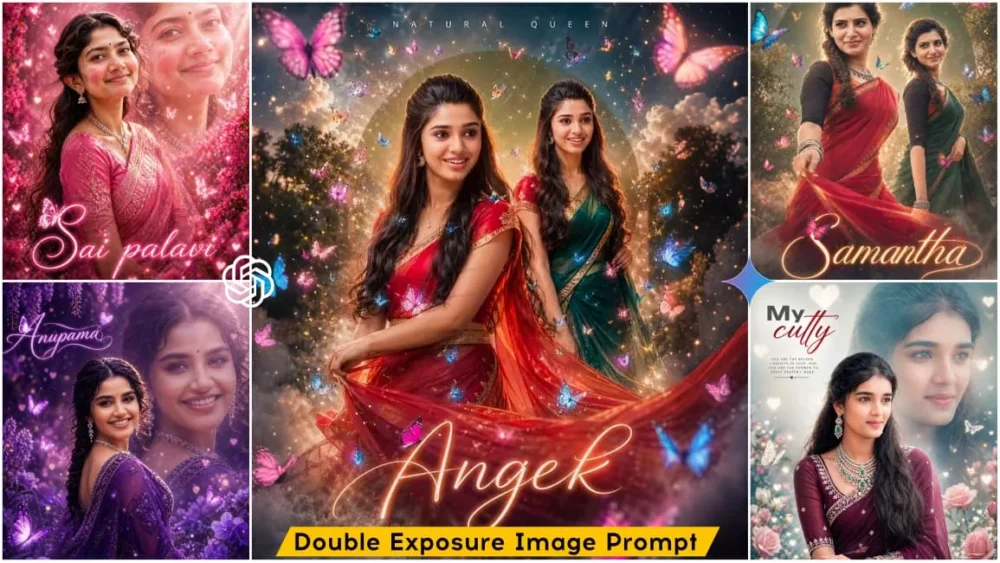
First, let me provide you with full details regarding this photo editing style in this paragraph. This editing technique features a “Double Layer Effect,” which essentially creates two copies of your original image; although it remains a single photograph, it is transformed into a dual-image composition. Furthermore, the “Double Exposure” editing style applied to each of the two images is distinct—each differs significantly from the other in terms of its visual effects. You will also find a “Butterfly Motion Effect,” wherein luminous butterflies appear to flutter around the subject. Additionally, the edit incorporates a “Particle Glow Effect” that casts a radiant shimmer across the entire image. A “Cinematic Background” style has been utilized, characterized by a soft focus and lighting adjustments tailored to the overall mood of the scene. Finally, a “Text Style Element” is included, allowing you to fully customize the text at the bottom of the image according to your preference; you can insert a caption, a quote, or anything else you desire—or, if you prefer, you can simply add your own name.
Best Way Of Proper Photo Selection:
Friends, if you wish to create a high-quality image, there are certain points you must keep in mind regarding the reference photo you provide. Paying attention to the type of image you use will ensure that the final AI-generated output appears completely realistic and visually appealing. When selecting a reference photo, you have the option of choosing either a full-body shot or a half-body shot; however, it is crucial that your face is clearly visible and your facial features are sharply defined. Furthermore, the clothing you are wearing should be relatively simple and understated; avoid using images where you are wearing outfits with overly intricate or complex designs. Additionally, you must always use a reference image featuring a single face. If you provide an image containing multiple faces, the AI system will be unable to properly detect and identify your specific features, leading to facial matching errors in the final output. Therefore, always prioritize selecting a clear, high-resolution image that distinctly displays your face. By adhering to all the guidelines and instructions outlined above, you will ensure that your photo editing process proceeds flawlessly, yielding truly spectacular results.
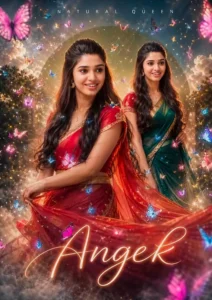
Create a hyper-realistic, ultra-detailed worm’s-eye cinematic portrait of the same young South Indian woman from the reference image (strict 100% face preservation — identical facial features, skin tone, hairstyle, expression, no changes at all). Scene Composition: Two overlapping opposite-direction poses: 1. Primary Pose (Front): Twirl motion, wearing red half saree with gold border, long black hair flowing, cute wince expression, saree slightly motion-blurred. 2. Secondary Pose (Back/Side): S-curve pose, wearing green half saree, facing forward with a bright smile. Camera & Lighting: Worm’s-eye low angle cinematic shot Strong backlight + golden rim light glow Soft skin tones, HDR finish Shallow depth of field (bokeh background) Butterfly Effects (MAIN FOCUS): Lots of butterflies (aga aga feel) flying all around Different sizes (small + medium + large for depth) Colors: magenta, blue, cyan, soft pink, golden glow Some butterflies: Flying near face (slight motion blur) Resting on saree folds One sitting on letter "Angel" Add butterfly light trails + glowing wing particles Subtle butterfly wing shadow overlays on background Create a butterfly swirl spiral around the subject Background & Atmosphere: Misty dreamy environment Thick cinematic fog/smoke at bottom (rolling effect) Large sage-green circular graphic halo behind subject Soft clouds floating Slight blurred trees for depth Floating dust + spark particles Typography: Top: "NATURAL QUEEN" (clean spaced sans-serif) Bottom: "Angel" (big glowing cursive) Add magenta butterfly sitting on "A" Style & Quality: Hyper-realistic, cinematic, editorial photoshoot 4K Ultra HD Soft glow + dreamy feminine tone Studio-quality photo manipulation Realistic saree fabric physics Extra Enhancements: Butterfly glow reflections on skin Light bloom + lens flare Soft vignette edges Depth layering (foreground butterflies blurred) --ar 3:4 --v 6 --style raw --quality 2 --uplight
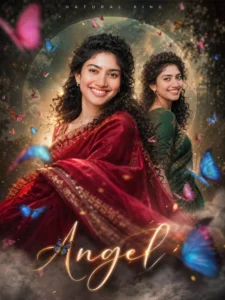
Create a hyper-realistic, ultra-detailed worm’s-eye cinematic portrait of the same young South Indian woman from the reference image (strict 100% face preservation — identical facial features, skin tone, hairstyle, and expression, no alteration at all). Scene Composition: Two overlapping opposite-direction poses of the same woman: Primary Pose (Foreground): She is in a dynamic twirl motion, wearing a traditional red half saree with gold border, long black hair flowing naturally over her shoulder, giving a cute wince expression. Saree fabric slightly motion-blurred for realism. Secondary Pose (Behind/Side): She stands in a graceful S-curve pose, wearing a traditional green half saree, facing forward with a bright, confident smile. Camera & Lighting: Worm’s-eye view (low-angle cinematic perspective) Strong backlighting with golden rim light glow Soft natural skin tones Shallow depth of field (background blur) Ultra sharp focus on face Background & Effects: Misty, dreamy environment with soft fog/smoke at bottom Large sage-green flat graphic circle behind subject (center composition) Subtle blurred trees for depth Floating fluffy white clouds Add multiple glowing butterflies (pink, blue, magenta) around subject Light particle dust, sparkles, and atmospheric haze Cinematic color grading (teal + warm highlights) Typography: Top: "NATURAL QUEEN" in clean, spaced-out modern sans-serif font Bottom Center: "Sai Pallavi" in large glowing elegant cursive font Add a small magenta butterfly sitting on the letter 'S' Style & Quality: Hyper-realistic, cinematic, editorial photoshoot style 4K Ultra HD resolution High dynamic range, studio-quality finish Soft glow, dreamy feminine aesthetic Professional photo manipulation Extra Enhancements: Add smoke swirl effects around feet Add butterfly wing light flares Slight lens bloom and glow Realistic saree fabric physics --ar 3:4 --v 6 --style raw --quality 2 --uplight"
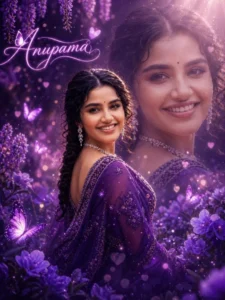
Create a highly realistic dreamy fantasy portrait of a beautiful young Indian woman wearing a rich deep purple saree with intricate embroidery and sheer fabric. She is standing in a magical garden filled with glowing purple flowers and soft floral elements.
Her hair is long, dark, and styled in a loose braid with soft curls around her face. She is wearing elegant diamond jewelry including earrings and a delicate choker. Her skin is glowing with natural makeup, soft blush, and a warm genuine smile.
Lighting is cinematic and magical: soft sun rays coming from the top right, creating a glowing halo effect around her hair. The environment is filled with purple tones, glowing particles, bokeh lights, and floating butterflies.
Add a double exposure effect: include a large, soft, semi-transparent close-up of the same woman's face in the background, blended smoothly and aligned behind her. The background face should feel dreamy, softly lit, and slightly blurred.
Add glowing heart-shaped bokeh and light sparkles throughout the scene to enhance the romantic fantasy mood.
Include a neon glowing cursive text “Anupama” at the bottom or side of the image, written in bright purple/pink light style, with a butterfly integrated into the text design.
Use shallow depth of field, ultra-detailed skin texture, realistic photography style, 8K quality, soft focus background, fantasy color grading.
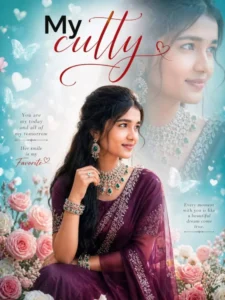
Create a highly realistic, dreamy romantic portrait of a beautiful young Indian woman wearing a deep maroon-purple saree with intricate silver embroidery and a sheer drape. She is sitting gracefully in a garden full of soft pink roses and pastel flowers. She is wearing elegant traditional jewelry including a green emerald and diamond choker necklace, layered necklaces, matching earrings, and bangles.
Her hair is long, dark, and styled in a thick side braid with soft loose strands around her face. Her skin is glowing, with natural makeup, soft blush, and expressive eyes, giving a gentle and romantic smile.
Use a double exposure effect: include a large, soft, semi-transparent close-up of her face in the background, blended smoothly behind her. The background should be teal-green with a dreamy blurred effect, soft bokeh lights, floating heart shapes, and butterflies.
Lighting should be soft, diffused, and cinematic, with glowing highlights and pastel color tones. The overall mood should be romantic, dreamy, and fantasy-like.
Add stylish red cursive text “My cutty” in the top left corner with a small heart design.
Ultra high detail, realistic skin texture, shallow depth of field, professional photography look, 8K quality.
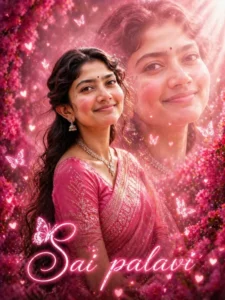
Create a highly realistic dreamy romantic portrait of a beautiful young Indian woman wearing a soft pink saree with delicate golden embroidery and a sheer fabric drape. She is standing in a magical garden filled with blooming pink flowers, roses, and soft floral elements all around.
Her hair is long, dark, slightly wavy, and styled naturally with soft curls framing her face. She is wearing elegant traditional jewelry including a diamond necklace and small jhumka earrings. Her skin is glowing with natural makeup, rosy cheeks, and a soft gentle smile.
Lighting is cinematic and magical, with warm sunlight rays coming from the top right, creating a soft glowing halo effect. The background is filled with pink tones, dreamy bokeh lights, floating heart shapes, glowing particles, and butterflies.
Add a double exposure effect: include a large, soft, semi-transparent close-up of the same woman's face in the background, blended smoothly behind her. The background face should be softly lit, dreamy, and slightly blurred.
Add glowing sparkles and heart-shaped light particles across the scene to enhance the romantic fantasy mood.
Include a neon glowing cursive text “Sai pallavi” at the bottom of the image, written in bright pink light style, with a butterfly integrated into the text design.
Use shallow depth of field, ultra-detailed skin texture, realistic photography style, 8K resolution, soft focus background, fantasy color grading.
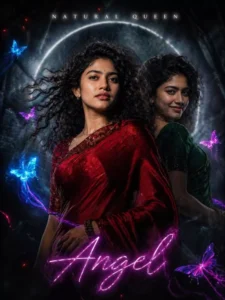
Create a dark cinematic portrait (strict face preservation).Scene:Dual pose:- Front: deep red saree, intense expression, wind-blown- Back: dark green saree, mysterious smileCamera:Worm’s-eye dramatic angle, strong depthLighting:Low-key lighting, strong contrastSingle backlight + subtle side lightDeep shadows, cinematic noir toneButterflies:Neon butterflies (electric blue, purple, magenta)Glowing in darknessLight trails like energy streaksBackground:Dark forest blur + fogMuted circular haloAtmosphere:Heavy smoke, cinematic haze, glowing particlesTypography:Top: NATURAL QUEEN (minimal, white glow)Bottom: "Angel" neon glow typographyStyle:Moody, dramatic, cinematic, high contrast, ultra-realistic
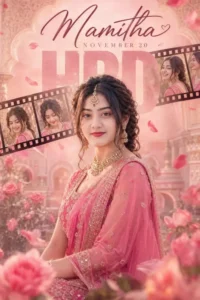
A cinematic Bollywood-style promotional poster of a young Indian woman wearing a vibrant pink traditional outfit (lehenga or saree), adorned with elegant gold jewelry. She has soft glam makeup, expressive eyes, and a calm, slightly serious expression. Her hair is styled in a loose braided updo with soft curls framing her face. The background is dreamy pastel pink with floating rose petals, soft floral elements, and a subtle royal palace interior with arches and ornamental details. A diagonal film strip runs across the upper portion of the poster, showing multiple frames of the same woman in different moods (smiling, candid, laughing, looking back)
Foreground includes blurred pink flowers and leaves for depth and a romantic cinematic feel.
At the top, elegant handwritten script text reads "Aliza". Below, include cinematic typography: "November 17"
Soft diffused lighting, glowing skin tones, shallow depth of field, ultra-realistic
How To Create Image Using Chatgpt
As for how to approach photo editing—specifically, which tools or themes to utilize to create your desired edits—you can simply use ChatGPT or Google Gemini. I will demonstrate the process using ChatGPT. Begin by copying any of the prompts provided in this article, then simply open the ChatGPT application. Here, use the plus icon to upload your reference image, and then paste the prompt you copied. Next, click the “Generate” button and wait for a few moments; ChatGPT will generate an AI-enhanced image for you in a double-exposure style, incorporating the exact details and specifications outlined in the prompt.
Conclusion
In this way, you can easily perform double-exposure AI photo editing. If you are looking for more trending AI photo editing resources like this, please let us know in the comments section; we will provide them to you as soon as possible. Furthermore, if you wish to learn such unique and trending AI photo editing techniques, please visit this website. You will find a variety of AI photo editing prompts that will enable you to easily create your own AI-generated images.