Photo Studio Ai Photo Editing Prompts – No matter which social media platform you use—be it Instagram, Facebook, or YouTube—if you want to upload a high-quality, professional-looking image, you essentially need to post a “studio-style” photograph, as these are the types of images you see most frequently on these platforms. Furthermore, the reality is that without a professional-quality image, your photos are unlikely to garner much attention or appreciation. However, it is worth noting that studio photography can be quite expensive and time-consuming—factors that often make it an impractical option for the average person. Fortunately, we have a solution to this problem: a method that allows you to easily transform any of your photos into a studio-quality image right from the comfort of your own home. You can achieve this in just a few minutes—even if you are a complete beginner with absolutely no prior knowledge of photo editing. In this article, you will learn—with absolute ease—how to convert a simple snapshot into a professional-grade photograph, and how to adjust the studio lighting and background, all without requiring any advanced editing skills.
What Is The Difference Compared To A Standard Studio-Style Photo?
Well, there is actually a significant distinction between the two. For instance, if you take a regular snapshot, it typically features a plain or ordinary background. In contrast, a studio-style photo utilizes a professional black background that complements your subject perfectly, resulting in a visually appealing image. Furthermore, your standard photo will rely entirely on natural lighting, whereas the studio-generated image will feature controlled lighting—specifically managed to determine exactly which areas of the subject are illuminated and which are not. When you take a standard snapshot, the clarity remains just as it is; however, with the studio version, the image is refined by smoothing your skin and enhancing overall clarity. Ultimately, a standard photo offers a casual aesthetic, while the studio version delivers a truly premium look that is ideal for social media—and all of this is accomplished automatically.
What You Need To Create This Photo Edit
This requires just a few things—specifically, a standard photograph in which your face is clearly visible. The photo should be a close-up, with your face positioned precisely in the center of the frame. If you use a high-quality image, the resulting output will be excellent. Furthermore, a stable internet connection is absolutely essential; there should be no interruptions or connectivity issues. Finally, you must have access to Google Gemini. If you do not currently have access, you can simply log in to Gemini to generate the image. It is a very straightforward process.
Tips For Achieving The Best Results:
If you wish to generate a high-quality photo, you must always use a good source image—specifically one where your face is clearly and accurately visible. This is crucial because if you use a low-quality photo, your face may not be detected correctly, potentially resulting in a facial mismatch. The system needs to detect the face precisely; a common issue with low-quality images is that the software struggles to accurately identify key facial features, leading to a mismatch—which often causes users to complain that their photo failed to generate. Therefore, when selecting a reference image, choose one that features only a single person and has a plain, simple background. This makes it much easier for the system to accurately detect and process your image. Furthermore, you must ensure that your text prompts are written correctly. However, you need not worry about this, as I have already provided suitable prompts within this article that you can utilize. If you choose to use custom prompts, you must provide detailed descriptions of all the elements you desire; the more detailed your input, the better the resulting output will be.
Update – This studio editing technique is becoming quite viral these days, so I’ve updated it in this article. You’ll find some new prompts in this article that you can use to create even more amazing photos.
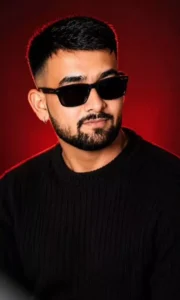
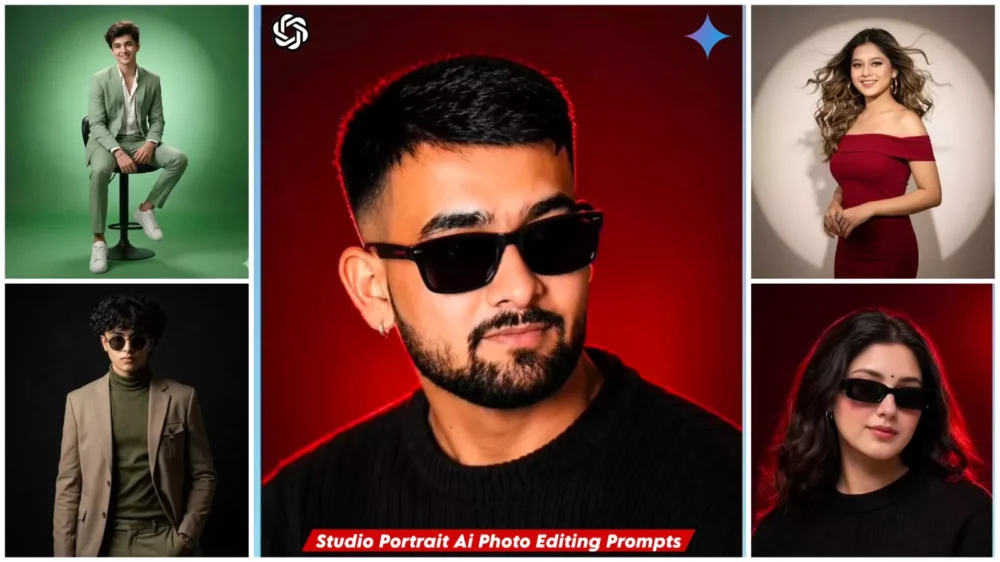
Use the uploaded reference image as the exact identity of the person.

STRICT IDENTITY LOCK:
Preserve 100% facial structure, skin tone, hairstyle, facial features, age, and identity. Do not alter the face, hair, skin texture, or any natural characteristics. Maintain complete likeness to the reference image.

OUTFIT:
Premium black ribbed knit sweater, sleek black rectangular sunglasses, small silver hoop earring, luxury men's fashion styling, clean and sophisticated look.

POSE:
Head slightly lowered, face turned subtly to the side, confident expression, subtle smile, looking slightly past the camera, relaxed yet powerful posture.

SCENE:
Luxury studio portrait, deep crimson-red gradient background, rich dark-red cinematic backdrop, minimal composition, premium editorial atmosphere.

LIGHTING:
Soft beauty lighting on the face, dramatic red rim light outlining the hair and shoulders, cinematic shadows, high contrast, luxury fashion-magazine lighting.

CAMERA:
Chest-up portrait, 85mm lens, shallow depth of field, ultra-sharp facial details, professional DSLR quality, subject in perfect focus.

STYLE:
Luxury men's fashion editorial, viral Instagram portrait, ultra-realistic photography, premium color grading, magazine-cover aesthetic, high-end commercial campaign, cinematic mood, luxury lifestyle branding.

QUALITY:
Photorealistic, 8K detail, natural skin texture, sharp focus, professional retouching, premium fashion photography, highly detailed, realistic lighting.

ASPECT RATIO:
4:5
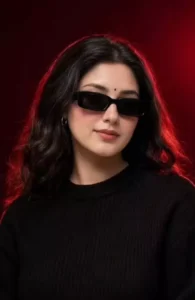
Use the uploaded reference image as the exact identity of the person. STRICT IDENTITY LOCK Preserve 100% facial structure, skin tone, hairstyle, beard, facial features, age and identity. Do not alter face, hair, beard or natural appearance.

OUTFIT Premium black ribbed knit sweater, sleek black rectangular sunglasses, small silver hoop earring.

POSE

Head slightly lowered, face turned slightly sideways, confident expression, subtle smile, looking past camera.

SCENE

Luxury studio portrait, deep crimson-red gradient background, dark red cinematic backdrop, clean minimal composition.

LIGHTING

Soft beauty light, dramatic red rim light around hair and shoulders, editorial lighting, cinematic shadows, high contrast.

CAMERA

Chest-up portrait, 85mm lens, shallow depth of field, sharp facial details.

STYLE

Luxury men's fashion editorial, viral Instagram portrait, ultra realistic, DSLR quality, premium color grading, magazine cover aesthetic.

Aspect Ratio 4:5
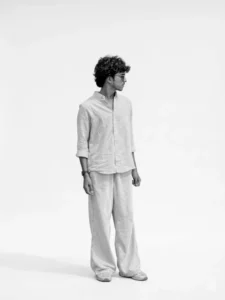
Change the background to a clean, professional studio white background. The subject should remain sharp and natural, with soft, even studio lighting, minimal shadows, and High-key look, realistic colors, and smooth edges around the subject.” Keep the face as same and change the lighting to very ultra realistic studio lighting and also keep the cutout as clean as possible if someone looks they think it was taken in the studio give a one side lighting and keep the photo black and white.
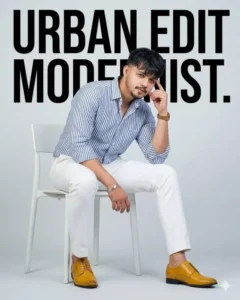
Create a high-end studio fashion photoshoot of me. Keep my face 100% the same as in my reference image. I am sitting casually on a modern white chair, leaning slightly forward with one elbow resting on my knee and my hand touching my temple. I am wearing a stylish blue-and-white striped shirt with the sleeves rolled up, paired with fitted white trousers and mustard-yellow formal shoes.The background is a clean, minimal light-grey studio setup with bold typography behind me
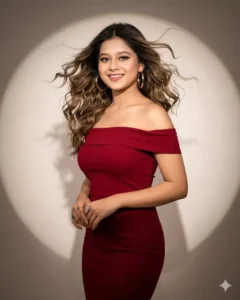
Create a high resolution HD 4k picture of A glamorous young woman poses in a fashion photoshoot against a smooth studio backdrop with a strong circular spotlight glow. She wears a fitted, off-shoulder deep red bodycon dress that highlights her figure.Her voluminous wavy hair flows outward, captured in motion, giving a dramatic and dynamic effect. She accessorizes with large gold hoop earrings, keeping the look bold yet minimal. Her makeup is elegant with sharp definition.
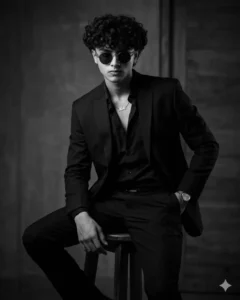
PROMPT – Use this image to create A dramatic black and white portrait of a confident looking man. sitting on a wooden stool against a dark studio background. He is wearing a well-fitted, all-black suit with a black shirt, and black pant small silver chain at naki and small silver watch slightly unbuttoned at the top, exuding a moody and powerful aura. His posture is relaxed yet dominant, with one arm resting on his leg and the other one in his pant pocket The lighting is soft but directional creating
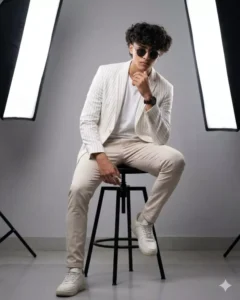
A stylish man sitting confidently on a black studio stool, wearing a white t-shirt, slim-fit light beige trousers, white sneakers, and a white blazer with subtle vertical stripes. Modern studio setup with professional softbox lighting on both sides, creating a clean high-fashion photoshoot look. Minimal gray background, cinematic lighting, sharp details, full-body portrait in a relaxed pose with one hand resting on the knee and the other near the chin. Ultra, 8k quality.
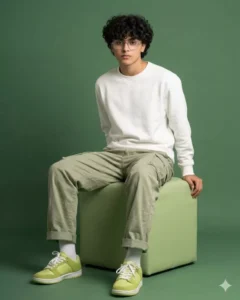
A full-body studio shot features man, seated on a light green cubic stool against a plain, slightly darker green background. He has short, dark hair, wears glasses, and looks directly at the viewer with a neutral expression.He is dressed in a casual outfit consisting of a white crew-neck sweatshirt and light olive-green cargo pants. His pants are slightly baggy, cuffed at the ankles, and reveal white socks. He is wearing lime-green sneakers with white laces.
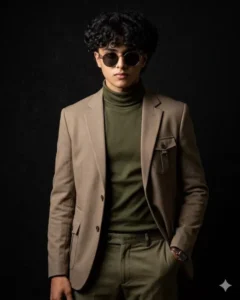
A high-quality, professional magazine-style studio photoshoot of the same man as in the reference image. He is posing confidently in front of a matte black background with subtle texture, under minimal and directional lighting that highlights his face and adds dramatic contrast. He is wearing a stylish, non-formal outfit, something bold and elegant like a dark beige or deep olive ensemble with modern, fashion-forward design. Theatmosphere is cinematic and editorial, giving the feel of a premium magazine cover shoot. The focus remains entirely on him, his confident pose, and the overall artistic composition.
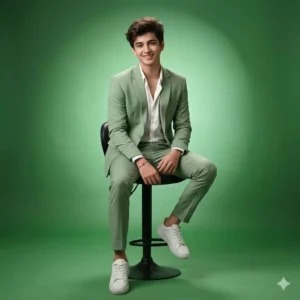
Create a studio portrait of the same athletic man (preserving the face 100%). He is wearing a light Green blazer and slim-fit trousers with white sneakers, and a white shirt slightly unbuttoned. He is seated on a tall swivel stool, with a gradient Green background and spotlight lighting, in the style of a fashion photoshoot.
How To Create Image In Chatgpt?
You can also create such photos using ChatGPT. In this article, I explain how to generate these kinds of images with ChatGPT. First, copy the prompt. Then, open ChatGPT, paste the prompt into the chat box, and upload your photo by clicking the plus (+) icon. Finally, select the generate option; after a brief moment, it will produce a professional-looking photo for you.
How To Create Image With Photo Studio Ai Photo Editing Prompts
Now comes the part about generating photos—specifically, how we can create them. To do this, you will need access to Google Gemini. As I have already mentioned, you can sign up using your email ID; the process is straightforward. Since this is a Google product, you may already be familiar with it; if not, that is no problem at all. First, copy the prompt. You will find a link provided below labeled “Create Image”; click on it to navigate to the website. Once there, you will see a “+” icon; click on it. Next, upload a photo to serve as a reference—the kind we discussed earlier. After that, paste your prompt. You will then see an arrow icon to initiate the generation process; click on it, and wait a few seconds. The tool will then generate a highly professional-looking image for you. However, you should not expect to get a perfectly professional photo on your very first attempt. If your goal is to generate a truly professional-quality image, you may need to try the process two or three times.
Conclusion
Now, with the help of AI, you can completely transform your photos. You can easily convert a standard photograph into a studio-quality image. In today’s world, this has become incredibly simple; by utilizing Gemini, you can effortlessly transform even an ordinary photo into a professional-grade image right from the comfort of your home. This results in significant savings of both time and money. If you are looking to post next-level photos on social media, this tool will prove to be extremely useful for you.