Google Gemini Wedding Invitation Card Prompt – In today’s digital age, everything is becoming smarter and more convenient. While we previously had to visit a printing press to get wedding cards made, we can now use the power of AI to generate cards featuring a wide variety of unique designs. In this article, we will explore in detail how you can create your own professional-quality invitation cards—simply by entering a prompt into Google Gemini and filling in your specific details. These cards will bear a striking resemblance to traditional Indian invitations. Furthermore, you can easily customize elements such as names, dates, and other details. This article features several examples; you can generate additional images in a similar style, and if you are looking for even more new designs, feel free to leave a comment.
Details Of Google Gemini Wedding Invitation Card Prompt
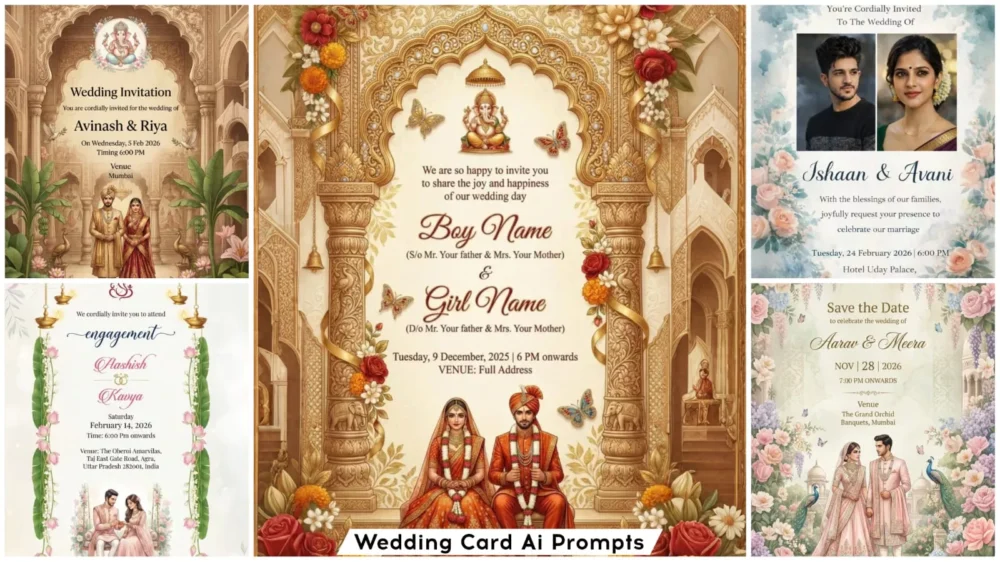
Regarding this AI-generated wedding card image: in today’s digital landscape, wedding card editing has evolved into a technique that allows you to create virtually any type of card simply by using prompts. All you need to do is specify the desired style for the card—how the names should be displayed, and where to place the wedding date and venue details. You can even add a photograph if you wish, as many available templates offer the option to insert a photo, while others generate standard cards without images. This ensures that users who prefer a photo-centric design can select that option, while those who prefer a simpler style can choose the alternative. The creation process remains exactly the same for both; let me show you how it’s done.
What Exactly Will You Need To Create This Wedding Card?
Look—if you want to generate a wedding card image like this, the very first thing you will require is a smartphone. You can only create this if you have a smartphone. You will also need an internet connection. Furthermore, Google Gemini must be installed on your phone; if you haven’t installed it yet, go ahead and do so—alternatively, you can simply use a web browser. You will also need a perfect prompt; however, there is no need to worry about that, as I have already shared one. Finally, if you wish to create a personalized card featuring a photograph, you will also need to have a photo ready.
What Exactly Is A “Prompt”?
It is essentially a command or instruction that attempts to convey your intent in simple language. Based on this input, the system generates corresponding images. To put it simply, whatever you ask of an AI is referred to as a “prompt.”
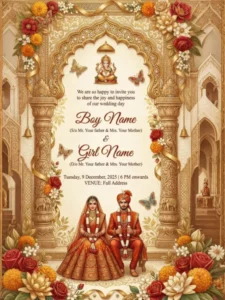
"Create a premium  8K Indian wedding invitation in royal Rajasthani style with golden arches, temple borders, floral decorations, carved pillars, cream background, butterflies, and a small Lord Ganesha at the top. Add a seated bride and groom in traditional red–orange attire with varmala and detailed embroidery , 9:16 Ratio.

Include this text in the design:
We are so happy to invite you to share the joy
and happiness of our wedding day
Boy Name
(S/o Mr. Your father & Mrs. Your Mother)
&
Girl Name
(D/o Mr. Your father & Mrs. Your Mother)
Tuesday, 9 December, 2025 | 6 PM onwards
VENUE: Full Address
Premium luxury card."
Invitation Card Prompt:
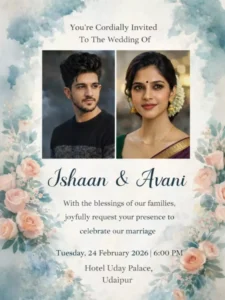
Create an elegant and romantic wedding invitation card design featuring the exact same faces from the uploaded images (100% face match, identical facial structure, same skin tone, no changes to expressions).
Place both portraits side by side in a balanced, symmetrical layout.
Card Style & Theme:
Elegant, modern design with a romantic flair.
Blend high-quality photography with soft watercolor elements.
Use a cool color palette of muted blues, teals, and soft grays, accented with subtle peach and blush pink floral touches.
Add delicate watercolor floral corners and soft textured background.
Typography Layout (aligned beautifully and centered):
Top Heading (serif font, elegant):
“You’re Cordially Invited To The Wedding Of”
Names (large stylish script font):
“Ishaan & Avani”
Body Text (clean serif font):
“With the blessings of our families,
we joyfully request your presence to
celebrate our marriage”
Date & Time (bold elegant font):
“Tuesday, 24 February 2026 | 6:00 PM”
Venue (classic serif font):
“Hotel Uday Palace,
Udaipur”
Ensure all text is perfectly aligned, evenly spaced, and aesthetically balanced within the card layout.
High resolution, print-ready design, soft romantic lighting, premium wedding invitation feel.
"9:16 Luxury royal Indian wedding invitation card design, ultra detailed text, 8k, sharp focus. ultra detailed, symmetrical composition, ornate golden Mughal-style arch frame with intricate floral carvings and filigree patterns, rich purple velvet curtains draped on both sides with golden embroidery, hanging decorative lanterns with warm glowing lights, elegant cream textured background with subtle floral motifs.
At the center elegant golden serif typography wedding text:
"YOU ARE CORDIALLY INVITED TO CELEBRATE THE WEDDING OF

  RAJ GUPTA
(S/O Mr. SANJAY GUPTA)
&
KOMAL GUPTA
(D/O Mr. RAJESH GUPTA)

ON TUESDAY, 25 APRIL 2026
AT 7:30 PM

VENUE: FULL ADDRESS"

Below the text a romantic royal Indian bride and groom couple standing together under an ornate carved mandap pavilion, wearing luxurious Red and gold traditional wedding attire, detailed embroidery, bride lehenga with heavy jewelry and veil, groom sherwani with turban.
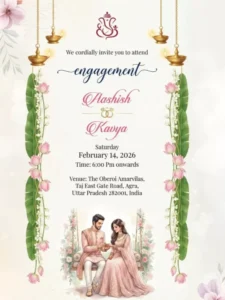
– “We cordially invite you to attend” in a clean serif font
– “engagement” written in flowing navy blue calligraphy script
– Names “Aashish” and “Kavya” in bold pink cursive lettering
– Interlocking gold engagement rings icon between the names
Date layout centered:
– Saturday
– Feburary 14, 2026
– Time: 6:00 Pm onwards
Venue( Full Address ) text in neat serif font at the bottom center.
Bottom illustration: a romantic watercolor-style couple illustration —groom in pastel pink sherwani placing a ring on bride wearing a blush pink gown, seated gracefully, surrounded by soft floral elements.
Ultra-high resolution, print-ready invitation card, Indian wedding theme, minimal yet luxurious, professional graphic design, balanced spacing, elegant composition."
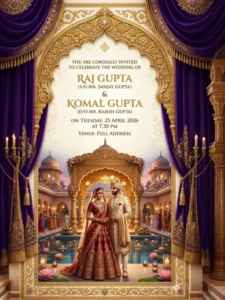
"9:16 Luxury royal Indian wedding invitation card design, ultra detailed text, 8k, sharp focus. ultra detailed, symmetrical composition, ornate golden Mughal-style arch frame with intricate floral carvings and filigree patterns, rich purple velvet curtains draped on both sides with golden embroidery, hanging decorative lanterns with warm glowing lights, elegant cream textured background with subtle floral motifs.
At the center elegant golden serif typography wedding text:
"YOU ARE CORDIALLY INVITED TO CELEBRATE THE WEDDING OF

  RAJ GUPTA
(S/O Mr. SANJAY GUPTA)
&
KOMAL GUPTA
(D/O Mr. RAJESH GUPTA)

ON TUESDAY, 25 APRIL 2026
AT 7:30 PM

VENUE: FULL ADDRESS"

Below the text a romantic royal Indian bride and groom couple standing together under an ornate carved mandap pavilion, wearing luxurious Red and gold traditional wedding attire, detailed embroidery, bride lehenga with heavy jewelry and veil, groom sherwani with turban.
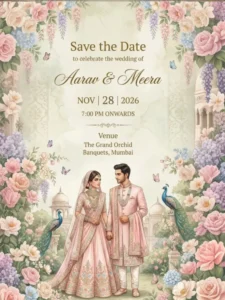
"Luxury Indian wedding Save the Date invitation design, pastel royal theme. Elegant illustrated bride and groom in coordinated blush-pink traditional attire, holding hands, intricate ethnic jewelry and embroidery. Soft floral arches with hanging blossoms, butterflies, peacocks, palace domes, lush garden elements. Cream–sage textured background with subtle Mughal patterns.
Text layout (sample content):
Top center: Save the Date
Below: to celebrate the wedding of
Center (large calligraphy): Aarav & Meera
Below names: NOV | 28 | 2026
Next line: 7:00 PM ONWARDS
Lower center (venue):
Venue
The Grand Orchid Banquets, Mumbai
Refined calligraphy typography for names, clean serif for details. High-end watercolor + digital illustration blend, soft lighting, muted pastel palette, muted pastel palette, premium wedding stationery aesthetic, ultra-detailed, print-ready, 4K resolution, 9:16 Ratio."
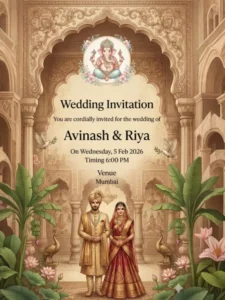
"9:16 Elegant Indian wedding invitation card design, vertical layout, royal traditional Indian theme.
Ornate arch-shaped palace frame in warm beige and antique brown tones.
Top center: Lord Ganesha illustration in soft pastel colors with floral accents.
Background: Mughal–South Indian palace interior with vintage texture.
Decorative elements: lotus flowers, banana leaves, peacock statue, doves in flight, lush greenery on both sides.
Bottom center: beautifully dressed Indian bride and groom standing together — groom in golden sherwani, bride in red and gold silk lehenga with traditional jewelry, realistic proportions, elegant posture.
Typography: classic serif font, black text, centered alignment.
Text content: “Wedding Invitation
You are cordially invited for the wedding of
Avinash & Riya
On Wednesday, 5 Feb 2026
Timing 6:00 PM
Venue
Mumbai”
Soft cinematic lighting, high detail, ultra-clean print quality, no blur, no distortion, symmetrical composition, premium wedding card aesthetic, 4K resolution."
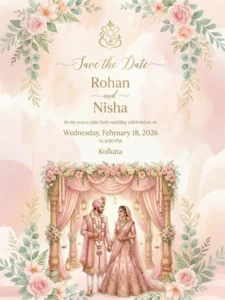
A premium Indian wedding “Save the Date” invitation card in vertical 9:16 format, soft pastel peach and blush background. Elegant watercolor floral borders on all four sides with pink roses and green leaves.
At the top center, a minimal traditional Indian wedding symbol in gold.
Centered elegant calligraphy text: “Save the Date”
Below in refined serif typography: Rohan
and
Nisha
Smaller elegant text below: Invite you to join their wedding celebration on
Wednesday, Febuary 18, 2026
At 4:00 PM
Location text in clean serif font: Kolkata
Bottom section features a highly detailed romantic illustration of an Indian bride and groom standing under a royal mandap. The mandap has blush pink silk drapes, ornate golden carved pillars, floral garlands of roses, soft ambient lighting.
Groom wearing pastel pink sherwani with turban and flower garland. Bride wearing pastel pink lehenga with traditional jewelry and dupatta. They are holding hands and looking at each other lovingly.
How Do You Create Your Own Personalized Wedding Card?
Well, making one is absolutely simple. First, you need to select a style from the available options that appeals to you and feels like the perfect fit. Simply copy that style. Next, you will find a link to Google Gemini provided below—or, as I mentioned earlier, you may need to use a specific application. Go ahead and install it. Once installed, paste the copied style into the tool. Now, if you wish to create a version featuring photos—specifically, if you copied a prompt designed for images—you will need to upload photos of yourself and your partner to serve as references. However, if you prefer to create a standard version—one that simply displays names—you will need to edit the prompt text. Look closely: the prompt includes placeholders for both the groom’s and the bride’s names, as well as the wedding date and location details. You simply need to replace those placeholders with your own specific information. Finally, click the “Generate” button. Within just a few seconds, a professional-quality video or image of your wedding card will be ready!
How Can You Enhance An Invitation Card Design?
If you consistently desire superior results—specifically through the use of prompts—you should incorporate keywords such as “4K,” “high detail,” “ultra-realistic,” and similar terms. You should also provide specific details regarding the color scheme; for instance, since cards are often printed in various colors, the specific hues are defined within the settings, allowing you the flexibility to modify them as you see fit. Additionally, you can incorporate specific lighting effects into the design. If you wish, you can also alter the overall theme style—such as “Royal,” “Traditional,” or “Modern.” While I have already provided these distinct options, you still retain the ability to further customize various elements within them.
Conclusion
AI wedding cards offer numerous benefits, significantly saving you both time and money. You have access to an unlimited selection of designs; unlike traditional methods, you do not have to pay fees just to create a design. You can craft an entirely new design simply by making a few minor adjustments. You will find an endless array of design options available, and the customization process is incredibly easy, delivering a high-quality final output.