Digital Vector Portrait Ai Photo Editing Prompts – Previously, to transform a standard photograph into a piece of digital art, we would typically rely on software such as Photoshop, Illustrator, or other design tools. However, to accomplish this task now, we no longer require any of those applications. We can now generate such images using nothing more than a simple text prompt and a single dedicated tool. If you browse social media platforms like Facebook and YouTube, you will notice that this style of imagery is currently trending significantly. People are frequently using these types of images as their profile pictures and sharing them in their posts; moreover, many are creating content to explain the editing process behind them. In today’s article, we will demonstrate exactly how you can create these digital cartoon-style images yourself. We will walk you through the incredibly simple process required to generate them, providing a step-by-step guide. By following these instructions, you will be able to produce high-quality images—and even videos—with excellent results.
Details Of Digital Vector Portrait Ai Photo Editing Prompts
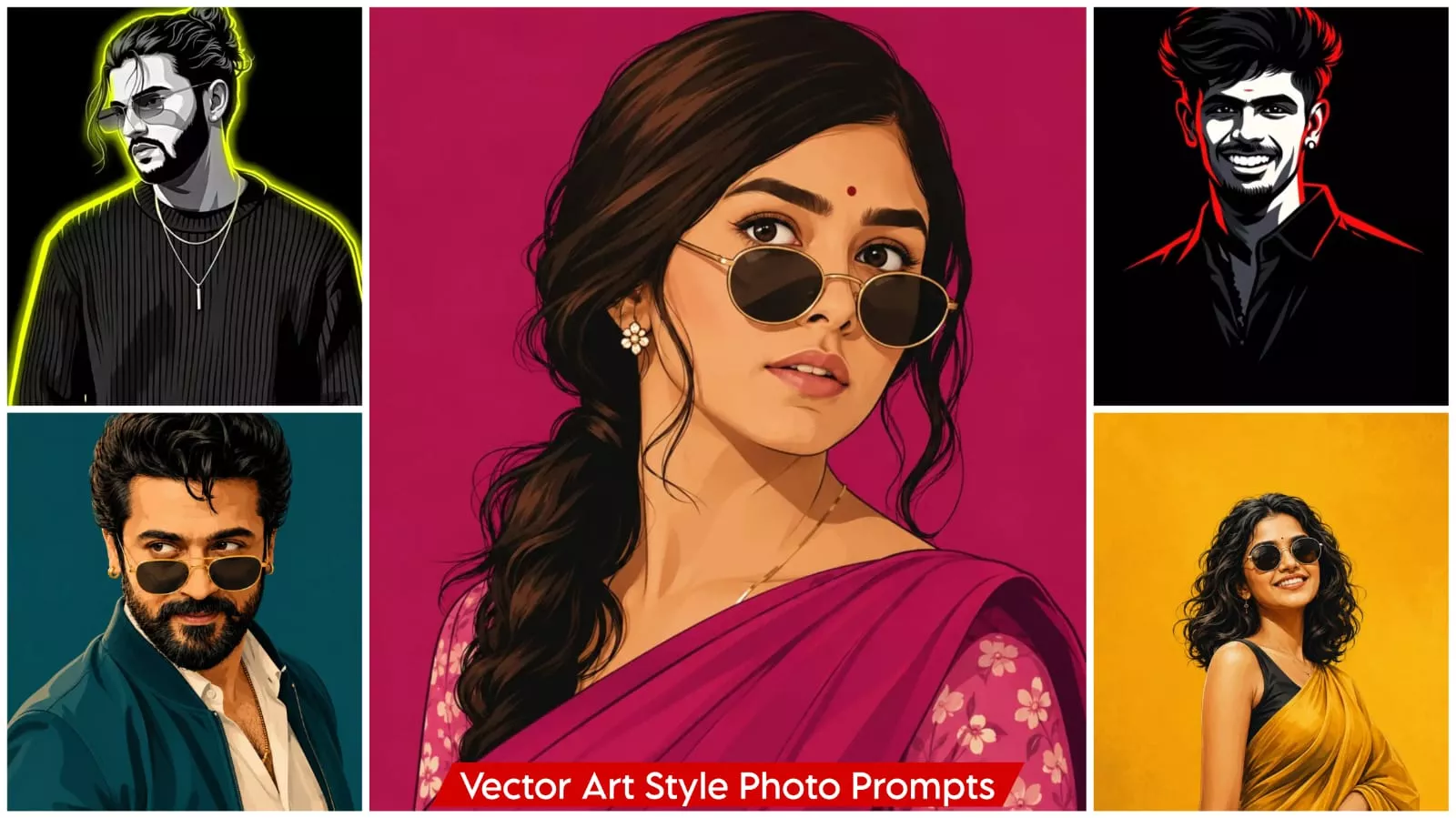
What exactly is a digital cartoon portrait? It is a process that allows you to transform any standard photograph into a piece of digital cartoon art. Crucially, the subject’s facial features remain completely unchanged; you still recognize the face exactly as it appears in the original photo, though the overall aesthetic is transformed. The image is rendered in the style of a painting, an illustration, or vector art, taking on that distinct visual appearance. An important point to note here is that the facial features appear smoother and more refined than in the original photo. Furthermore, the use of color makes the image appear even more vibrant and visually appealing. It remains instantly recognizable—it is unmistakably you in the picture. The artist uses your submitted photograph as a reference point, transforming that specific image into a cartoon or illustration. You will frequently see this style utilized for channel branding and logos—such as for YouTube channels—or for social media profiles; in short, it is widely used for display pictures (DPs) across various platforms.
Why Are People Loving This Trend
Look—this is a digital cartoon portrait. Why are people loving this trend, and why is it going viral? The reason is that it makes creating a unique profile picture (DP) for social media incredibly easy. If you were to attempt to create this kind of image manually—using standard tools like Photoshop or any other editing software—it would require a great deal of effort and demand proper editing skills. With this method, however, the editing process is extremely fast and effortless; it can be done with absolute ease right from your mobile phone. In fact, you cannot perform this specific type of editing without using a mobile device, yet the final result delivers a completely professional look. Even if you are a beginner, you will achieve a professional outcome; conversely, if you were to attempt this using traditional software as a beginner, creating such an image would be extremely difficult.
Note – This vector art editing that’s going viral right now can be easily created. It’s using a new approach that delivers excellent results. A perfect vector art editing is being created, so you can edit it.
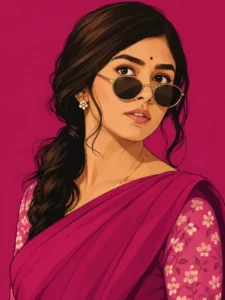
Create this as a 9:16 vertical portrait image.

Using the attached reference photo, recreate the person's face with high precision - exact facial structure, eyes, nose, lips, and skin tone matching the reference photo closely, side-profile or three-quarter angle as shown.

Style: bold flat vector illustration, clean smooth linework, minimal shading, poster-art aesthetic - no painterly texture, crisp digital vector finish.

Pose: head turned slightly to the side in a relaxed three-quarter profile, one shoulder forward, subtle confident expression, hair styled in soft loose waves pulled into a low ponytail with a few face-framing strands.

Outfit: elegant traditional saree in a single bold

monochrome color family (deep teal, burnt orange, or rich magenta - pick one saturated tone), with a delicate floral-print blouse in a contrasting lighter shade of the same color family, small dainty flower-shaped stud earring, thin gold chain necklace, round vintage-style sunglasses pushed slightly down the nose.

Background: solid bold monochrome color matching the outfit's color family, completely flat with no texture or gradient, high contrast, poster-style minimalism.

Composition: subject positioned in the lower two-thirds of the frame with headroom above, generous negative space around the head, fully filling the 9:16 vertical frame, clean poster-quality layout.

Style: flat vector illustration, bold saturated color palette, minimal linework, high-fashion editorial poster quality, confident and stylish mood.
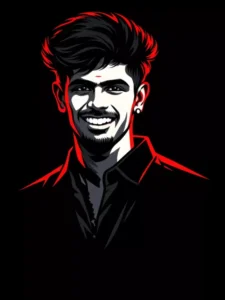
Create a 3:4 vertical ultra-clean vector portrait based strictly on the provided reference image. The final artwork must preserve the subject's facial identity with absolute accuracy. Keep facial features 100 percent identical to the original reference image. Do not modify facial structure, proportions, skin tone, bone structure, eye spacing, nose shape, Lip shape, jawline, hairline, beard density, or any defining characteristics. Style transformation only. No identity alteration. Convert the portrait into a high-contrast neo-noir vector illustration with the following specifications: COMPOSITION Tight
head-and-upper-neck crop Slightly angled face orientation preserved exactly as reference Strong cinematic framing Large negative space around the subject Centered or slightly off-center placement BACKGROUND Pure solid black (#000000) No texture, no gradients, no noise LIGHTING Dramatic single -direction rim Lighting Dominant red/crimson edge Lighting from one side Deep black shadows con
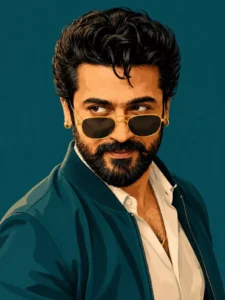
Create this as a 9:16 vertical portrait image.

Using the attached reference photo, recreate the person's face with high precision - exact facial structure, eyes, nose, lips, jawline, beard/facial hair (if any), and skin tone matching the reference photo closely, side-profile or three-quarter angle as shown.

Style: bold flat vector illustration, clean smooth linework, minimal shading, poster-art aesthetic - no painterly texture, crisp digital vector finish.

Pose: head turned slightly to the side in a relaxed three-quarter profile, one shoulder forward, warm charming smile - natural, confident, slightly playful, eyes gently engaged. Hair styled neatly matching the reference (textured, swept back, or tousled as shown).

Outfit: sharp casual-formal look - a solid-color bomber jacket or structured shirt in a single bold monochrome tone (deep teal, burnt orange, or charcoal-pick one saturated color), plain fitted t-shirt or collared shirt underneath in a lighter contrasting shade, minimal accessories (thin chain necklace or wristwatch), round or square vintage-style sunglasses pushed slightly down the nose.

Background: solid bold monochrome color matching the outfit's color family, completely flat with no texture or gradient, high contrast, poster-style minimalism.

Composition: subject positioned in the lower two-thirds of

the frame with headroom above, generous negative space around the head, fully filling the 9:16 vertical frame, clean poster-quality layout.

Style: flat vector illustration, bold saturated color palette, minimal linework, high-fashion editorial poster quality, confident, charming, and stylish mood.
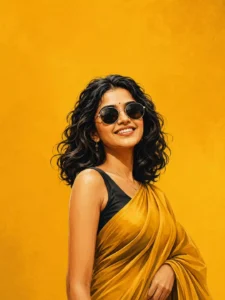
Create a high-end digital illustration poster featuring the uploaded girl transformed into a confident, stylish fashion icon. Preserve her facial features and identity while rendering her in a clean, modern vector-painting style with smooth brushwork, bold outlines, rich shading, and premium editorial artwork quality. Pose her in a powerful and elegant stance: body slightly angled, shoulders relaxed, head tilted upward with a confident, fearless expression. Maintain a poised posture with arms naturally positioned near the body, creating a calm yet dominant presence.The overall attitude should convey independence, confidence, elegance, and self-assurance. Style her with voluminous shoulder-length wavy black hair, naturally flowing with realistic texture and movement. Add oversized round black sunglasses with thin metallic frames, reflecting subtle ambient light. Dress her in a vibrant mustard-yellow saree draped gracefully over a sleeveless black blouse. The saree should feature realistic folds, fabric texture, and elegant draping that enhances the fashion-forward look. Background: a solid rich mustard-yellow backdrop with a soft textured gradient and minimal artistic grain. Keep the background completely clean and uncluttered with no objects, patterns, logos, watermarks, borders, captions, quotes, typography, or text elements of any kind. Lighting should be soft and cinematic, creating warm highlights on the skin and realistic depth in the hair, clothing, and accessories. Use a modern fashion-poster composition with the subject positioned slightly toward the lower-right portion of the frame, leaving generous negative space around her for a premium minimalist aesthetic.Ultra-detailed digital painting, editorial fashion illustration, luxury magazine cover quality, crisp linework, smooth color transitions, realistic facial rendering, elegant color harmony, high contrast, professional artwork, sophisticated mood, 4K resolution, vertical 3:4 aspect ratio, sharp focus, premium contemporary poster design
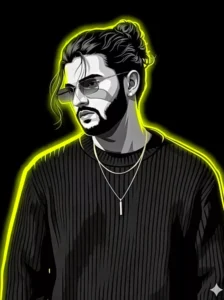
Create a high-contrast vector illustration based on the provided reference image, keeping the exact same face, facial structure, and identity of the person. Preserve all defining facial features and expressions exactly as they appear in the uploaded photo. Use the natural hairstyle from the image and do not alter or regenerate the hair. Render the portrait in a minimalist vector illustration style using grayscale tones for the face and clothing, sharp cel shading, and deep black contrast shadows. Add bright neon yellow rim lighting around the silhouette and hair to create a striking glow against a pure black background. The final design should feel modern, edgy, and graphic with a clean poster-style composition while maintaining accurate identity preservation.
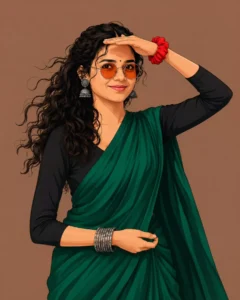
Vector illustration of a stylish South Asian woman in a 4:5 vertical layout on a solid muted brown background. She wears an elegant emerald green saree over a long-sleeved black blouse, circular orange-tinted sunglasses, silver oxidized jhumka earrings, a black bindi, and a red scrunchie on her raised wrist as she shades her forehead. Flowing wavy black hair blowing in the breeze, confident pose, crisp cel-shaded lighting, sleek digital graphic art style.
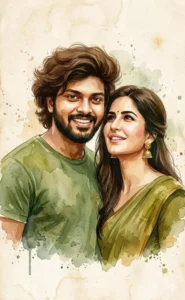
A high-quality digital watercolor portrait of a smiling young South Asian couple. The man my face has messy voluminous brown wavy hair, wearing a moss green t-shirt. The katrina kaif is wearing a traditional olive green saree with gold jhumka earrings, looking up at him affectionately. The art style features soft watercolor splatters, tea-stained paper texture, and a warm earthy color palette (greens, ochre, and cream). Soft, romantic lighting with visible brush strokes and ink bleeds around the edges.A romantic couple portrait, watercolor painting style, mixed media, messy ink splashes, olive green and mustard yellow color scheme, candid joyful expressions, textured canvas background, ethereal atmosphere, highly detailed facial features --ar 2:3 --v 6.0
Digital watercolor illustration of a couple in green outfits, watercolor splatter effect, warm vintage paper texture, romantic mood, soft edges, earthy tones, realistic faces with painterly bodies
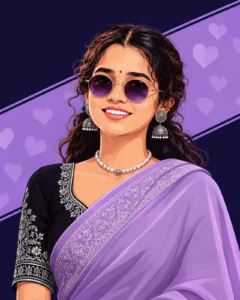
Stylized 2D digital illustration of a confident South Asian woman. She has middle-parted dark wavy hair, a small black bindi, round tinted sunglasses with metallic frames, and silver drop earrings. She wears an elegant lavender purple saree draped over a black blouse with intricate silver embroidered borders. Set against a dark navy-purple background with a diagonal pastel purple banner patterned with subtle hearts. Clean vector art, modern chic aesthetic, vivid portrait shot. 4:5 ratio.
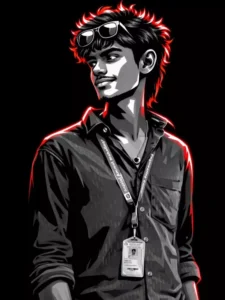
"A high-contrast vector illustration of a young man with curly hair and sunglasses perched on his forehead. The art style uses a grayscale palette for the face and clothing, featuring sharp cell shading and deep black shadows. Intense neon red rim lighting outlines his silhouette and hair against a solid black background. Minimalist, modern, and edgy graphic design style."
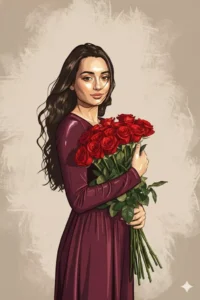
Convert this image into cartoon illustration+digital painting+glossy+ warm-toned+metallic+milky white+metallic yellow, vibrant, high-detail digital portrait illustration of a character in reference, in the style of a modern vector comic. Emphasize clean lines, strong shadows, and reflective highlights on the face. Add dynamic brush stroke textures and beige background
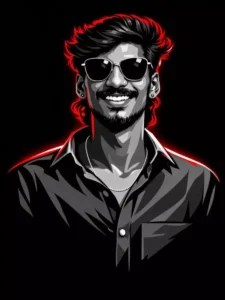
Create a high-quality digital cartoon portrait of a young man with a bright smile, styled in bold vector-art. Use strong black, white, and grey shades for the face with sharp shadows. Add glowing red highlights around the hair and shoulders for a striking neon effect. Keep the background fully black. Ensure the face looks clean, smooth, and well-defined with crisp line work. Make the portrait modern, stylish, and vibrant.”
How To Create Image Using ChatGpt?
How do we go about performing this cartoon-style editing using a prompt with the help of ChatGPT? Look, creating these is actually quite simple; however, you need to learn how to utilize the tool correctly. Selecting the right photograph is key to making your profile look truly unique. First, choose whichever prompt appeals to you from the available options and copy it. Next, scroll down until you find the “AI Create Image” option, and click on it. Clicking this will redirect you to ChatGPT, where you can proceed to upload your photo by selecting the “+” icon. When choosing your photo, pay close attention to the details: ideally, you should select an image that does not feature a crowd of people and has a completely plain background. Ensure that your face is clearly visible and that the lighting is optimal, as the tool is designed to transform your photograph into a digital cartoon—making these specific elements absolutely essential for a successful result. Finally, paste your chosen prompt and hit “Generate”; your cartoon-style image will then be ready!
Conclusion
So, in this tutorial, we have demonstrated editing techniques suitable for everyone—whether you are a guy, a girl, or a couple. Couples, in particular, can easily create such portrait-style DPs for themselves. You won’t encounter any difficulties whatsoever during the process; the editing will be absolutely flawless, and the final results will be truly outstanding.