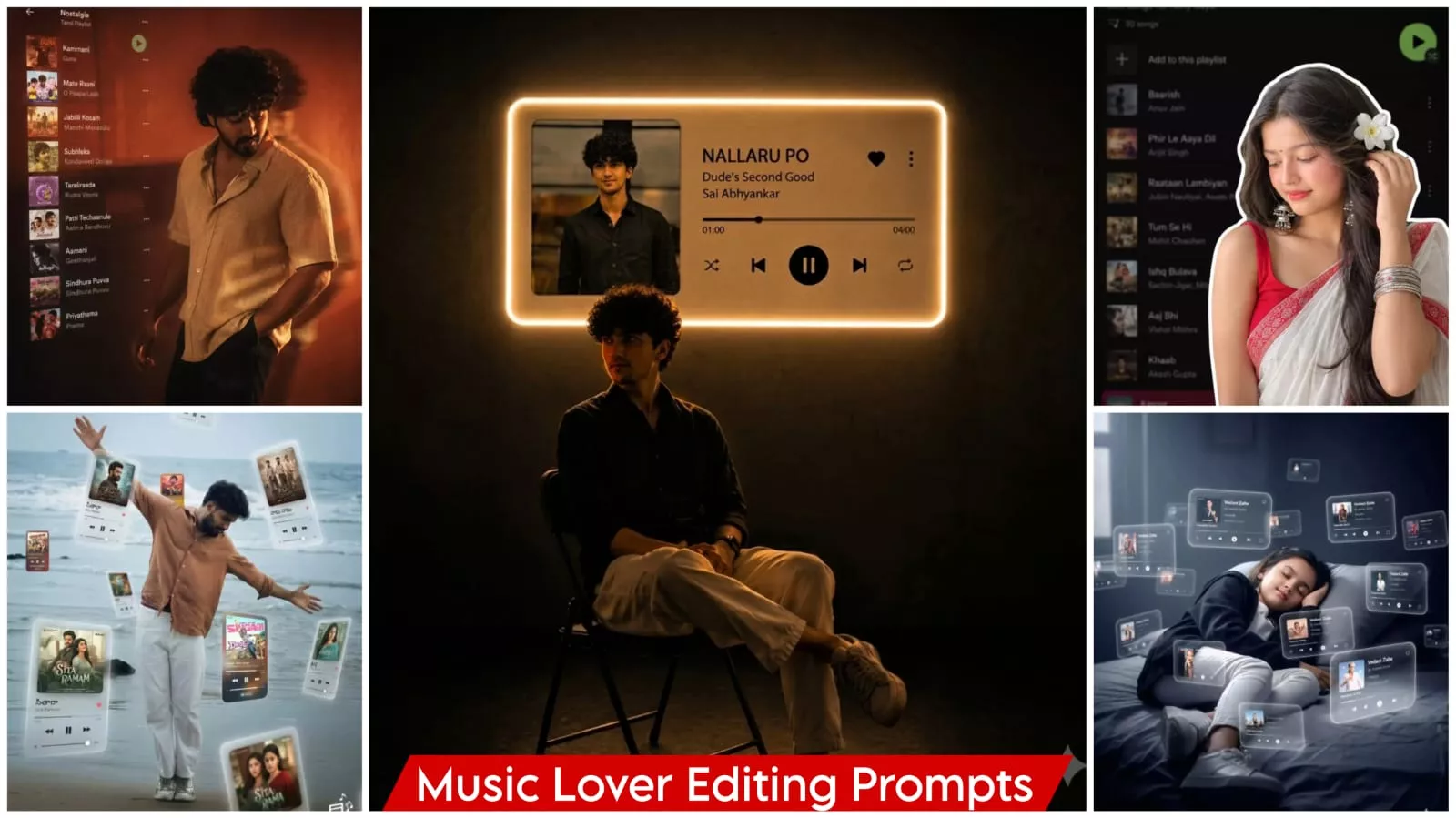
Google Gemini Music Lover Ai Photo Editing Prompts – Photo editing is no longer limited to just normal editing or creating stylish photos. With Google, you can even create creative photos with a music lover theme. You can be pictured wearing headphones, with objects around you appearing to be floating or levitating in the air. If you want to create this kind of image, or different types of music lover photos, I’ve included some creative ideas for you in this article. If you want to create them, I’ll show you how. We used Google Gemini to help us, and I’ll explain how you can create a really cool photo with its help and how the editing process is incredibly easy.
What Do You See In This Type Of Editing?
At the beginning, the photo is presented in a way that makes it look like you’re completely immersed in the world of music. It typically uses elements like headphones or AirPods. There are also floating items on the sides, such as music symbols or musical notes. The background is usually a natural studio-like or cinematic style. Google Gemini automatically creates all of this. You just need to provide the correct description. That’s exactly what I’m providing here; I’ll show you how to do it and how to create the perfect photo.
What We Need To Start Editing
To start editing, you will need a normal, clear photo. Gemini will then analyze the photo and provide good results. Keep your face and expression simple and natural. The lighting should be good, and the background should be plain. This will allow the system to detect the image properly. After you upload your photo and generate the result, you will get a very good outcome. The details I’m describing are about the type of photo you should use. If you use a photo like the ones shown here, you will get similar results. If you use a different type of photo or make any changes, you won’t get good results.
Update :-
I’ve updated you on the music player editing method several times, but new trends keep emerging. That’s why I’m constantly providing it here in different ways so you can use it to edit. We’ve added it to this article so you can use it to edit. The process remains the same. You can create using this method.
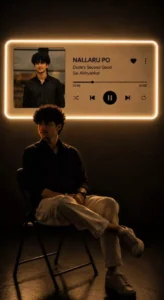
Transform my uploaded photo into a cinematic 9:16 vertical portrait inspired by a dark aesthetic music-listening scene.

Keep the exact same person from my uploaded photo — preserve their identity, face, facial features, hairstyle, skin tone, body proportions and clothing. Do not replace or redesign the person.

Place the person sitting naturally on a simple chair in a dark, minimal room, shown mostly as a dramatic silhouette from a side/three-quarter angle. Keep the pose realistic and elegant, with subtle rim lighting outlining the body and hair.

On the wall behind the person, create a large futuristic music-player panel with a soft warm white/golden neon glow around its edges. Inside the panel, show the uploaded/selected album artwork on the left and a realistic modern music-player interface on the right with:
Song: [SONG NAME]
Artist: [ARTIST NAME]
A progress bar, heart icon, menu icon, shuffle, previous, large pause/play button, next and repeat icons.

Make the music-player panel look physically mounted on the wall with realistic glow and light spill onto the room. Keep the background almost completely dark, with subtle shadows and reflections on the floor.

Use realistic photography, cinematic low-key lighting, warm ambient glow, deep blacks, soft shadows, realistic skin texture, natural proportions, subtle film grain, premium editorial aesthetic, high detail, photorealistic, dramatic composition.

Aspect ratio: 9:16 vertical.
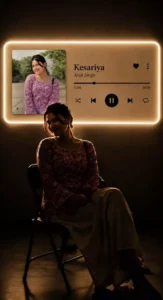
Transform my uploaded photo into a cinematic 9:16 vertical portrait inspired by a dark aesthetic music-listening scene.

Keep the exact same person from my uploaded photo — preserve their identity, face, facial features, hairstyle, skin tone, body proportions and clothing. Do not replace or redesign the person.

Place the person sitting naturally on a simple chair in a dark, minimal room, shown mostly as a dramatic silhouette from a side/three-quarter angle. Keep the pose realistic and elegant, with subtle rim lighting outlining the body and hair.

On the wall behind the person, create a large futuristic music-player panel with a soft warm white/golden neon glow around its edges. Inside the panel, show the uploaded/selected album artwork on the left and a realistic modern music-player interface on the right with:
Song: [SONG NAME]
Artist: [ARTIST NAME]
A progress bar, heart icon, menu icon, shuffle, previous, large pause/play button, next and repeat icons.

Make the music-player panel look physically mounted on the wall with realistic glow and light spill onto the room. Keep the background almost completely dark, with subtle shadows and reflections on the floor.

Use realistic photography, cinematic low-key lighting, warm ambient glow, deep blacks, soft shadows, realistic skin texture, natural proportions, subtle film grain, premium editorial aesthetic, high detail, photorealistic, dramatic composition.

Aspect ratio: 9:16 vertical.
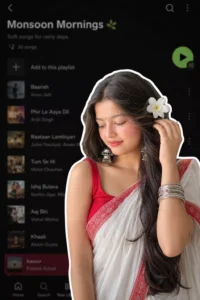
A digital collage style image. In the foreground, a young South Asian woman is cut out with a thick white sticker-like outline. She is wearing a traditional white saree with a red border, a red blouse, and silver bangles, with a white flower tucked into her long dark hair. She is looking downwards with a soft, serene expression, gently touching her hair near her ear. The background is a heavily blurred, dark-mode screenshot of a mobile music streaming app playlist.
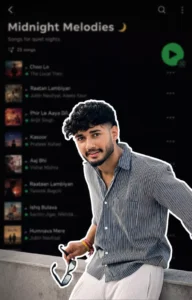
Use the uploaded reference image as the exact reference. Preserve the person's identity, facial features, skin tone, hairstyle, pose, expression, and body proportions exactly as shown. Keep the clothing 100% identical to the reference image. Do not change the outfit, colors, patterns, fabric, accessories, or fit. Preserve every detail of the original clothing exactly as in the uploaded image.
Create a premium digital collage style portrait. Cut out the subject with a thick white sticker-like outline, giving it a modern editorial collage look. Keep the pose natural and relaxed, with the person looking slightly downward with a calm, confident expression. If the reference image includes a hand near the face or clothing, preserve that naturally.
The background should be a heavily blurred dark-mode mobile music streaming app playlist, creating a stylish and modern aesthetic while keeping the focus entirely on the subject. Use soft ambient lighting, clean shadows, premium cinematic color grading, subtle film grain, high contrast, realistic skin texture, ultra-sharp details, HDR quality, and a minimal editorial design.
Ensure the face remains 100% recognizable and matches the uploaded reference perfectly. Do not alter the hairstyle, facial features, outfit, accessories, or overall appearance. The only transformation should be the digital collage effect, thick white sticker outline, and the blurred playlist background.
Ultra-realistic, Instagram aesthetic, premium graphic design, editorial quality, realistic depth of field, clean composition, 4K, HDR, vertical 4:5 aspect ratio.
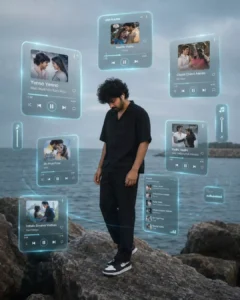
A cinematic editorial portrait of a handsome young indian man standing alone on large weathered coastal rocks beside a vast calm ocean during an overcast afternoon. He stands in a relaxed posture with his head slightly lowered, looking toward the ground with a quiet, introspective expression, completely immersed in music. His hands rest naturally by his sides as if lost in thought while listening to his favorite songs.
The young indian man has naturally messy medium-length black hair, soft textured strands moving gently in the sea breeze, smooth youthful skin, a defined jawline, expressive facial features, and a calm melancholic expression. He wears a minimalist oversized black short-sleeve shirt with relaxed black tailored trousers and black-and-white Nike-style sneakers. The overall styling is modern, understated, and elegant.
The background features an expansive blue-gray ocean with gentle ripples extending to the horizon, a distant stone breakwater, soft haze, muted skies, and a cool desaturated color palette. Large natural shoreline rocks occupy the foreground, adding texture and depth.
Surrounding the subject are multiple floating holographic music player interfaces suspended in mid-air in a circular arrangement. The translucent glass Ul cards glow softly with cyan-blue neon edges, subtle reflections, frosted glass effects, and realistic transparency. Each floating player displays realistic album artwork, song titles, artist names, playback controls, progress bars, volume icons, and music symbols, giving the impression that the subject is surrounded by memories through music.
The holographic interfaces vary in size and distance, floating naturally in three-dimensional space around him with subtle perspective distortion. A large central player appears closest to the viewer, while smaller music cards orbit around the subject. Thin glowing circular light trails and faint particle rings connect the floating interfaces, creating a futuristic augmented reality atmosphere.
Example floating music cards include:Yenno Yenno – Malli Malli ldhi Rani Roju Chinni Chinni Aasalu - Manam
Yedhi Yedhi – Yeto Vellipoyindi Manasu Inthalo Ennenni Vinthalo - Karthikeya Oh Priya Priya – Ishg ioto Yii
Neetho Yedho – Paisa
Now Plaving interface
Additional floating playlist cards with realistic album covers
The holographic Ul features premium Apple Vision Pro-inspired glass morphism design, with rounded translucent panels, soft cyan glow, floating reflections, subtle depth blur, and realistic lighting interaction with the environment. The interfaces feel naturally integrated into the scene rather than pasted on top.
Soft cinematic natural lighting, cool ocean color grading, atmospheric haze, shallow depth of field, premium editorial photography, subtle film grain, muted teal and gray palette, emotional storytelling, luxury fashion campaign aesthetic, minimalist composition, futuristic AR interface, volumetric ambient light, ultra-realistic textures, HDR photography, masterpiece, award-winning editorial artwork, 8K, ultra-detailed, 4:5 aspect ratio.

Stvle Keywords
Apple Vision Pro UI, Glassmorphism, Holographic music player, Augmented Reality interface, Floating UI cards, Cinematic editorial photography, Coastal aesthetic vinthal, Ocean mood, Music visualization, Minimalist fashion portrait UI, Teal cinematic color grading, Soft film grain, Luxury editorial campaign, Emotional storytelling, Futuristic interface design, Ultra-realistic, HDR, 8K, Masterpiece.
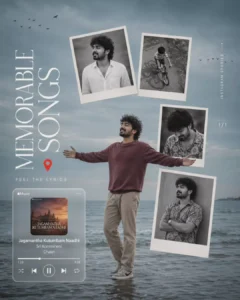
A premium minimalist lifestyle editorial collage inspired by modern Instagram carousel covers and luxury magazine layouts. A handsome young indian man stands alone in shallow seavater at a quiet beach during an overcast evening. The ocean is calm with gentle waves extending to the horizon beneath a muted blue-gray sky. The overall atmosphere is nostalgic, peaceful, and emotionally reflective, with soft cinematic color grading dominated by cool teal, gray, and muted blue tones.The young indian man stands centered in the composition with both arms stretched wide open, embracing the ocean breeze as if reliving beautiful memories. He wears a deep maroon long-sleeve sweatshirt, beige chinos, and casual sneakers. His expression is relaxed with a warm genuine smile, conveying freedom, happiness, and nostalgia. His hair is naturally messy and softly blown by the sea breezeFloating above and beside him are four slightly tilted Polaroid-style photo prints, appearing as if suspended in mid-air. Each photograph contains a different black-and-white memoryA clean studio portrait of the same young man wearing a white shirt A nostalgic childhood bicycle memory photographed from above.A candid portrait of him looking downward in a floral shirt. A relaxed portrait leaning against a wall with folded arms.Each photo has a white border with subtle perspective distortion, soft shadows, and slight rotation, creating the feeling of memories floating in space. The collage is arranged asymmetrically while maintaining premium editorial balance.At the lower-left corner floats a realistic Apple Music-style mini player widget with rounded corners, translucent white glassmorphism design, album artwork, playbackcontrols, progress bar, shuffle, repeat icons, and song information displayingSong: Jagamantha Kutumbam NaadhiArtist: Sri KommineniComposer: ChakriMinimal editorial typography is carefully integrated into the composition:Large elegant serif title reading "MEMORABLE SONGS" positioned vertically on the left sideSmall subtitle beneath reading "FEEL THE LYRICS"A minimalist red location pin icon placed beside the title.Small vertical text reading "INSTAGRAM STORIES" near the floating photos.Page indicator "1/1" positioned beside the collage, resembling an Instagram carousel cover.Small flocks of black birds fly across the upper corners of the sky, adding movement and cinematic storytelling. The background remains clean with abundant negative5pace, allowing the floating memories and typography to breathe naturallySoft diffused natural lighting, muted vintage tones, subtle atmospheric haze, gentle film grain, editorial composition, premium magazine aesthetic, Apple-inspired minimalist design, luxury Instagram branding, emotional storytelling, nostalgic memories, lifestyle photography, clean typography, floating collage elements, realistic refilections on shallow water, soft depth of field, ultra-detailed, cinematic color grading, masterpiece, award-winning editorial artwork, BK, HDR, 4:5 aspect ratio.
Style Keywords-
Luxury editorial collageInstagram carousel coverApple Music widgetGlassmorphism UIFloating Polaroid photosLifestyle magazine aesthetlicMinimalist typographyNostalgic memoriesBeach photogtaphyACinematie color gradingIHCYY)Cool teal oaletteSoft film grainModern editorlal designHlghrendsocilal medla layoutam NaadhiEmotional storytellingPremium branding mmineni8KHDRUltra-detailedMasterpiece
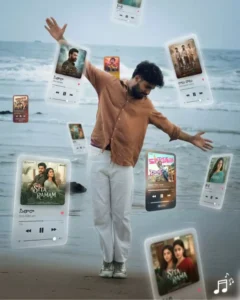
A surreal, movie-quality augmented-reality visual where multiple floating music player interface card's orbit around the central subject the person shown) in a fully realized 310 spatial composition. Each player card represents a telugu song, positioned at varying depths-some hovering boldly in the foreground and partially overlapping the subject, while others drift subtly behind and along the sides, creating immersive depth.
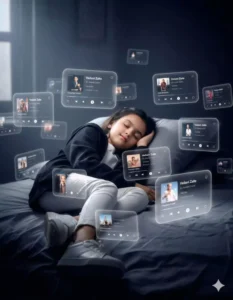
Subject: me (use uploaded face - 100% facial accuracy, no
changes) with no extra brightness on the face, keeping my natural dark facial tone intact. dreamlike, movie-quality augmented reality visual where numerous hovering Spotify player interface cards orbit the central figure (a girl), I am sleeping on bed, relax and calm, subtle smile, in a complete 3D spatial composition, with each music player card strategically placed at varying distances, some prominently positioned in front and partially covering the subject, while others float behind and alongside them, utilizing the authentic Instagram reels and Music UI/Spotify Ul elements playback progress indicators and featuring songs by [Vedant Zalte ]; all cards display smooth rounded edges with subtle angular perspective shifts, presenting a translucent, frosted-glass aesthetic that radiates a gentle diffused border luminescence with measured cinematic light bloom interacting organically with the ambient lighting of the scene; the composition showcases a cool-to-neutral color palette with rich yet preserved shadow detail, strategic bursts of color from album artwork, medium-high contrast levels with gradual highlight transitions, delicate focal depth variation where nearer cards maintain crisp detail while farther ones receive gentle blur treatment, and understated motion-enhancing accents, all while keeping the subject photorealistic, centrally positioned, and authentically integrated into their physical surroundings. wear open black hoodie and white jeans, white sneakers, realistic dark room background. closed eyes. midnight
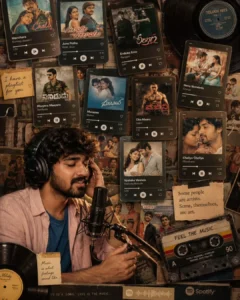
A premium nostalgic music-themed editorial collage inspired by vintage cassette culture, Spotify playlists, and 2000s Telugu cinema. The composition combines a realistic portrait with floating music streaming interfaces, classic Telugu movie album covers, vinyl records, and retro audio elements arranged like a modern magazine coverIn the lower-left foreground sits a handsome young Indian man wearing large black over-ear studio headphones while singing into a professional condenser microphone mounted on a black boom stand. His eyes are gently closed, with one hand touching the headphone earcup and the other resting naturally on the microphone stand, completely immersed in the music. His expression conveys deep emotion, nostalgia, and passion.He has naturally messy black hair, soft facial features, warm brown skin, subtle stubble, and realistic skin texture. He wears a soft pastel pink overshirt layered over a royal blue T-shirt, creating a relaxed contemporary aesthetic. Warm cinematic lighting softly illuminates his face while maintaining an intimate recording studio atmosphere.The entire background is covered with a dynamic collage of floating Spotify-style music player screens arranged at different angles with realistic perspective, slight overlaps, soft drop shadows, and subtle depth, Each music player displays classic Tamil songs with authentic album artwork, artist names, progress bars, playback controls, heart icons, and premium dark-mode streaming Ul.The playlist features iconic Telugu classics including; Manohara- Bombay Jayashri (Cheli)June Pothe - Krish, Arun (Neevalle Neevalle)Enduko Emo (Rangam)Oka MaarucainMaayera Maayera (Sainikudu)Manasaa (Munna)Nenu Nuvvantu (Orange)Oka Maaru (Gajini)Cheliya Cheliya (Gharshana)Vyshaka Vennela (Neevalle Neevalle)Additional nostalgic Telugu soundtrack covers from the early 2000s and 2010s.Several vintage vinyl records partially overlap the collage, with one large black record extending from the upper-right corner. A retro cassette tape with colorful labels rests diagonally in the lower-right corner, reinforcing the nostalgic music theme. Small handwritten-style sticky notes and minimal editorial captions are scattered throughout the composition, including phrases like "l have a playlist for you" and "Some people are artists. Some, themselves, are art."The color palette blends warm amber, beige, faded black, cream, muted blue, and vintage brown tones. Soft analog film grain, tiny dust particles, slight paper texture, subtle vignette, faded print imperfections, and warm cinematic color grading create the feeling of an old music scrapbook preserved over time.The overall design resemmbles a premium Pinterest aesthetic board, Behance editorial project, luxury music magazine cover, and Spotify campaign artwork. The layout is intentionally layered, with overlapping album covers, floating Ul cards, vinyl records, and portrait photography creating rich visual depth while maintaining a clean editorial balanceUltra-realistic editorial collage, cinematic photography, premium magazine design, nostalglc music moodboard, Spotify-inspired interface, Apple Music aesthetics, layered scrapbook design, realistic reflections, soft shadows, analog film photography, shallow depth of field, premium typography, warm ambient lighting, emotional storytelling, masterplece, award-vinning digital collage, ultra-detalled, 8K, HDR, 4:5 aspect ratio.Style KeywordsSpotity UlApple Music aestheticMusic moodboardEditorial collagePinterest aestheticVintage scrapbookAnalog film photographyVinyl recordsCassette nostalgiaTamil music playlistMagazine cover designLayered poster compositionWarm cinematic lightingSoft film grainRetro music cultureLuxury editorialUltra-detailedHDR8KMasterpiece
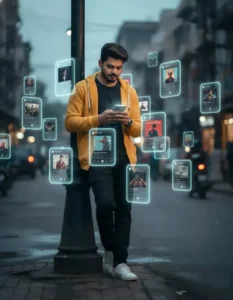
A Subject: me (use uploaded face - 100% facial accuracy, no changes). with no extra brightness on the face, keeping my natural dark facial tone intact. dreamlike, movie-quality augmented reality visual where numerous hovering Spotify player interface cards orbit the central figure (the person shown), I am sleeping on bed, relax and calm, subtle smile, in a complete 3D spatial composition, with each music player card strategically placed at varying distances, some prominently positioned in front and partially covering the subject, while others float behind and alongside them, utilizing the authentic Instagram reels and Music UI/Spotify Ul elements playback progress indicators and featuring songs by [Vedant Zalte ]; all cards display smooth rounded edges with subtle angular perspective shifts, presenting a translucent, frosted-glass aesthetic that radiates a gentle diffused border luminescence with measured cinematic light bloom interacting organically with the ambient lighting of the scene; the composition showcases a cool-to-neutral color palette with rich yet preserved shadow detail, strategic bursts of color from album artwork, medium-high contrast levels with gradual highlight transitions, delicate focal depth variation where nearer cards maintain crisp detail while farther ones receive gentle blur treatment, and understated motion-enhancing accents, all while keeping the subject photorealistic, centrally positioned, and authentically integrated into their physical surroundings. wear open black hoodie and white jeans, white sneakers, realistic dark room background. closed eyes. midnight
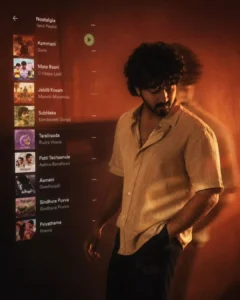
A cinematic music-inspired editorial portrait of a handsome young indian man standing against a warm burnt-red gradient wall in a dimly lit room, immersed in nostalgic late-night music. the composition blends portrait photography with a translucent dligltal music player interface floating over the image, creating a dreamy "music memories" aesthetic.The young indian man stands casually in a relaxed three:quarter profile, one hand inside his trouser pocket while the other arm hangs naturally as if walking slowly. His head is slightly lowered, eyes looking downward with a calm, introspective expression, conveying nostalgia, loneliness, and emotional reflection. His silhouette is partially softened with subtle motion blur and double-exposure ghosting, giving the feeling of moving gently through memories.He has naturally messy medium-length black hair with soft textured strands, smooth youthful skin, a defined jawline, expressive facial features, and soft shadows across his face. His face remains partially visible, illuminated by warm cinematic side lighting while maintaining a mysterious mood.He wears a light beige short-sleeve patterned linen button-up shirt left casually open at the collar, revealing a simple silver chain necklace. The shirt features realistic fabric folds, soft texture, and warm highlights. He pairs it with relaxed black trousers, creating a minimalist contemporary aesthetic.The background is a warm amber-to-burnt-orange gradient with soft cinematic haze, fine film grain, floating dust particles, and subtle bokeh, evoking the feeling of an old projector or vintage evening light. Gentle horizontal light streaks pass through the frame, adding a dreamy analog atmosphere.Overlaying the left side of the composition is a semi transparent modern music streaming interface, similar to Spotify, displaying a vertical playlist with realistic square album artworks, white song titles, smaller gray artist names, and subtle interface spacing. The interface blends naturally into the background with soft opacity and slight bur, appearing like a projected memory rather thana screen.The playlist contains nostalgic Tamil songs with reallstic album covers and typography:Kammani - Gunar8Iraad6Mate Raani - 0 Paapa LaaliJabilli Kosam — Manchi ManasuluSubhleka- Kondaveeti DongaTaraliraada — Rudra VeenaPatti Techaanule – Aatma BandhuvuAamani- GeethanjaliSindhura Puvva - sindhura PuvvuPriyathama— PremaThe interface should feel like a nostalgic music playlist floating beside the subject rather than a phone screenshot, with premium typography, translucent layers, soft glow, and realistic UI design.Warm cinematic side lighting, soft rim light, subtle motion blur, analog film grain, dreamy shadows, shallow depth of field, emotional storytelling, luxury editorial photography, premium color grading, nostalgic music aesthetic, minimalist composition, moody atmosphere, high-fashion portrait style, soft diffusion, realistic skin texture, award-winning editorial artwork.Style inspired by Wong Kar-wai cinematography, Kodak Portra 400 film, analog photography, modern fashion editorials, Apple Music promotional visuals, and contemporary lifestyle campaigns. Ultra-realistic, cinematic, soft orange palette, masterpiece, 8K, HDR, ultra-detailed, 4:5 aspect ratio.
Style Keywords
Wong Kar-wai aesthetic, Ura Puyva, Kodak Portra 400, Analog film photograph, Apple Music UI overlay, Spotify editorial style, Cinematic portrait, Motion blur, Double exposure, Rathama, Warm orange lighting, Dreamy nostalgia, Music memories, Lifestyle editorial, Luxury fashion photography, Film grain, Soft diffusion, Moody atmosphere, Minimalist composition, HDR, Ultra-detailed, 8K masterpiece.
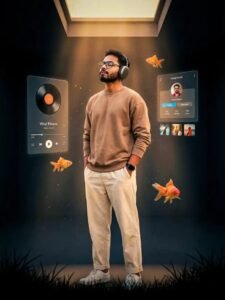
Ultra-realistic cinematic indoor portrait of a stylish young man with the exact same face, hair texture, curls & beard shape as the uploaded image, listening to music with premium over-ear headphones.
Standing calmly inside a dark, futuristic minimal room, surrounded by levitating UI panels and floating orange goldfish. Soft volumetric light coming from an overhead skylight, creating dramatic highlights and shadows. Smooth natural sharpness, clean details, realistic skin texture, warm color tones.
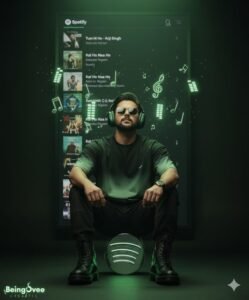
Hyper-realistic black studio scene. A man (face exactly as uploaded photo) in light green oversized t-shirt, combat pants, and premium shoes, sitting on a 3D Spotify Music logo. Headphones on, eyes closed, enjoying music. From headphones, glowing 3D symbols float out. Behind him, a playlist wall shows songs by Singer Name(s), Full studio in green spotify brand Color tones, cinematic vibe.
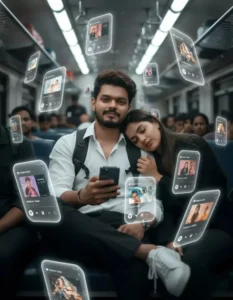
A Subject: me (use uploaded face 100% facial accuracy, no changes). with no extra brightness on the face, keeping my natural dark facial tone intact. dreamlike, movie-quality augmented reality visual where numerous hovering Spotify player interface cards orbit the central figure (the person shown), I am sitting, a beautiful girl sleeping, her head on my shoulder in inside train, holding a phone and looking front to viewer, relax and calm, leg and leg, subtle smile, in a complete 3D spatial composition, with each music player card strategically placed at varying distances, some prominently positioned in front and partially covering the subject, while others float behind and alongside them, utilizing the authentic Instagram reels and Music UI/Spotify UI elements playback progress indicators and featuring songs by [Vedant Zalte ]; all cards display smooth rounded edges with subtle angular perspective shifts, presenting a translucent, frosted-glass aesthetic that radiates a gentle diffused border luminescence with measured cinematic light bloom interacting organically with the ambient lighting of the scene; the composition showcases a cool-to-neutral color palette with rich yet preserved shadow detail, strategic bursts of color from album artwork, medium-high contrast levels with gradual highlight transitions, delicate focal depth variation where nearer cards maintain crisp detail while farther ones receive gentle blur treatment, and understated motion-enhancing accents, all while keeping the subject photorealistic, centrally positioned, and authentically integrated into their physical surroundings. wear white shirt and black pant, wear backpack, white sneakers, realistic crowded train background. closed eyes. midnight, girl softly blur by Dslr lens quality
How To Create Image In Chatgpt?
To do this, open ChatGPT. Click on the ‘plus’ option and upload a reference photo—choose one that will help ensure the final result is perfect. Next, paste the prompt and hit generate. It will take a little time, but you will see an excellent photo with outstanding results.
How To Use Google Gemini Music Lover Ai Photo Editing Prompts
And here’s the procedure for creating photos using Google Gemini. They explain it like this: First, you’ll be given a prompt, which, as I mentioned earlier, is a description. You need to copy this prompt. Just click on the copy button, and it will be copied. After that, you need to go to Google Gemini. You can go there directly by clicking on the button. Once you’re there, first paste the prompt. Paste the prompt I provided, then go to the plus option. Upload the same photo whose details I explained above. If you understood that and uploaded the correct photo, you’ll get excellent results. Then, click on generate, and your amazing photos will be ready.
Conclusion
And finally, what will your photo look like? Look, your photo will have headphones on. You’ll get a dark, non-distracting background. You’ll get cinematic backgrounds. Like you might have seen, someone sitting on top of a huge mountain and looking at the sky. We’ve already seen some different kinds of things like this, and they’re being liked a lot. These things have been created and showcased here. You can select whichever ones you like best from here. You can edit your photo accordingly.