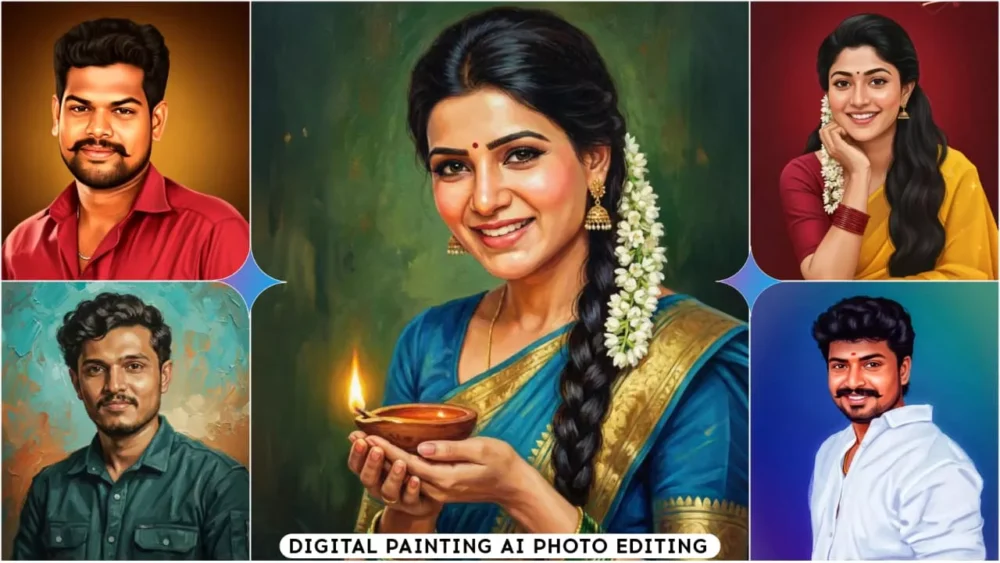
Google Gemini Digital Painting Ai Photo Editing Prompts – Oil painting has been trending for quite some time now. You must have seen it. A long time ago, when we used to do photo editing manually, this type of editing would go viral, but things have changed now. If you want to create digital paintings that are incredibly beautiful and are currently trending on Instagram, you don’t need to spend hours working in Photoshop or other photo editing software. Google has a tool that allows you to convert a regular photo into a high-quality digital painting. It’s going to be incredibly easy. I’ll explain it to you step by step. By following this article, you can create amazing photos like this.
Details Of Google Gemini Digital Painting Ai Photo Editing Prompts
If you want to create this type of photo, you’ll get the best results when you use a good quality image. So let me explain what kind of photo you should use. Please understand this carefully. If you use this type of photo, you’ll get excellent results. First, your photo should be clear. Your face shouldn’t be at an angle; it should be perfectly clear. The background shouldn’t be too busy; it should be plain. If you stand in front of a simple, solid-colored wall and take a picture, it will turn out great. Your facial angle should be natural. You can take the picture from the front; don’t tilt your face too much and then take the picture, that won’t work. Your photo quality should be HD. These are some small but important points. If you follow these tips, your oil painting will turn out absolutely amazing.
How To Create With Google Gemini Digital Painting Ai Photo Editing Prompts
Now, I’ll explain how to create the photo using Google Gemini. First, open the Google app or your browser (I’ve provided the link here, you can go there directly). Scroll down and tap on the plus icon. Then, go to the photo option and upload your regular photo. After uploading, Google Gemini will take a little time to process the image. Then, you need to paste the prompt that I’ve provided here. With the help of this prompt, it will convert your normal photo into a digital painting. I’ve also provided different styles that you can use. Simply copy the prompt, paste it, and then generate the image, and your digital painting will be ready.
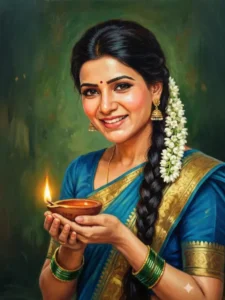
"A close-up portrait of a beautiful Indian woman oil painting (raja Ravi Verma style painting) bollywood 90s with dark hair styled in a long braid, adorned with white flowers. She has large, expressive eyes with dramatic eyeliner and a bindi on her forehead. She is wearing south Indian attire, including a golden-yellow saree, along with intricate style.
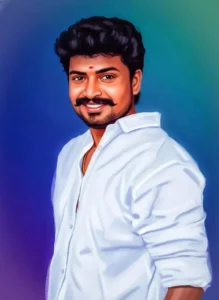
"A vibrant, painterly portrait of a young man with a warm smile, featuring textured, dark curly hair and a neatly trimmed beard. He is wearing a crisp white collared shirt, and a gold chain is visible around his neck. A small, bright red bindi is placed on his forehead, adding a cultural touch. The background is a soft, artistic blend of blues, purples, and subtle greens, creating a gentle gradient. The style is reminiscent of digital painting or vector art, with smooth transitions and subtle
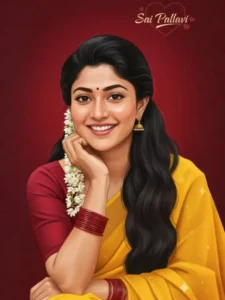
"Digital painting of a beautiful Indian woman with a radiant smile, resting her chin on her hand. She is wearing a traditional yellow saree with a red blouse and red bangles. Her long black hair is adorned with white jasmine flowers, flowing gracefully over her shoulder. She has a small red bindi on her forehead, subtle makeup, and a warm, cheerful expression. The background is a solid rich red color and heart stylish text ‘Sai Pallavi’. The lighting is soft, giving the artwork a smooth, realistic, and vibrant aesthetic. The overall mood is traditional, joyful, and elegant, in a semi-realistic art style."
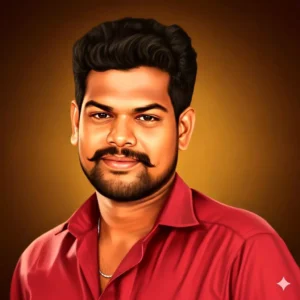
“Ultra-realistic digital painting portrait of a handsome young man with smooth, glowing skin, expressive brown eyes, and neatly styled dark hair. He’s wearing a dark red zip-up shirt with a subtle silver chain visible on his neck. His face is softly lit with warm golden lighting, creating a gentle glow on his skin and a cinematic depth. The background is a smooth gradient of golden brown and amber tones, adding a cozy, intimate atmosphere.
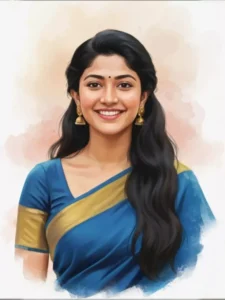
“Realistic digital oil painting of a beautiful young woman with long, wavy black hair, smiling gracefully. She is wearing an royal blue saree with a golden border and matching golden jhumka earrings. A small black bindi adorns her forehead. Her skin has a soft, warm glow with natural tones. The background is a smooth watercolor-style blend of pastel peach, beige, and light pink shades, creating a gentle and artistic feel. The lighting is soft and balanced, highlighting her cheerful, expression and serene beauty. The overall composition should feel elegant, traditional, and refined,100% same face.”
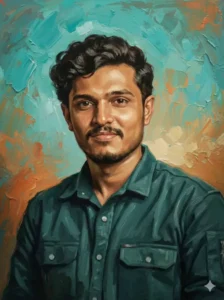
"Create a portrait of the uploaded image using classic watercolor techniques. Use soft, diffused edges and fluid color transitions in the background and in the initial layers of the skin tones and shirt. Apply transparent watercolor washes for the base layers, especially in the background and the pink shirt. Add more defined details such as the eyes, mustache, and hair texture-using controlled brush strokes.

The background should feature a multi-color splash effect. Ensure high sharpness, 32K hyper-realistic quality, and keep the face exactly the same as the uploaded image."
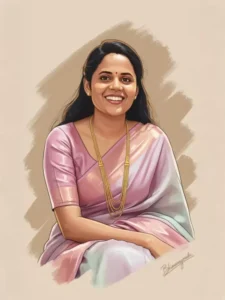
Convert this image into cartoon illustration+digital painting+glossy+Warm-toned+metallic+milky white+metallic pink vibrant, high-detail digital portrait illustration, in the style of a modern vector comic. Emphasize clean lines, strong shadows, and reflective highlights on the face. Add dynamic brush stroke textures and beige background. Include lighting contrast between warm and cool tones on the face. Face should be 100% same as uploaded image.
Pro Tips For Ai Photo Editing
I’m sharing some pro tips with you that you should always follow. If you’re using your photos in any kind of editing, you should always avoid these things. Some things shouldn’t be in your photo, and some things should. First of all, your photo should have good lighting. If the lighting and clarity in your photo are good, and you don’t make it too dark or try to give it an overly artistic look, then it will work. Don’t use anything that covers your face. For example, if you’re wearing a hat or a mask, stay away from those things. After that, take photos in portrait mode. Your photos always turn out best in this mode. Your background will be blurred, and your personality will stand out. Try to keep your clothing completely normal. This will always give you a good result in any Google Gemini editing.
How Will You Get This Result?
Let me explain. When the final editing is complete and the image is ready, you’ll see a digital brush effect. Your painting will look incredibly smooth. The colors will be vibrant. There will be a greater range of colors, and the portrait will have a depth that will be beyond your comprehension. So, with all that explained, you’ll see in your photo that it looks like someone used a paintbrush on a page or a piece of paper to create this painting, and it looks both realistic and clearly like a painting at the same time.