Virat Kohli Ai Photo Editing Prompts Google Gemini – Hello friends, how are you all? Welcome to our website. As you all know, Google Gemini has become such an AI photo editing tool. You can easily create any photo with cinematic realistic or any other type of viral social media photo using this tool. If you want to create a selfie with Virat Kohli or create a viral photo, which I have shown here in the article. Similarly, if you want to create a photo of your fun moments, I will tell you how you can create such realistic and fun moments photos from your normal photo using the Google Gemini method described in this article. If you want to know, in this article I will also tell you how you can create a photo of him shaking hands with him or taking a selfie in the stadium.
Details Of Virat Kohli Ai Photo Editing Prompts Google Gemini
Look at the photo styles. You can see different types of photo styles here. For example, there’s a photo of him shaking hands. You’re shaking hands with him at a cricket stadium. You might have seen a lot of fans go to cricket stadiums. They shake hands with him there. They take photos with him. This will be exactly the same. The background is like night lighting, and you’ll see very realistic people in the stadium. You also have a selfie option. If you want to take a selfie photo, you can take a selfie photo. If you want to take a photo like a press conference, you can also sit with him and take a press conference photo. We’ve explained them here. You can use these. If you like them, please let us know.
Why These Images Are Viral?
See why a photo like this goes viral. Why are people liking it? It’s because Virat Kohli is in the photo. He’s one of the world’s biggest cricketers right now, and his fans are obsessed with him. If you look at social media, any photo with him—any realistic photo—goes viral. And Google Gemini creates these photos of yours in such a realistic way. They look exactly like real life. His fans definitely create them. If you look at this photo, it will seem as if you’re actually shaking hands with Kohli or taking a selfie with him. Now, I’ll tell you how to create this photo.
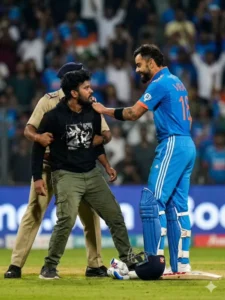
A direct close-up zoom face visible clearly this emotional movement dramatic, low-angle, field-level photograph capturing a pitch invasion during a major international cricket match. An 18-year-old young fan with dark messy hair in a black graphic hoodie and green cargo pants, white Jordan shoes is being gently but firmly restrained by a security guard or official, while Indian cricketer Virat Kohli (wearing a blue jersey with number 18 and white-and-blue striped pants) stands over them, reaching out and looking down with a smiling warmly expression. A cricket bat, helmet, and batting pads are visible on the grass. The stadium crowd and bright floodlights are blurred in the background, creating a shallow depth of field. Sports photography, high resolution. Face 100% accurate match as reference image.
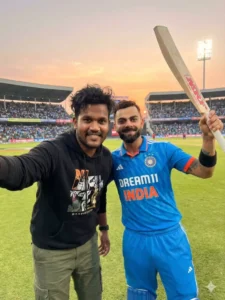
A realistic, high-angle close-up selfie shot on a cricket field at sunset. In the foreground, a young man with messy dark hair, wearing a black graphic hoodie( not same as reference image), green Cargo pants is smiling warmly while taking a selfie. Standing next to him is the Indian cricketer Virat Kohli, wearing the blue Indian team jersey with 'DREAMII INDIA written on it. Kohli is smiling and holding a cricket bat up high in his right hand. The background shows a packed stadium with spectators and the glow of the setting sun over the stands. Authentic stadium lighting, warm golden hour. 8k high detail, los quality. Face 100% match as reference image.
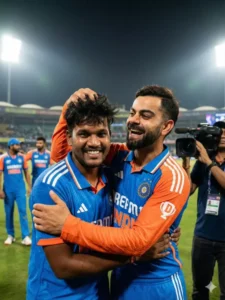
"A close-up high-resolution, photorealistic sports photograph of Indian cricketers Virat Kohli and young man. Kohli, on the right, is laughing joyfully and playfully messing up a young man hair while hugging him. A young man with dark messy hair, is smiling warmly. Both are wearing the blue and orange ODI jersey, with the 'INDIA' logo visible and looking towards the camera. The background is a blurred cricket stadium at night with floodlights, other YJU teammates in the distance, and a TV camera operator visible on the side. 8k resolution, cinematic lighting, emotional and candid moment." As same as reference image
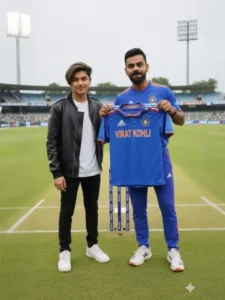
Create an image of me, hyper realistic to my face and features (hairstyle),

Next to my idol player Virat Kohli, holding a team india or national team jersey, on a Cricket field in 8k."

Face 100%mach Face accurate same text to jersey 'Virat Kohli'

A high-quality photograph taken on a cricket stadium during sunset.
In the foreground, a young man is taking a cheerful selfie. He is wearing black sunglasses, a light green open shirt over a white T-shirt, and is smiling widely. His hair is slightly messy, and the warm sunset light reflects softly on his face.

Behind him, a professional cricket player Virat Kohli wearing a blue India cricket jersey with orange accents is standing on the field. His jersey has “DREAM11 INDIA” branding on the front. He is holding a cricket bat up in the air with one hand, as if acknowledging applause. He is wearing gloves, pads, and full cricket gear. The player has a trimmed beard and visible tattoos on his left arm.

The background shows a large stadium crowd, banners, and advertisements on the stands. The atmosphere looks energetic, with the evening sky showing warm orange tones.

The field is green and well-lit, creating a vibrant sports environment. The camera angle is slightly wide, capturing both the selfie-taker and the cricket player standing proudly behind him.

Create a realistic this picture

"A vibrant, high-quality, candid photo capturing the virat kohli with 18 years old young man in a post-match celebration moment on a cricket field. Virat Kohli, on the left, is wearing the red and blue Royal Challengers Bangalore (RCB) team jersey and bottoms. He is beaming, raising his right fist in a gesture of victory and excitement. 18 years old young man with dark messy hair, on the right, is smiling broadly, wearing a red and blue Royal Challengers Bangalore (RCB) team jersey and bottoms. They are embracing, with his arm around his 18 years old young man shoulder. The background is slightly blurred (bokeh effect) but shows a brightly lit stadium environment, with other teammates and spectators visible in the mid-ground. Confetti is faintly visible. The lighting is dramatic and celebratory. Photorealistic, 8k, highly detailed, professional sports photography look." Face 100% match as reference image
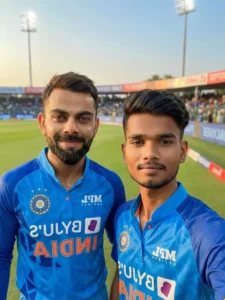
A hyper-realistic medium-distance selfie taken from a slightly raised front camera angle inside a real cricket stadium.
A person standing beside Virat Kohli.

Virat Kohli wearing current India cricket jersey, short trimmed beard, sharp eyes, confident natural smile, slight sweat and match dust on face.

The person's face must match the uploaded image 100% (same facial features, jawline, skin tone, hairstyle, eyebrows, nose, lips no changes).

Camera distance 2-3 feet away so both full upper body visible.

Background shows pitch, boundary rope, blurred audience lights, stadium ambience with warm sunlight.

Natural colors, realistic shadows, DSLR look, ultra-detailed skin texture, 8k quality, no cartoon, no filter.
How To Use Virat Kohli Ai Photo Editing Prompts Google Gemini
Now, as for creating this photo, there are different ways to create photos, but we have the exact same method. For example, all the other photos shown here can be created using the same method. You just need to learn to use prompts. Different prompts are provided here, allowing you to create different types of photos. Choose the one you find appropriate. Copy that prompt. A button has also been added to copy it. After copying, open Google Gemini. What you’ll need to do for this is a button below. You can click on it. Once there, you’ll first need to paste the prompt. Paste the prompt you’re given. Then, go to the Plus option and upload your photo. You’ll get the option to generate. Click on Generate, and your photo will be created and ready.
Final Touches For This Editing
When creating a photo, you need to add the final touches. Use software HDR lighting to enhance the photo. Keep skin tones natural, and increase shadow depth. The stadium background should also be slightly blurred. There’s no need to manually do this. If you’re creating a custom prompt, you’ll need to add this element to it. However, this prompt has already been fully integrated. You just need to use it and create your photo.